OpenID Connect (OIDC) を使用したBearer Token認可によるサービスアプリケーションの保護
このガイドでは、Quarkus OpenID Connect (OIDC) Extensionを使用して、Bearer TokenがOpenID Connectや Keycloak などのOAuth 2.0準拠の認可サーバーによって発行されるBearer Token認可を使用して、JAX-RSアプリケーションを保護する方法を説明します。
Bearer Token認可とは、Bearer Tokenの存在と有効性に基づいて HTTP リクエストを認可するプロセスで、HTTP リソースにアクセスできるかどうかだけでなく、呼び出しの対象を決定するための価値のある情報を提供します。
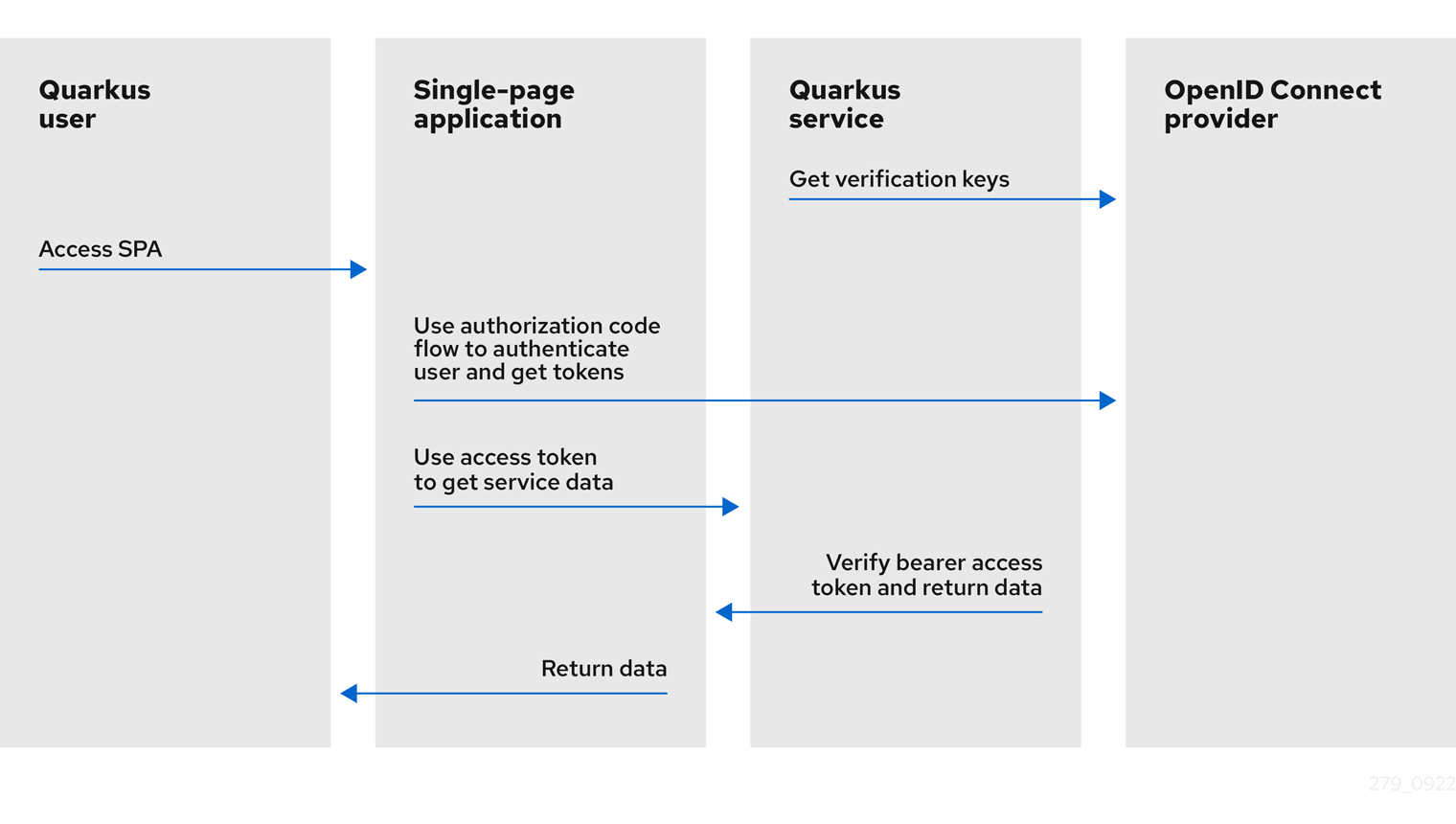
次の図は、Quarkus のBearer Token認可メカニズムの概要を示しています。
-
Quarkusサービスでは、OpenID Connectプロバイダーから検証キーを取得します。検証キーは、Bearerアクセストークンの署名を検証するために使用されます。
-
Quarkusユーザーは、シングルページアプリケーションにアクセスします。
-
シングルページアプリケーションでは、Authorization Code Flowを使用してユーザーを認証し、OpenID Connectプロバイダーからトークンを取得します。
-
シングルページアプリケーションでは、アクセストークンを使用して、Quarkusサービスからサービスデータを取得します。
-
Quarkusサービスは、検証キーを使用してBearerアクセストークンの署名を検証し、トークンの有効期限やその他のクレームをチェックし、トークンが有効であればリクエストを続行させ、サービス応答をシングルページアプリケーションに返します。
-
シングルページアプリケーションは、同じデータをQuarkusユーザーに返します。
-
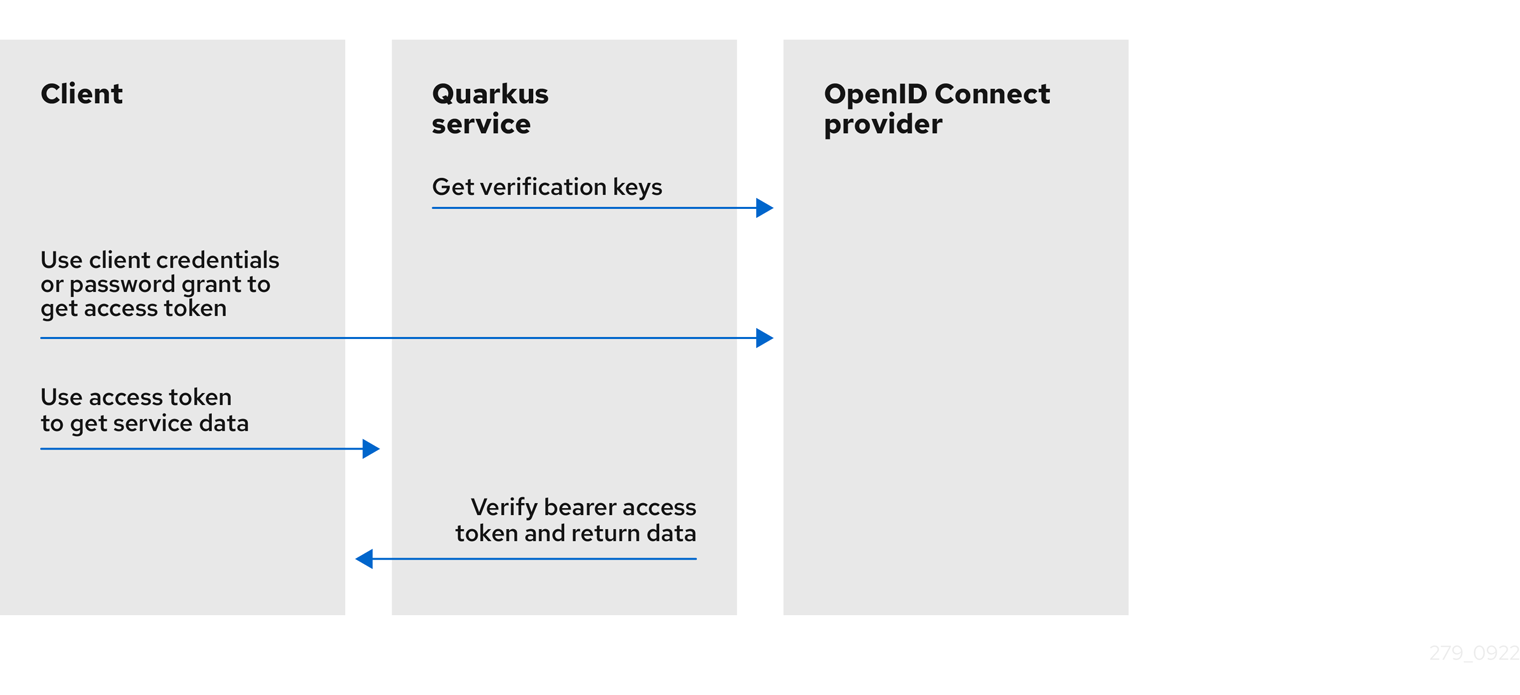
Quarkusサービスでは、OpenID Connectプロバイダーから検証キーを取得します。検証キーは、Bearerアクセストークンの署名を検証するために使用されます。
-
クライアントは、OpenID Connectプロバイダからアクセストークンを取得するために、クライアントIDとシークレットを必要とする
client_credentials、またはクライアントID、シークレット、ユーザー名、パスワードも必要とするpassword grantを使用します。 -
クライアントはアクセストークンを使用して、Quarkusサービスからサービスデータを取得します。
-
Quarkusサービスは、検証キーを使用してBearerアクセストークンの署名を検証し、トークンの有効期限やその他のクレームをチェックし、トークンが有効であればリクエストの実行を許可し、サービスレスポンスをクライアントに返します。
OpenID Connect認可コードフローを使用してユーザーの認証と認可を行う必要がある場合は、 Using OpenID Connect to Protect Web Applications を参照してください。また、KeycloakとBearer Tokenを使用する場合は、 Using Keycloak to Centralize Authorization を参照してください。
マルチテナントへの対応方法については、 OpenID Connect (OIDC) マルチテナンシーの使用 ガイドをお読みください。
クイックスタート
前提条件
このガイドを完成させるには、以下が必要です:
-
約15分
-
IDE
-
JDK 11+ がインストールされ、
JAVA_HOMEが適切に設定されていること -
Apache Maven 3.8.6
-
動作するコンテナランタイム(Docker, Podman)
-
使用したい場合は、 Quarkus CLI
-
ネイティブ実行可能ファイルをビルドしたい場合、MandrelまたはGraalVM(あるいはネイティブなコンテナビルドを使用する場合はDocker)をインストールし、 適切に設定していること
アーキテクチャ
この例では、2つのエンドポイントを提供する非常にシンプルなマイクロサービスを構築しています。
-
/api/users/me -
/api/admin
これらのエンドポイントは保護されており、クライアントがリクエストと一緒にベアラートークンを送信している場合にのみアクセスすることができます。
ベアラートークンは、Keycloakサーバーによって発行され、トークンが発行された対象を表します。OAuth 2.0 認可サーバーであるため、トークンはユーザーの代わりに動作するクライアントも参照します。
/api/users/me エンドポイントは、有効なトークンを持つ任意のユーザーがアクセスできます。レスポンスとして、トークンに記録されている情報から取得したユーザーの詳細を含む JSON ドキュメントを返します。
/api/admin エンドポイントは RBAC (Role-Based Access Control) で保護されており、 admin ロールで許可されたユーザーのみがアクセスできます。このエンドポイントでは、 @RolesAllowed アノテーションを使用して、アクセス制約を宣言的に強制します。
ソリューション
次の章で紹介する手順に沿って、ステップを踏んでアプリを作成することをお勧めします。ただし、完成した例にそのまま進んでも構いません。
Gitレポジトリをクローンするか git clone https://github.com/quarkusio/quarkus-quickstarts.git 、 アーカイブ をダウンロードします。
ソリューションは security-openid-connect-quickstart directory にあります。
Mavenプロジェクトの作成
まず、新しいプロジェクトが必要です。以下のコマンドで新規プロジェクトを作成します。
このコマンドは、QuarkusのOIDCの実装である oidc エクステンションをインポートして、Mavenプロジェクトを生成します。
すでにQuarkusプロジェクトが設定されている場合は、プロジェクトのベースディレクトリーで以下のコマンドを実行することで、プロジェクトに oidc エクステンションを追加することができます。
quarkus extension add 'oidc'./mvnw quarkus:add-extension -Dextensions='oidc'./gradlew addExtension --extensions='oidc'これにより、 pom.xml に以下が追加されます:
<dependency>
    <groupId>io.quarkus</groupId>
    <artifactId>quarkus-oidc</artifactId>
</dependency>implementation("io.quarkus:quarkus-oidc")アプリケーションの記述
まずは /api/users/me エンドポイントを実装してみましょう。下のソースコードを見るとわかるように、これは通常の JAX-RS リソースです。
package org.acme.security.openid.connect;

import javax.annotation.security.RolesAllowed;
import javax.inject.Inject;
import javax.ws.rs.GET;
import javax.ws.rs.Path;

import org.jboss.resteasy.reactive.NoCache;
import io.quarkus.security.identity.SecurityIdentity;

@Path("/api/users")
public class UsersResource {

    @Inject
    SecurityIdentity securityIdentity;

    @GET
    @Path("/me")
    @RolesAllowed("user")
    @NoCache
    public User me() {
        return new User(securityIdentity);
    }

    public static class User {

        private final String userName;

        User(SecurityIdentity securityIdentity) {
            this.userName = securityIdentity.getPrincipal().getName();
        }

        public String getUserName() {
            return userName;
        }
    }
}
/api/admin エンドポイントのソースコードも非常にシンプルです。ここでの主な違いは、 admin ロールで付与されたユーザーだけがエンドポイントにアクセスできるように @RolesAllowed アノテーションを使用していることです:
package org.acme.security.openid.connect;

import javax.annotation.security.RolesAllowed;
import javax.ws.rs.GET;
import javax.ws.rs.Path;
import javax.ws.rs.Produces;
import javax.ws.rs.core.MediaType;

@Path("/api/admin")
public class AdminResource {

    @GET
    @RolesAllowed("admin")
    @Produces(MediaType.TEXT_PLAIN)
    public String admin() {
        return "granted";
    }
}
SecurityIdentity のインジェクションは、 @RequestScoped と @ApplicationScoped の両方のコンテキストでサポートされています。
アプリケーションの設定
OpenID Connect エクステンションを使用すると、 src/main/resources ディレクトリーに配置される application.properties ファイルを使用してアダプター設定を定義することができます。
ビルド時に固定される設定プロパティ - 他のすべての設定プロパティは実行時にオーバーライド可能
タイプ |
デフォルト |
|
|---|---|---|
If DevServices has been explicitly enabled or disabled. When DevServices is enabled Quarkus will attempt to automatically configure and start Keycloak when running in Dev or Test mode and when Docker is running. Environment variable: Show more |
boolean |
|
The container image name to use, for container based DevServices providers. Image with a Quarkus based distribution is used by default. Image with a WildFly based distribution can be selected instead, for example: 'quay.io/keycloak/keycloak:19.0.3-legacy'. Note Keycloak Quarkus and Keycloak WildFly images are initialized differently. By default, Dev Services for Keycloak will assume it is a Keycloak Quarkus image if the image version does not end with a '-legacy' string. Set 'quarkus.keycloak.devservices.keycloak-x-image' to override this check. Environment variable: Show more |
string |
|
If Keycloak-X image is used. By default, Dev Services for Keycloak will assume a Keycloak-X image is used if the image name contains a 'keycloak-x' string. Set 'quarkus.keycloak.devservices.keycloak-x-image' to override this check which may be necessary if you build custom Keycloak-X or Keycloak images. You do not need to set this property if the default check works. Environment variable: Show more |
boolean |
|
Indicates if the Keycloak container managed by Quarkus Dev Services is shared. When shared, Quarkus looks for running containers using label-based service discovery. If a matching container is found, it is used, and so a second one is not started. Otherwise, Dev Services for Keycloak starts a new container.
The discovery uses the Environment variable: Show more |
boolean |
|
The value of the Environment variable: Show more |
string |
|
The comma-separated list of class or file system paths to Keycloak realm files which will be used to initialize Keycloak. The first value in this list will be used to initialize default tenant connection properties. Environment variable: Show more |
文字列のリスト |
|
The JAVA_OPTS passed to the keycloak JVM Environment variable: Show more |
string |
|
Show Keycloak log messages with a "Keycloak:" prefix. Environment variable: Show more |
boolean |
|
Keycloak start command. Use this property to experiment with Keycloak start options, see Environment variable: Show more |
string |
|
The Keycloak realm name. This property will be used to create the realm if the realm file pointed to by the 'realm-path' property does not exist, default value is 'quarkus' in this case. If the realm file pointed to by the 'realm-path' property exists then it is still recommended to set this property for Dev Services for Keycloak to avoid parsing the realm file in order to determine the realm name. Environment variable: Show more |
string |
|
Indicates if the Keycloak realm has to be created when the realm file pointed to by the 'realm-path' property does not exist. Disable it if you’d like to create a realm using Keycloak Administration Console or Keycloak Admin API from Environment variable: Show more |
boolean |
|
Optional fixed port the dev service will listen to. If not defined, the port will be chosen randomly. Environment variable: Show more |
int |
|
The Keycloak users map containing the username and password pairs. If this map is empty then two users, 'alice' and 'bob' with the passwords matching their names will be created. This property will be used to create the Keycloak users if the realm file pointed to by the 'realm-path' property does not exist. Environment variable: Show more |
|
|
The Keycloak user roles. If this map is empty then a user named 'alice' will get 'admin' and 'user' roles and all other users will get a 'user' role. This property will be used to create the Keycloak roles if the realm file pointed to by the 'realm-path' property does not exist. Environment variable: Show more |
|
|
If the OIDC extension is enabled. Environment variable: Show more |
boolean |
|
Grant type which will be used to acquire a token to test the OIDC 'service' applications Environment variable: Show more |
|
|
The WebClient timeout. Use this property to configure how long an HTTP client used by Dev UI handlers will wait for a response when requesting tokens from OpenId Connect Provider and sending them to the service endpoint. Environment variable: Show more |
|
|
Enable the registration of the Default TokenIntrospection and UserInfo Cache implementation bean. Note it only allows to use the default implementation, one needs to configure it in order to activate it, please see Environment variable: Show more |
boolean |
|
The base URL of the OpenID Connect (OIDC) server, for example, Environment variable: Show more |
string |
|
Enables OIDC discovery. If the discovery is disabled then the OIDC endpoint URLs must be configured individually. Environment variable: Show more |
boolean |
|
Relative path or absolute URL of the OIDC token endpoint which issues access and refresh tokens. Environment variable: Show more |
string |
|
Relative path or absolute URL of the OIDC token revocation endpoint. Environment variable: Show more |
string |
|
The client-id of the application. Each application has a client-id that is used to identify the application Environment variable: Show more |
string |
|
The maximum amount of time connecting to the currently unavailable OIDC server will be attempted for. The number of times the connection request will be repeated is calculated by dividing the value of this property by 2. For example, setting it to Environment variable: Show more |
||
The number of times an attempt to re-establish an already available connection will be repeated for. Note this property is different to the Environment variable: Show more |
int |
|
The amount of time after which the current OIDC connection request will time out. Environment variable: Show more |
|
|
The maximum size of the connection pool used by the WebClient Environment variable: Show more |
int |
|
Client secret which is used for a Environment variable: Show more |
string |
|
The client secret value - it will be ignored if 'secret.key' is set Environment variable: Show more |
string |
|
The CredentialsProvider name which should only be set if more than one CredentialsProvider is registered Environment variable: Show more |
string |
|
The CredentialsProvider client secret key Environment variable: Show more |
string |
|
Authentication method. Environment variable: Show more |
|
|
If provided, indicates that JWT is signed using a secret key Environment variable: Show more |
string |
|
The CredentialsProvider name which should only be set if more than one CredentialsProvider is registered Environment variable: Show more |
string |
|
The CredentialsProvider client secret key Environment variable: Show more |
string |
|
If provided, indicates that JWT is signed using a private key in PEM or JWK format. You can use the Environment variable: Show more |
string |
|
If provided, indicates that JWT is signed using a private key from a key store Environment variable: Show more |
string |
|
A parameter to specify the password of the key store file. If not given, the default ("password") is used. Environment variable: Show more |
string |
|
The private key id/alias Environment variable: Show more |
string |
|
The private key password Environment variable: Show more |
string |
|
JWT audience ('aud') claim value. By default, the audience is set to the address of the OpenId Connect Provider’s token endpoint. Environment variable: Show more |
string |
|
Key identifier of the signing key added as a JWT 'kid' header Environment variable: Show more |
string |
|
Issuer of the signing key added as a JWT 'iss' claim (default: client id) Environment variable: Show more |
string |
|
Subject of the signing key added as a JWT 'sub' claim (default: client id) Environment variable: Show more |
string |
|
Signature algorithm, also used for the Environment variable: Show more |
string |
|
JWT life-span in seconds. It will be added to the time it was issued at to calculate the expiration time. Environment variable: Show more |
int |
|
The host (name or IP address) of the Proxy. Note: If OIDC adapter needs to use a Proxy to talk with OIDC server (Provider), then at least the "host" config item must be configured to enable the usage of a Proxy. Environment variable: Show more |
string |
|
The port number of the Proxy. Default value is 80. Environment variable: Show more |
int |
|
The username, if Proxy needs authentication. Environment variable: Show more |
string |
|
The password, if Proxy needs authentication. Environment variable: Show more |
string |
|
Certificate validation and hostname verification, which can be one of the following values from enum Environment variable: Show more |
|
|
An optional key store which holds the certificate information instead of specifying separate files. Environment variable: Show more |
path |
|
An optional parameter to specify type of the key store file. If not given, the type is automatically detected based on the file name. Environment variable: Show more |
string |
|
An optional parameter to specify a provider of the key store file. If not given, the provider is automatically detected based on the key store file type. Environment variable: Show more |
string |
|
A parameter to specify the password of the key store file. If not given, the default ("password") is used. Environment variable: Show more |
string |
|
An optional parameter to select a specific key in the key store. When SNI is disabled, if the key store contains multiple keys and no alias is specified, the behavior is undefined. Environment variable: Show more |
string |
|
An optional parameter to define the password for the key, in case it’s different from Environment variable: Show more |
string |
|
An optional trust store which holds the certificate information of the certificates to trust Environment variable: Show more |
path |
|
A parameter to specify the password of the trust store file. Environment variable: Show more |
string |
|
A parameter to specify the alias of the trust store certificate. Environment variable: Show more |
string |
|
An optional parameter to specify type of the trust store file. If not given, the type is automatically detected based on the file name. Environment variable: Show more |
string |
|
An optional parameter to specify a provider of the trust store file. If not given, the provider is automatically detected based on the trust store file type. Environment variable: Show more |
string |
|
A unique tenant identifier. It must be set by Environment variable: Show more |
string |
|
If this tenant configuration is enabled. Environment variable: Show more |
boolean |
|
The application type, which can be one of the following values from enum Environment variable: Show more |
|
|
Relative path or absolute URL of the OIDC authorization endpoint which authenticates the users. This property must be set for the 'web-app' applications if OIDC discovery is disabled. This property will be ignored if the discovery is enabled. Environment variable: Show more |
string |
|
Relative path or absolute URL of the OIDC userinfo endpoint. This property must only be set for the 'web-app' applications if OIDC discovery is disabled and 'authentication.user-info-required' property is enabled. This property will be ignored if the discovery is enabled. Environment variable: Show more |
string |
|
Relative path or absolute URL of the OIDC RFC7662 introspection endpoint which can introspect both opaque and JWT tokens. This property must be set if OIDC discovery is disabled and 1) the opaque bearer access tokens have to be verified or 2) JWT tokens have to be verified while the cached JWK verification set with no matching JWK is being refreshed. This property will be ignored if the discovery is enabled. Environment variable: Show more |
string |
|
Relative path or absolute URL of the OIDC JWKS endpoint which returns a JSON Web Key Verification Set. This property should be set if OIDC discovery is disabled and the local JWT verification is required. This property will be ignored if the discovery is enabled. Environment variable: Show more |
string |
|
Relative path or absolute URL of the OIDC end_session_endpoint. This property must be set if OIDC discovery is disabled and RP Initiated Logout support for the 'web-app' applications is required. This property will be ignored if the discovery is enabled. Environment variable: Show more |
string |
|
Public key for the local JWT token verification. OIDC server connection will not be created when this property is set. Environment variable: Show more |
string |
|
Name Environment variable: Show more |
string |
|
Secret Environment variable: Show more |
string |
|
Include OpenId Connect Client ID configured with 'quarkus.oidc.client-id' Environment variable: Show more |
boolean |
|
List of paths to claims containing an array of groups. Each path starts from the top level JWT JSON object and can contain multiple segments where each segment represents a JSON object name only, example: "realm/groups". Use double quotes with the namespace qualified claim names. This property can be used if a token has no 'groups' claim but has the groups set in one or more different claims. Environment variable: Show more |
文字列のリスト |
|
Separator for splitting a string which may contain multiple group values. It will only be used if the "role-claim-path" property points to one or more custom claims whose values are strings. A single space will be used by default because the standard 'scope' claim may contain a space separated sequence. Environment variable: Show more |
string |
|
Source of the principal roles. Environment variable: Show more |
|
|
Expected issuer 'iss' claim value. Note this property overrides the Environment variable: Show more |
string |
|
Expected audience 'aud' claim value which may be a string or an array of strings. Environment variable: Show more |
文字列のリスト |
|
Expected token type Environment variable: Show more |
string |
|
Life span grace period in seconds. When checking token expiry, current time is allowed to be later than token expiration time by at most the configured number of seconds. When checking token issuance, current time is allowed to be sooner than token issue time by at most the configured number of seconds. Environment variable: Show more |
int |
|
Token age. It allows for the number of seconds to be specified that must not elapse since the Environment variable: Show more |
||
Name of the claim which contains a principal name. By default, the 'upn', 'preferred_username' and Environment variable: Show more |
string |
|
Refresh expired authorization code flow ID or access tokens. If this property is enabled then a refresh token request will be performed if the authorization code ID or access token has expired and, if successful, the local session will be updated with the new set of tokens. Otherwise, the local session will be invalidated and the user redirected to the OpenID Provider to re-authenticate. In this case the user may not be challenged again if the OIDC provider session is still active. For this option be effective the Environment variable: Show more |
boolean |
|
Refresh token time skew in seconds. If this property is enabled then the configured number of seconds is added to the current time when checking if the authorization code ID or access token should be refreshed. If the sum is greater than the authorization code ID or access token’s expiration time then a refresh is going to happen. This property will be ignored if the 'refresh-expired' property is not enabled. Environment variable: Show more |
||
Forced JWK set refresh interval in minutes. Environment variable: Show more |
|
|
Custom HTTP header that contains a bearer token. This option is valid only when the application is of type Environment variable: Show more |
string |
|
Decryption key location. JWT tokens can be inner-signed and encrypted by OpenId Connect providers. However, it is not always possible to remotely introspect such tokens because the providers may not control the private decryption keys. In such cases set this property to point to the file containing the decryption private key in PEM or JSON Web Key (JWK) format. Note that if a 'private_key_jwt' client authentication method is used then the private key which is used to sign client authentication JWT tokens will be used to try to decrypt an encrypted ID token if this property is not set. Environment variable: Show more |
string |
|
Allow the remote introspection of JWT tokens when no matching JWK key is available. Note this property is set to 'true' by default for backward-compatibility reasons and will be set to Environment variable: Show more |
boolean |
|
Require that JWT tokens are only introspected remotely. Environment variable: Show more |
boolean |
|
Allow the remote introspection of the opaque tokens. Set this property to 'false' if only JWT tokens are expected. Environment variable: Show more |
boolean |
|
Indirectly verify that the opaque (binary) access token is valid by using it to request UserInfo. Opaque access token is considered valid if the provider accepted this token and returned a valid UserInfo. You should only enable this option if the opaque access tokens have to be accepted but OpenId Connect provider does not have a token introspection endpoint. This property will have no effect when JWT tokens have to be verified. Environment variable: Show more |
boolean |
|
The relative path of the logout endpoint at the application. If provided, the application is able to initiate the logout through this endpoint in conformance with the OpenID Connect RP-Initiated Logout specification. Environment variable: Show more |
string |
|
Relative path of the application endpoint where the user should be redirected to after logging out from the OpenID Connect Provider. This endpoint URI must be properly registered at the OpenID Connect Provider as a valid redirect URI. Environment variable: Show more |
string |
|
Name of the post logout URI parameter which will be added as a query parameter to the logout redirect URI. Environment variable: Show more |
string |
|
The relative path of the Back-Channel Logout endpoint at the application. Environment variable: Show more |
string |
|
The relative path of the Front-Channel Logout endpoint at the application. Environment variable: Show more |
string |
|
Authorization code flow response mode Environment variable: Show more |
|
|
Relative path for calculating a "redirect_uri" query parameter. It has to start from a forward slash and will be appended to the request URI’s host and port. For example, if the current request URI is 'https://localhost:8080/service' then a 'redirect_uri' parameter will be set to 'https://localhost:8080/' if this property is set to '/' and be the same as the request URI if this property has not been configured. Note the original request URI will be restored after the user has authenticated if 'restorePathAfterRedirect' is set to 'true'. Environment variable: Show more |
string |
|
If this property is set to 'true' then the original request URI which was used before the authentication will be restored after the user has been redirected back to the application. Note if Environment variable: Show more |
boolean |
|
Remove the query parameters such as 'code' and 'state' set by the OIDC server on the redirect URI after the user has authenticated by redirecting a user to the same URI but without the query parameters. Environment variable: Show more |
boolean |
|
Relative path to the public endpoint which will process the error response from the OIDC authorization endpoint. If the user authentication has failed then the OIDC provider will return an 'error' and an optional 'error_description' parameters, instead of the expected authorization 'code'. If this property is set then the user will be redirected to the endpoint which can return a user-friendly error description page. It has to start from a forward slash and will be appended to the request URI’s host and port. For example, if it is set as '/error' and the current request URI is 'https://localhost:8080/callback?error=invalid_scope' then a redirect will be made to 'https://localhost:8080/error?error=invalid_scope'. If this property is not set then HTTP 401 status will be returned in case of the user authentication failure. Environment variable: Show more |
string |
|
Both ID and access tokens are fetched from the OIDC provider as part of the authorization code flow. ID token is always verified on every user request as the primary token which is used to represent the principal and extract the roles. Access token is not verified by default since it is meant to be propagated to the downstream services. The verification of the access token should be enabled if it is injected as a JWT token. Access tokens obtained as part of the code flow will always be verified if Environment variable: Show more |
boolean |
|
Force 'https' as the 'redirect_uri' parameter scheme when running behind an SSL terminating reverse proxy. This property, if enabled, will also affect the logout Environment variable: Show more |
boolean |
|
List of scopes Environment variable: Show more |
文字列のリスト |
|
Add the 'openid' scope automatically to the list of scopes. This is required for OpenId Connect providers but will not work for OAuth2 providers such as Twitter OAuth2 which does not accept that scope and throws an error. Environment variable: Show more |
boolean |
|
Request URL query parameters which, if present, will be added to the authentication redirect URI. Environment variable: Show more |
文字列のリスト |
|
If enabled the state, session and post logout cookies will have their 'secure' parameter set to 'true' when HTTP is used. It may be necessary when running behind an SSL terminating reverse proxy. The cookies will always be secure if HTTPS is used even if this property is set to false. Environment variable: Show more |
boolean |
|
Cookie name suffix. For example, a session cookie name for the default OIDC tenant is 'q_session' but can be changed to 'q_session_test' if this property is set to 'test'. Environment variable: Show more |
string |
|
Cookie path parameter value which, if set, will be used to set a path parameter for the session, state and post logout cookies. The Environment variable: Show more |
string |
|
Cookie path header parameter value which, if set, identifies the incoming HTTP header whose value will be used to set a path parameter for the session, state and post logout cookies. If the header is missing then the Environment variable: Show more |
string |
|
Cookie domain parameter value which, if set, will be used for the session, state and post logout cookies. Environment variable: Show more |
string |
|
SameSite attribute for the session cookie. Environment variable: Show more |
|
|
If this property is set to 'true' then an OIDC UserInfo endpoint will be called. Environment variable: Show more |
boolean |
|
Session age extension in minutes. The user session age property is set to the value of the ID token life-span by default and the user will be redirected to the OIDC provider to re-authenticate once the session has expired. If this property is set to a non-zero value then the expired ID token can be refreshed before the session has expired. This property will be ignored if the Environment variable: Show more |
|
|
If this property is set to 'true' then a normal 302 redirect response will be returned if the request was initiated via JavaScript API such as XMLHttpRequest or Fetch and the current user needs to be (re)authenticated which may not be desirable for Single Page Applications since it automatically following the redirect may not work given that OIDC authorization endpoints typically do not support CORS. If this property is set to Environment variable: Show more |
boolean |
|
Requires that ID token is available when the authorization code flow completes. Disable this property only when you need to use the authorization code flow with OAuth2 providers which do not return ID token - an internal IdToken will be generated in such cases. Environment variable: Show more |
boolean |
|
Internal ID token lifespan. This property is only checked when an internal IdToken is generated when Oauth2 providers do not return IdToken. Environment variable: Show more |
|
|
Requires that a Proof Key for Code Exchange (PKCE) is used. Environment variable: Show more |
boolean |
|
Secret which will be used to encrypt a Proof Key for Code Exchange (PKCE) code verifier in the code flow state. This secret must be set if PKCE is required but no client secret is set. The length of the secret which will be used to encrypt the code verifier must be 32 characters long. Environment variable: Show more |
string |
|
Default TokenStateManager strategy. Environment variable: Show more |
|
|
Default TokenStateManager keeps all tokens (ID, access and refresh) returned in the authorization code grant response in a single session cookie by default. Enable this property to minimize a session cookie size Environment variable: Show more |
boolean |
|
Requires that the tokens are encrypted before being stored in the cookies. Environment variable: Show more |
boolean |
|
Secret which will be used to encrypt the tokens. This secret must be set if the token encryption is required but no client secret is set. The length of the secret which will be used to encrypt the tokens must be 32 characters long. Environment variable: Show more |
string |
|
Allow caching the token introspection data. Note enabling this property does not enable the cache itself but only permits to cache the token introspection for a given tenant. If the default token cache can be used then please see Environment variable: Show more |
boolean |
|
Allow caching the user info data. Note enabling this property does not enable the cache itself but only permits to cache the user info data for a given tenant. If the default token cache can be used then please see Environment variable: Show more |
boolean |
|
Allow inlining UserInfo in IdToken instead of caching it in the token cache. This property is only checked when an internal IdToken is generated when Oauth2 providers do not return IdToken. Inlining UserInfo in the generated IdToken allows to store it in the session cookie and avoids introducing a cached state. Environment variable: Show more |
boolean |
|
Well known OpenId Connect provider identifier Environment variable: Show more |
|
|
Maximum number of cache entries. Set it to a positive value if the cache has to be enabled. Environment variable: Show more |
int |
|
Maximum amount of time a given cache entry is valid for. Environment variable: Show more |
|
|
Clean up timer interval. If this property is set then a timer will check and remove the stale entries periodically. Environment variable: Show more |
||
Grant options Environment variable: Show more |
|
|
A map of required claims and their expected values. For example, Environment variable: Show more |
|
|
Additional properties which will be added as the query parameters to the logout redirect URI. Environment variable: Show more |
|
|
Additional properties which will be added as the query parameters to the authentication redirect URI. Environment variable: Show more |
|
|
Additional parameters, in addition to the required Environment variable: Show more |
|
|
Custom HTTP headers which have to be sent to complete the authorization code grant request. Environment variable: Show more |
|
|
タイプ |
デフォルト |
|
The base URL of the OpenID Connect (OIDC) server, for example, Environment variable: Show more |
string |
|
Enables OIDC discovery. If the discovery is disabled then the OIDC endpoint URLs must be configured individually. Environment variable: Show more |
boolean |
|
Relative path or absolute URL of the OIDC token endpoint which issues access and refresh tokens. Environment variable: Show more |
string |
|
Relative path or absolute URL of the OIDC token revocation endpoint. Environment variable: Show more |
string |
|
The client-id of the application. Each application has a client-id that is used to identify the application Environment variable: Show more |
string |
|
The maximum amount of time connecting to the currently unavailable OIDC server will be attempted for. The number of times the connection request will be repeated is calculated by dividing the value of this property by 2. For example, setting it to Environment variable: Show more |
||
The number of times an attempt to re-establish an already available connection will be repeated for. Note this property is different to the Environment variable: Show more |
int |
|
The amount of time after which the current OIDC connection request will time out. Environment variable: Show more |
|
|
The maximum size of the connection pool used by the WebClient Environment variable: Show more |
int |
|
Client secret which is used for a Environment variable: Show more |
string |
|
The client secret value - it will be ignored if 'secret.key' is set Environment variable: Show more |
string |
|
The CredentialsProvider name which should only be set if more than one CredentialsProvider is registered Environment variable: Show more |
string |
|
The CredentialsProvider client secret key Environment variable: Show more |
string |
|
Authentication method. Environment variable: Show more |
|
|
If provided, indicates that JWT is signed using a secret key Environment variable: Show more |
string |
|
The CredentialsProvider name which should only be set if more than one CredentialsProvider is registered Environment variable: Show more |
string |
|
The CredentialsProvider client secret key Environment variable: Show more |
string |
|
If provided, indicates that JWT is signed using a private key in PEM or JWK format. You can use the Environment variable: Show more |
string |
|
If provided, indicates that JWT is signed using a private key from a key store Environment variable: Show more |
string |
|
A parameter to specify the password of the key store file. If not given, the default ("password") is used. Environment variable: Show more |
string |
|
The private key id/alias Environment variable: Show more |
string |
|
The private key password Environment variable: Show more |
string |
|
JWT audience ('aud') claim value. By default, the audience is set to the address of the OpenId Connect Provider’s token endpoint. Environment variable: Show more |
string |
|
Key identifier of the signing key added as a JWT 'kid' header Environment variable: Show more |
string |
|
Issuer of the signing key added as a JWT 'iss' claim (default: client id) Environment variable: Show more |
string |
|
Subject of the signing key added as a JWT 'sub' claim (default: client id) Environment variable: Show more |
string |
|
Signature algorithm, also used for the Environment variable: Show more |
string |
|
JWT life-span in seconds. It will be added to the time it was issued at to calculate the expiration time. Environment variable: Show more |
int |
|
The host (name or IP address) of the Proxy. Note: If OIDC adapter needs to use a Proxy to talk with OIDC server (Provider), then at least the "host" config item must be configured to enable the usage of a Proxy. Environment variable: Show more |
string |
|
The port number of the Proxy. Default value is 80. Environment variable: Show more |
int |
|
The username, if Proxy needs authentication. Environment variable: Show more |
string |
|
The password, if Proxy needs authentication. Environment variable: Show more |
string |
|
Certificate validation and hostname verification, which can be one of the following values from enum Environment variable: Show more |
|
|
An optional key store which holds the certificate information instead of specifying separate files. Environment variable: Show more |
path |
|
An optional parameter to specify type of the key store file. If not given, the type is automatically detected based on the file name. Environment variable: Show more |
string |
|
An optional parameter to specify a provider of the key store file. If not given, the provider is automatically detected based on the key store file type. Environment variable: Show more |
string |
|
A parameter to specify the password of the key store file. If not given, the default ("password") is used. Environment variable: Show more |
string |
|
An optional parameter to select a specific key in the key store. When SNI is disabled, if the key store contains multiple keys and no alias is specified, the behavior is undefined. Environment variable: Show more |
string |
|
An optional parameter to define the password for the key, in case it’s different from Environment variable: Show more |
string |
|
An optional trust store which holds the certificate information of the certificates to trust Environment variable: Show more |
path |
|
A parameter to specify the password of the trust store file. Environment variable: Show more |
string |
|
A parameter to specify the alias of the trust store certificate. Environment variable: Show more |
string |
|
An optional parameter to specify type of the trust store file. If not given, the type is automatically detected based on the file name. Environment variable: Show more |
string |
|
An optional parameter to specify a provider of the trust store file. If not given, the provider is automatically detected based on the trust store file type. Environment variable: Show more |
string |
|
A unique tenant identifier. It must be set by Environment variable: Show more |
string |
|
If this tenant configuration is enabled. Environment variable: Show more |
boolean |
|
The application type, which can be one of the following values from enum Environment variable: Show more |
|
|
Relative path or absolute URL of the OIDC authorization endpoint which authenticates the users. This property must be set for the 'web-app' applications if OIDC discovery is disabled. This property will be ignored if the discovery is enabled. Environment variable: Show more |
string |
|
Relative path or absolute URL of the OIDC userinfo endpoint. This property must only be set for the 'web-app' applications if OIDC discovery is disabled and 'authentication.user-info-required' property is enabled. This property will be ignored if the discovery is enabled. Environment variable: Show more |
string |
|
Relative path or absolute URL of the OIDC RFC7662 introspection endpoint which can introspect both opaque and JWT tokens. This property must be set if OIDC discovery is disabled and 1) the opaque bearer access tokens have to be verified or 2) JWT tokens have to be verified while the cached JWK verification set with no matching JWK is being refreshed. This property will be ignored if the discovery is enabled. Environment variable: Show more |
string |
|
Relative path or absolute URL of the OIDC JWKS endpoint which returns a JSON Web Key Verification Set. This property should be set if OIDC discovery is disabled and the local JWT verification is required. This property will be ignored if the discovery is enabled. Environment variable: Show more |
string |
|
Relative path or absolute URL of the OIDC end_session_endpoint. This property must be set if OIDC discovery is disabled and RP Initiated Logout support for the 'web-app' applications is required. This property will be ignored if the discovery is enabled. Environment variable: Show more |
string |
|
Public key for the local JWT token verification. OIDC server connection will not be created when this property is set. Environment variable: Show more |
string |
|
Name Environment variable: Show more |
string |
|
Secret Environment variable: Show more |
string |
|
Include OpenId Connect Client ID configured with 'quarkus.oidc.client-id' Environment variable: Show more |
boolean |
|
List of paths to claims containing an array of groups. Each path starts from the top level JWT JSON object and can contain multiple segments where each segment represents a JSON object name only, example: "realm/groups". Use double quotes with the namespace qualified claim names. This property can be used if a token has no 'groups' claim but has the groups set in one or more different claims. Environment variable: Show more |
文字列のリスト |
|
Separator for splitting a string which may contain multiple group values. It will only be used if the "role-claim-path" property points to one or more custom claims whose values are strings. A single space will be used by default because the standard 'scope' claim may contain a space separated sequence. Environment variable: Show more |
string |
|
Source of the principal roles. Environment variable: Show more |
|
|
Expected issuer 'iss' claim value. Note this property overrides the Environment variable: Show more |
string |
|
Expected audience 'aud' claim value which may be a string or an array of strings. Environment variable: Show more |
文字列のリスト |
|
A map of required claims and their expected values. For example, Environment variable: Show more |
|
|
Expected token type Environment variable: Show more |
string |
|
Life span grace period in seconds. When checking token expiry, current time is allowed to be later than token expiration time by at most the configured number of seconds. When checking token issuance, current time is allowed to be sooner than token issue time by at most the configured number of seconds. Environment variable: Show more |
int |
|
Token age. It allows for the number of seconds to be specified that must not elapse since the Environment variable: Show more |
||
Name of the claim which contains a principal name. By default, the 'upn', 'preferred_username' and Environment variable: Show more |
string |
|
Refresh expired authorization code flow ID or access tokens. If this property is enabled then a refresh token request will be performed if the authorization code ID or access token has expired and, if successful, the local session will be updated with the new set of tokens. Otherwise, the local session will be invalidated and the user redirected to the OpenID Provider to re-authenticate. In this case the user may not be challenged again if the OIDC provider session is still active. For this option be effective the Environment variable: Show more |
boolean |
|
Refresh token time skew in seconds. If this property is enabled then the configured number of seconds is added to the current time when checking if the authorization code ID or access token should be refreshed. If the sum is greater than the authorization code ID or access token’s expiration time then a refresh is going to happen. This property will be ignored if the 'refresh-expired' property is not enabled. Environment variable: Show more |
||
Forced JWK set refresh interval in minutes. Environment variable: Show more |
|
|
Custom HTTP header that contains a bearer token. This option is valid only when the application is of type Environment variable: Show more |
string |
|
Decryption key location. JWT tokens can be inner-signed and encrypted by OpenId Connect providers. However, it is not always possible to remotely introspect such tokens because the providers may not control the private decryption keys. In such cases set this property to point to the file containing the decryption private key in PEM or JSON Web Key (JWK) format. Note that if a 'private_key_jwt' client authentication method is used then the private key which is used to sign client authentication JWT tokens will be used to try to decrypt an encrypted ID token if this property is not set. Environment variable: Show more |
string |
|
Allow the remote introspection of JWT tokens when no matching JWK key is available. Note this property is set to 'true' by default for backward-compatibility reasons and will be set to Environment variable: Show more |
boolean |
|
Require that JWT tokens are only introspected remotely. Environment variable: Show more |
boolean |
|
Allow the remote introspection of the opaque tokens. Set this property to 'false' if only JWT tokens are expected. Environment variable: Show more |
boolean |
|
Indirectly verify that the opaque (binary) access token is valid by using it to request UserInfo. Opaque access token is considered valid if the provider accepted this token and returned a valid UserInfo. You should only enable this option if the opaque access tokens have to be accepted but OpenId Connect provider does not have a token introspection endpoint. This property will have no effect when JWT tokens have to be verified. Environment variable: Show more |
boolean |
|
The relative path of the logout endpoint at the application. If provided, the application is able to initiate the logout through this endpoint in conformance with the OpenID Connect RP-Initiated Logout specification. Environment variable: Show more |
string |
|
Relative path of the application endpoint where the user should be redirected to after logging out from the OpenID Connect Provider. This endpoint URI must be properly registered at the OpenID Connect Provider as a valid redirect URI. Environment variable: Show more |
string |
|
Name of the post logout URI parameter which will be added as a query parameter to the logout redirect URI. Environment variable: Show more |
string |
|
Additional properties which will be added as the query parameters to the logout redirect URI. Environment variable: Show more |
|
|
The relative path of the Back-Channel Logout endpoint at the application. Environment variable: Show more |
string |
|
The relative path of the Front-Channel Logout endpoint at the application. Environment variable: Show more |
string |
|
Authorization code flow response mode Environment variable: Show more |
|
|
Relative path for calculating a "redirect_uri" query parameter. It has to start from a forward slash and will be appended to the request URI’s host and port. For example, if the current request URI is 'https://localhost:8080/service' then a 'redirect_uri' parameter will be set to 'https://localhost:8080/' if this property is set to '/' and be the same as the request URI if this property has not been configured. Note the original request URI will be restored after the user has authenticated if 'restorePathAfterRedirect' is set to 'true'. Environment variable: Show more |
string |
|
If this property is set to 'true' then the original request URI which was used before the authentication will be restored after the user has been redirected back to the application. Note if Environment variable: Show more |
boolean |
|
Remove the query parameters such as 'code' and 'state' set by the OIDC server on the redirect URI after the user has authenticated by redirecting a user to the same URI but without the query parameters. Environment variable: Show more |
boolean |
|
Relative path to the public endpoint which will process the error response from the OIDC authorization endpoint. If the user authentication has failed then the OIDC provider will return an 'error' and an optional 'error_description' parameters, instead of the expected authorization 'code'. If this property is set then the user will be redirected to the endpoint which can return a user-friendly error description page. It has to start from a forward slash and will be appended to the request URI’s host and port. For example, if it is set as '/error' and the current request URI is 'https://localhost:8080/callback?error=invalid_scope' then a redirect will be made to 'https://localhost:8080/error?error=invalid_scope'. If this property is not set then HTTP 401 status will be returned in case of the user authentication failure. Environment variable: Show more |
string |
|
Both ID and access tokens are fetched from the OIDC provider as part of the authorization code flow. ID token is always verified on every user request as the primary token which is used to represent the principal and extract the roles. Access token is not verified by default since it is meant to be propagated to the downstream services. The verification of the access token should be enabled if it is injected as a JWT token. Access tokens obtained as part of the code flow will always be verified if Environment variable: Show more |
boolean |
|
Force 'https' as the 'redirect_uri' parameter scheme when running behind an SSL terminating reverse proxy. This property, if enabled, will also affect the logout Environment variable: Show more |
boolean |
|
List of scopes Environment variable: Show more |
文字列のリスト |
|
Add the 'openid' scope automatically to the list of scopes. This is required for OpenId Connect providers but will not work for OAuth2 providers such as Twitter OAuth2 which does not accept that scope and throws an error. Environment variable: Show more |
boolean |
|
Additional properties which will be added as the query parameters to the authentication redirect URI. Environment variable: Show more |
|
|
Request URL query parameters which, if present, will be added to the authentication redirect URI. Environment variable: Show more |
文字列のリスト |
|
If enabled the state, session and post logout cookies will have their 'secure' parameter set to 'true' when HTTP is used. It may be necessary when running behind an SSL terminating reverse proxy. The cookies will always be secure if HTTPS is used even if this property is set to false. Environment variable: Show more |
boolean |
|
Cookie name suffix. For example, a session cookie name for the default OIDC tenant is 'q_session' but can be changed to 'q_session_test' if this property is set to 'test'. Environment variable: Show more |
string |
|
Cookie path parameter value which, if set, will be used to set a path parameter for the session, state and post logout cookies. The Environment variable: Show more |
string |
|
Cookie path header parameter value which, if set, identifies the incoming HTTP header whose value will be used to set a path parameter for the session, state and post logout cookies. If the header is missing then the Environment variable: Show more |
string |
|
Cookie domain parameter value which, if set, will be used for the session, state and post logout cookies. Environment variable: Show more |
string |
|
SameSite attribute for the session cookie. Environment variable: Show more |
|
|
If this property is set to 'true' then an OIDC UserInfo endpoint will be called. Environment variable: Show more |
boolean |
|
Session age extension in minutes. The user session age property is set to the value of the ID token life-span by default and the user will be redirected to the OIDC provider to re-authenticate once the session has expired. If this property is set to a non-zero value then the expired ID token can be refreshed before the session has expired. This property will be ignored if the Environment variable: Show more |
|
|
If this property is set to 'true' then a normal 302 redirect response will be returned if the request was initiated via JavaScript API such as XMLHttpRequest or Fetch and the current user needs to be (re)authenticated which may not be desirable for Single Page Applications since it automatically following the redirect may not work given that OIDC authorization endpoints typically do not support CORS. If this property is set to Environment variable: Show more |
boolean |
|
Requires that ID token is available when the authorization code flow completes. Disable this property only when you need to use the authorization code flow with OAuth2 providers which do not return ID token - an internal IdToken will be generated in such cases. Environment variable: Show more |
boolean |
|
Internal ID token lifespan. This property is only checked when an internal IdToken is generated when Oauth2 providers do not return IdToken. Environment variable: Show more |
|
|
Requires that a Proof Key for Code Exchange (PKCE) is used. Environment variable: Show more |
boolean |
|
Secret which will be used to encrypt a Proof Key for Code Exchange (PKCE) code verifier in the code flow state. This secret must be set if PKCE is required but no client secret is set. The length of the secret which will be used to encrypt the code verifier must be 32 characters long. Environment variable: Show more |
string |
|
Additional parameters, in addition to the required Environment variable: Show more |
|
|
Custom HTTP headers which have to be sent to complete the authorization code grant request. Environment variable: Show more |
|
|
Default TokenStateManager strategy. Environment variable: Show more |
|
|
Default TokenStateManager keeps all tokens (ID, access and refresh) returned in the authorization code grant response in a single session cookie by default. Enable this property to minimize a session cookie size Environment variable: Show more |
boolean |
|
Requires that the tokens are encrypted before being stored in the cookies. Environment variable: Show more |
boolean |
|
Secret which will be used to encrypt the tokens. This secret must be set if the token encryption is required but no client secret is set. The length of the secret which will be used to encrypt the tokens must be 32 characters long. Environment variable: Show more |
string |
|
Allow caching the token introspection data. Note enabling this property does not enable the cache itself but only permits to cache the token introspection for a given tenant. If the default token cache can be used then please see Environment variable: Show more |
boolean |
|
Allow caching the user info data. Note enabling this property does not enable the cache itself but only permits to cache the user info data for a given tenant. If the default token cache can be used then please see Environment variable: Show more |
boolean |
|
Allow inlining UserInfo in IdToken instead of caching it in the token cache. This property is only checked when an internal IdToken is generated when Oauth2 providers do not return IdToken. Inlining UserInfo in the generated IdToken allows to store it in the session cookie and avoids introducing a cached state. Environment variable: Show more |
boolean |
|
Well known OpenId Connect provider identifier Environment variable: Show more |
|
|
期間フォーマットについて
期間のフォーマットは標準の 数値で始まる期間の値を指定することもできます。この場合、値が数値のみで構成されている場合、コンバーターは値を秒として扱います。そうでない場合は、 |
設定例:
%prod.quarkus.oidc.auth-server-url=http://localhost:8180/realms/quarkus
quarkus.oidc.client-id=backend-service
quarkus.oidc.credentials.secret=secret

# Tell Dev Services for Keycloak to import the realm file
# This property is not effective when running the application in JVM or Native modes

quarkus.keycloak.devservices.realm-path=quarkus-realm.json
quarkus.oidc.auth-server-url に %prod. プロファイルのプレフィックスを追加すると、アプリケーションが開発モードで実行されたときに Dev Services for Keycloak がコンテナを起動するようになります。詳しくは、後述の 開発モードでのアプリケーションの実行 をご覧ください。
|
Keycloak サーバーの起動と設定
アプリケーションを開発モードで実行しているときは、Keycloak サーバーを起動しないでください。 Dev Services for Keycloak はコンテナーを起動します。詳細については、以下の Running the Application in Dev mode セクションを参照してください。 レルム設定ファイル をクラスパス (target/classes ディレクトリー) に配置して、開発モードで実行しているときに自動的にインポートされるようにします (すでに 完全なソリューション をビルドしている場合を除く (このレルムファイルはビルド時にクラスパスに追加されます))。
|
Keycloak サーバーを起動するにはDockerを使用し、以下のコマンドを実行するだけです。
docker run --name keycloak -e KEYCLOAK_ADMIN=admin -e KEYCLOAK_ADMIN_PASSWORD=admin -p 8180:8080 quay.io/keycloak/keycloak:{keycloak.version} start-devここで、 keycloak.version は 17.0.0 以上に設定する必要があります。
localhost:8180 で Keycloak サーバーにアクセスできるはずです。
Keycloak 管理コンソールにアクセスするには、 admin ユーザーとしてログインしてください。ユーザー名は admin 、パスワードは admin です。
新しいレルムを作成するには、https://github.com/quarkusio/quarkus-quickstarts/tree/2.16/security-openid-connect-quickstart/config/quarkus-realm.json[realm設定ファイル]をインポートします。 新しいレルムを作成する 方法について詳しくはKeycloakのドキュメントを参照してください。
Keycloak Admin Clientを使用して、アプリケーションからサーバーを設定したい場合は、 quarkus-keycloak-admin-client エクステンションまたは quarkus-keycloak-admin-client-reactive エクステンション (アプリケーションが quarkus-rest-client-reactive を使用する場合) のどちらかを含める必要があります。詳しくは Quarkus Keycloak Admin Client ガイドをご覧ください。
|
開発モードでのアプリケーションの実行
アプリケーションを開発モードで実行するには、次を使用します。
quarkus dev./mvnw quarkus:dev./gradlew --console=plain quarkusDevDev Services for Keycloak は、Keycloak コンテナーを起動し、 quarkus-realm.json をインポートします。
OpenID Connect Dev UI が提供する Single Page Application へのログインを求められます。
-
userのロールを持つalice(パスワード:alice) としてログインします-
/api/adminにアクセスすると、403が返されます -
/api/users/meにアクセスすると、200が返されます
-
-
ログアウトし、
adminとuserロールの両方を持つadmin(パスワード:admin) としててログインします-
/api/adminにアクセスすると、200が返されます -
/api/users/meにアクセスすると、200が返されます
-
JVM モードでのアプリケーションの実行
「dev モード」で遊び終わったら、標準のJavaアプリケーションとして実行することができます。
まずコンパイルします。
quarkus build./mvnw install./gradlew build次に、以下を実行してください。
java -jar target/quarkus-app/quarkus-run.jarネイティブモードでのアプリケーションの実行
同じデモをネイティブコードにコンパイルすることができます。
これは、生成されたバイナリーにランタイム技術が含まれており、最小限のリソースオーバーヘッドで実行できるように最適化されているため、本番環境にJVMをインストールする必要がないことを意味します。
コンパイルには少し時間がかかるので、このステップはデフォルトで無効になっています。 native プロファイルを有効にして再度ビルドしてみましょう。
quarkus build --native./mvnw install -Dnative./gradlew build -Dquarkus.package.type=nativeコーヒーを飲み終わると、このバイナリーは以下のように直接実行出来るようになります:
./target/security-openid-connect-quickstart-1.0.0-SNAPSHOT-runnerアプリケーションのテスト
開発モードでのアプリケーションのテストについては、上記の 開発モードでのアプリケーションの実行 セクションを参照してください。
curl を使用して、JVM またはネイティブモードで起動したアプリケーションをテストできます。
アプリケーションはベアラートークン認可を使用しており、まず最初に行うべきことは、アプリケーションのリソースにアクセスするためにKeycloak サーバーからアクセストークンを取得することです。
export access_token=$(\
    curl --insecure -X POST http://localhost:8180/realms/quarkus/protocol/openid-connect/token \
    --user backend-service:secret \
    -H 'content-type: application/x-www-form-urlencoded' \
    -d 'username=alice&password=alice&grant_type=password' | jq --raw-output '.access_token' \
 )
上記の例では、ユーザー alice のアクセストークンを取得しています。
どのユーザーでも http://localhost:8080/api/users/me エンドポイントで、基本的にはユーザーに関する詳細な情報を含む JSON ペイロードを返します。
curl -v -X GET \
  http://localhost:8080/api/users/me \
  -H "Authorization: Bearer "$access_token
http://localhost:8080/api/admin エンドポイントは、 admin ロールを持つユーザーのみがアクセスできます。以前に発行されたアクセストークンを使用してこのエンドポイントにアクセスしようとすると、サーバーから 403 応答が返ってくるはずです。
curl -v -X GET \
   http://localhost:8080/api/admin \
   -H "Authorization: Bearer "$access_token
admin エンドポイントにアクセスするには、 admin ユーザーのトークンを取得する必要があります。
export access_token=$(\
    curl --insecure -X POST http://localhost:8180/realms/quarkus/protocol/openid-connect/token \
    --user backend-service:secret \
    -H 'content-type: application/x-www-form-urlencoded' \
    -d 'username=admin&password=admin&grant_type=password' | jq --raw-output '.access_token' \
 )
また、 Dev Services for Keycloak に依存する統合テストの書き方については、以下の Dev Services for Keycloak セクションを参照してください。
リファレンスガイド
JWT クレームへのアクセス
JWT トークンクレームにアクセスする必要がある場合は、 JsonWebToken を注入できます。
package org.acme.security.openid.connect;

import org.eclipse.microprofile.jwt.JsonWebToken;
import javax.inject.Inject;
import javax.annotation.security.RolesAllowed;
import javax.ws.rs.GET;
import javax.ws.rs.Path;
import javax.ws.rs.Produces;
import javax.ws.rs.core.MediaType;

@Path("/api/admin")
public class AdminResource {

    @Inject
    JsonWebToken jwt;

    @GET
    @RolesAllowed("admin")
    @Produces(MediaType.TEXT_PLAIN)
    public String admin() {
        return "Access for subject " + jwt.getSubject() + " is granted";
    }
}
JsonWebToken の注入は、 @ApplicationScoped、 @Singleton、および @RequestScoped スコープでサポートされていますが、個々のクレームがシンプル型として注入される場合は、 @RequestScoped の使用が必要です。 JsonWebToken およびクレームの注入スコープのサポート を参照してください。
ユーザー情報
OIDC userinfo エンドポイントから UserInfo JSON オブジェクトを要求する必要がある場合は quarkus.oidc.authentication.user-info-required=true を設定します。リクエストが OpenId Provider UserInfo エンドポイントに送信され、 io.quarkus.oidc.UserInfo (単純な javax.json.JsonObject ラッパー) オブジェクトが作成されます。 io.quarkus.oidc.UserInfo は、SecurityIdentity userinfo 属性として注入、アクセスすることもできます。
設定メタデータ
現在のテナントが検出した OpenID Connect 設定メタデータ は io.quarkus.oidc.OidcConfigurationMetadata で表され、 SecurityIdentity configuration-metadata 属性として注入またはアクセスが可能です。
エンドポイントがパブリックの場合、デフォルトのテナントの OidcConfigurationMetadata が注入されます。
トークンクレームとセキュリティーアイデンティティロール
SecurityIdentity ロールは、検証済みの JWT アクセストークンから以下のようにマッピングすることができます。
-
quarkus.oidc.roles.role-claim-pathプロパティーが設定されており、一致する配列または文字列のクレームが見つかった場合、このクレームからロールが抽出されます。例えば、customroles、customroles/array、scope、"http://namespace-qualified-custom-claim"/roles、"http://namespace-qualified-roles"などです。 -
groupsクレームが利用可能な場合は、その値が使用されます。 -
realm_access/rolesまたはresource_access/client_id/roles(ここでclient_idはquarkus.oidc.client-idプロパティーの値)クレームが利用可能な場合は、その値が使用されます。このチェックは、Keycloakが発行するトークンをサポートします。
トークンが不透明(バイナリー)の場合は、リモートトークンイントロスペクションレスポンスの scope プロパティーが使用されます。
UserInfoがロールのソースである場合は、 quarkus.oidc.authentication.user-info-required=true と quarkus.oidc.roles.source=userinfo 、必要に応じて quarkus.oidc.roles.role-claim-path を設定します。
さらに、ここ に文書化されているようにロールを追加することにカスタム SecurityIdentityAugmentor を使用することも出来ます。
トークンの検証とイントロスペクション
トークンが JWT トークンの場合、デフォルトでは、OpenID Connect プロバイダーの JWK エンドポイントから取得したローカルの JsonWebKeySet からの JsonWebKey (JWK) キーで検証されます。トークンのキー識別子 kid ヘッダー値は、一致する JWK キーを見つけるために使用されます。一致する JWK がローカルで利用できない場合、 JsonWebKeySet は、JWK エンドポイントから現在のキーセットを取得することによって更新されます。 JsonWebKeySet の更新は、 quarkus.oidc.token.forced-jwk-refresh-interval (デフォルトは 10 分) の期限が切れた後にのみ繰り返すことができます。更新後に一致する JWK が利用できない場合、JWT トークンは OpenID Connectプロバイダーのトークンイントロスペクションエンドポイントに送信されます。
トークンが不透明な場合 (バイナリートークンまたは暗号化された JWT トークンの場合があります)、常に OpenID Connectプロバイダーのトークンイントロスペクションエンドポイントに送信されます。
JWT トークンのみを使用していて、一致する JsonWebKey が常に使用可能になると予想される場合 (おそらくキーセットの更新後)、トークンのイントロスペクションを無効にする必要があります。
quarkus.oidc.token.allow-jwt-introspection=false
quarkus.oidc.token.allow-opaque-token-introspection=false
ただし、JWT トークンをイントロスペクションのみで検証する必要がある場合があります。イントロスペクションエンドポイントアドレスのみを設定することで強制できます。たとえば、Keycloak の場合は、次のように設定できます。
quarkus.oidc.auth-server-url=http://localhost:8180/realms/quarkus
quarkus.oidc.discovery-enabled=false
# Token Introspection endpoint: http://localhost:8180/realms/quarkus/protocol/openid-connect/tokens/introspect
quarkus.oidc.introspection-path=/protocol/openid-connect/tokens/introspect
JWTトークンがリモートでイントロスペクションされるだけのこの間接的な実施方法の利点は、2つのリモートコールが避けられることです。リモートOIDCメタデータディスカバリー呼出と、続く使用されない検証キーを取得する別のリモートコールを避けることが出来ます。一方欠点として、ユーザーがイントロスペクションエンドポイントアドレスを知って、それを手動で構成する必要があることです。
別のアプローチは、OIDCメタデータのディスカバリーは許可するが(これはデフォルトのオプション)、リモートJWTイントロスペクションのみが実行されることを要求することです:
quarkus.oidc.auth-server-url=http://localhost:8180/realms/quarkus
quarkus.oidc.token.require-jwt-introspection-only=true
この方法の利点は、設定がシンプルでわかりやすいことですが、欠点は、イントロスペクションのエンドポイントアドレスを発見するために、リモートOIDCメタデータディスカバリー呼び出しが必要なことです(検証キーもフェッチされない)。
io.quarkus.oidc.TokenIntrospection (シンプルな javax.json.JsonObject ラッパー) オブジェクトが作成され、JWT または不透明トークンどちらかのイントロスペクションが成功した場合に SecurityIdentity introspection 属性として注入またはアクセスできることに注意してください。
トークンイントロスペクションと UserInfo キャッシュ
すべての不透明な、場合によっては JWT Bearer アクセストークンは、リモートで検査する必要があります。 UserInfo も必要な場合は、同じアクセストークンを使用して OpenID Connectプロバイダーへのリモート呼び出しを再度実行します。したがって、 UserInfo が必要で、現在のアクセストークンが不透明な場合、そのようなトークンごとに 2 つのリモート呼び出しが行われます。1 つはそれを検査し、もう 1 つは UserInfo を取得します。トークンが JWT の場合、通常は UserInfo を取得するには、1 回のリモート呼び出しだけが必要になります。
着信ベアラーまたはコードフローアクセストークンごとに最大 2 つのリモート呼び出しを行うコストが、問題になる場合があります。
本番環境でこれに当てはまる場合は、トークンのイントロスペクションと UserInfo データを短時間、たとえば 3 - 5 分間キャッシュすることをお勧めします。
quarkus-oidc は quarkus.oidc.TokenIntrospectionCache と quarkus.oidc.UserInfoCache インターフェイスを提供します。これらは @ApplicationScoped キャッシュ実装を実装するために使用できます。これらは quarkus.oidc.TokenIntrospection や quarkus.oidc.UserInfo オブジェクトを取得および保存するのに使用できます。以下に例を示します。
@ApplicationScoped
@AlternativePriority(1)
public class CustomIntrospectionUserInfoCache implements TokenIntrospectionCache, UserInfoCache {
...
}
各 OIDC テナントは、ブール値 quarkus.oidc."tenant".allow-token-introspection-cache および quarkus.oidc."tenant".allow-user-info-cache プロパティーを使用して、その quarkus.oidc.TokenIntrospection や quarkus.oidc.UserInfo データを保存することを許可または拒否できます。
さらに、 quarkus-oidc は、 quarkus.oidc.TokenIntrospectionCache および quarkus.oidc.UserInfoCache インターフェイスの両方を実装するシンプルなデフォルトのメモリーベースのトークンキャッシュを提供します。
これは、次のようにアクティブ化および設定できます。
# 'max-size' is 0 by default so the cache can be activated by setting 'max-size' to a positive value.
quarkus.oidc.token-cache.max-size=1000
# 'time-to-live' specifies how long a cache entry can be valid for and will be used by a cleanup timer.
quarkus.oidc.token-cache.time-to-live=3M
# 'clean-up-timer-interval' is not set by default so the cleanup timer can be activated by setting 'clean-up-timer-interval'.
quarkus.oidc.token-cache.clean-up-timer-interval=1M
デフォルトのキャッシュはトークンをキーとして使用し、各エントリーは TokenIntrospection や UserInfo を持つことができます。 max-size のエントリー数までしか保持しません。新しいエントリーを追加するときにキャッシュがいっぱいな場合、期限切れのエントリーを 1 つ削除して、スペースを見つけようとします。さらに、クリーンアップタイマーがアクティブになっている場合は、期限切れのエントリーを定期的にチェックして削除します。
デフォルトのキャッシュ実装を試すか、カスタム実装を登録してください。
JSON Web トークンのクレーム検証
ベアラのJWTトークンの署名が検証され、 expires at ( exp) のクレームが確認されると、次に iss ( issuer) クレーム値が検証されます。
デフォルトでは、 iss クレーム値は、well-knownプロバイダの設定で発見された issuer プロパティと比較されます。しかし、 quarkus.oidc.token.issuer プロパティが設定されている場合は、代わりに iss クレーム値がそれと比較されます。
場合によっては、この iss クレームの検証がうまくいかないことがあります。例えば、発見された issuer プロパティに内部の HTTP/IP アドレスが含まれている一方で、トークン iss クレーム値に外部の HTTP/IP アドレスが含まれている場合です。あるいは、発見された issuer プロパティにテンプレートのテナント変数が含まれているが、トークン iss クレーム値には完全なテナント固有の発行者の値が含まれている場合です。
このような場合には、 quarkus.oidc.token.issuer=any を設定して、issuer検証を省略することを検討してください。なお、この設定は推奨されておらず、他に選択肢がない場合を除き、避けるべきです。
-
Keycloakを使用していて、ホストアドレスが異なるために発行者検証エラーが発生する場合は、Keycloakに
KEYCLOAK_FRONTEND_URLプロパティを設定して、同じホストアドレスが使用されるようにしてください。 -
マルチテナント展開で
issプロパティがテナント固有のものである場合は、SecurityIdentitytenant-id属性を使用して、エンドポイント自体やカスタム JAX-RS フィルタなどでissuerが正しいかどうかを確認することができます。
import javax.inject.Inject;
import javax.ws.rs.container.ContainerRequestContext;
import javax.ws.rs.container.ContainerRequestFilter;
import javax.ws.rs.ext.Provider;

import org.eclipse.microprofile.jwt.JsonWebToken;
import io.quarkus.oidc.OidcConfigurationMetadata;
import io.quarkus.security.identity.SecurityIdentity;

@Provider
public class IssuerValidator implements ContainerRequestFilter {
    @Inject
    OidcConfigurationMetadata configMetadata;

    @Inject JsonWebToken jwt;
    @Inject SecurityIdentity identity;

    public void filter(ContainerRequestContext requestContext) {
        String issuer = configMetadata.getIssuer().replace("{tenant-id}", identity.getAttribute("tenant-id"));
        if (!issuer.equals(jwt.getIssuer())) {
            requestContext.abortWith(Response.status(401).build());
        }
    }
}
なお、トークン aud ( audience) のクレーム値を検証するために quarkus.oidc.token.audience プロパティを使用することも推奨します。
シングルページアプリケーション
シングルページアプリケーション (SPA) は通常、 XMLHttpRequest (XHR) と OpenID Connect プロバイダーが提供する JavaScript ユーティリティーコードを使用してBearer Tokenを取得し、それを使用してQuarkus service アプリケーションにアクセスします。
例えば、 keycloak.js を使用してユーザーを認証し、SPA から期限切れのトークンをリフレッシュする方法は以下の通りです。
<html>
<head>
    <title>keycloak-spa</title>
    <script src="https://cdn.jsdelivr.net/npm/axios/dist/axios.min.js"></script>
    <script src="http://localhost:8180/js/keycloak.js"></script>
    <script>
        var keycloak = new Keycloak();
        keycloak.init({onLoad: 'login-required'}).success(function () {
            console.log('User is now authenticated.');
        }).error(function () {
            window.location.reload();
        });
        function makeAjaxRequest() {
            axios.get("/api/hello", {
                headers: {
                    'Authorization': 'Bearer ' + keycloak.token
                }
            })
            .then( function (response) {
                console.log("Response: ", response.status);
            }).catch(function (error) {
                console.log('refreshing');
                keycloak.updateToken(5).then(function () {
                    console.log('Token refreshed');
                }).catch(function () {
                    console.log('Failed to refresh token');
                    window.location.reload();
                });
            });
    }
    </script>
</head>
<body>
    <button onclick="makeAjaxRequest()">Request</button>
</body>
</html>
クロスオリジンリソース共有
別のドメインで動作する Single Page Application から OpenID Connect service アプリケーションを利用する場合は、CORS (Cross-Origin Resource Sharing) を設定する必要があります。詳細については、 HTTP CORSのドキュメントを参照してください。
プロバイダーエンドポイント設定
OIDC service アプリケーションは、OpenID Connect プロバイダのトークン、 JsonWebKey (JWK) セット、そして時には UserInfo とイントロスペクションのエンドポイントアドレスを知る必要があります。
デフォルトでは、設定された quarkus.oidc.auth-server-url に /.well-known/openid-configuration パスを追加することで検出されます。
また、ディスカバリーエンドポイントが利用できない場合や、ディスカバリーエンドポイントのラウンドトリップを節約したい場合は、ディスカバリーを無効にして、相対パスの値で設定することができます。
quarkus.oidc.auth-server-url=http://localhost:8180/realms/quarkus
quarkus.oidc.discovery-enabled=false
# Token endpoint: http://localhost:8180/realms/quarkus/protocol/openid-connect/token
quarkus.oidc.token-path=/protocol/openid-connect/token
# JWK set endpoint: http://localhost:8180/realms/quarkus/protocol/openid-connect/certs
quarkus.oidc.jwks-path=/protocol/openid-connect/certs
# UserInfo endpoint: http://localhost:8180/realms/quarkus/protocol/openid-connect/userinfo
quarkus.oidc.user-info-path=/protocol/openid-connect/userinfo
# Token Introspection endpoint: http://localhost:8180/realms/quarkus/protocol/openid-connect/tokens/introspect
quarkus.oidc.introspection-path=/protocol/openid-connect/tokens/introspect
トークンの伝播
下流サービスへのベアラアクセストークンの伝播については、トークン伝播 の項を参照してください。
Oidc プロバイダークライアント認証
quarkus.oidc.runtime.OidcProviderClient は、OpenID Connect プロバイダーへのリモートリクエストを実行する必要がある場合に使用されます。Bearer Tokenを検査する必要がある場合は、 OidcProviderClient が OpenID Connect プロバイダーに対して認証する必要があります。サポートされているすべての認証オプションの詳細については、Oidc Provider Client Authentication を参照してください。
テスト
テストプロジェクトに以下の依存関係を追加することから始めます。
<dependency>
    <groupId>io.rest-assured</groupId>
    <artifactId>rest-assured</artifactId>
    <scope>test</scope>
</dependency>
<dependency>
    <groupId>io.quarkus</groupId>
    <artifactId>quarkus-junit5</artifactId>
    <scope>test</scope>
</dependency>testImplementation("io.rest-assured:rest-assured")
testImplementation("io.quarkus:quarkus-junit5")Wiremock
テストプロジェクトに以下の依存関係を追加します。
<dependency>
    <groupId>io.quarkus</groupId>
    <artifactId>quarkus-test-oidc-server</artifactId>
    <scope>test</scope>
</dependency>testImplementation("io.quarkus:quarkus-test-oidc-server")RESTテストエンドポイントを用意し、例えば以下のように application.properties を設定します。
# keycloak.url is set by OidcWiremockTestResource
quarkus.oidc.auth-server-url=${keycloak.url}/realms/quarkus/
quarkus.oidc.client-id=quarkus-service-app
quarkus.oidc.application-type=service
最後に、例えば次のようにテストコードを書きます。
import static org.hamcrest.Matchers.equalTo;

import java.util.Set;

import org.junit.jupiter.api.Test;

import io.quarkus.test.common.QuarkusTestResource;
import io.quarkus.test.junit.QuarkusTest;
import io.quarkus.test.oidc.server.OidcWiremockTestResource;
import io.restassured.RestAssured;
import io.smallrye.jwt.build.Jwt;

@QuarkusTest
@QuarkusTestResource(OidcWiremockTestResource.class)
public class BearerTokenAuthorizationTest {

    @Test
    public void testBearerToken() {
        RestAssured.given().auth().oauth2(getAccessToken("alice", Set.of("user")))
            .when().get("/api/users/me")
            .then()
            .statusCode(200)
            // the test endpoint returns the name extracted from the injected SecurityIdentity Principal
            .body("userName", equalTo("alice"));
    }

    private String getAccessToken(String userName, Set<String> groups) {
        return Jwt.preferredUserName(userName)
                .groups(groups)
                .issuer("https://server.example.com")
                .audience("https://service.example.com")
                .sign();
    }
}
quarkus-test-oidc-server エクステンションには、 JSON Web Key (JWK) 形式の署名 RSA 秘密鍵ファイルが含まれており、 smallrye.jwt.sign.key.location 設定プロパティーでそれをポイントすることに注意してください。引数なしの sign () 操作を使用してトークンに署名できます。
quarkus-oidc service アプリケーションを OidcWiremockTestResource でテストすると、通信チャネルが Wiremock HTTP スタブに対してテストされるため、最高のカバレッジが得られます。 OidcWiremockTestResource は、より複雑な Bearer トークンのテストシナリオをサポートするために、今後強化される予定です。
現在 OidcWiremockTestResource でサポートされていない Wiremock スタブを定義するテストがすぐに必要な場合は、テストクラスに注入された WireMockServer インスタンスを介して行うことができます。次に例を示します。
|
Wiremock サーバーはテストを実行している JVM で実行されており、Quarkus アプリケーションを実行している Docker コンテナーからはアクセスできないため、 |
package io.quarkus.it.keycloak;

import static com.github.tomakehurst.wiremock.client.WireMock.matching;
import static org.hamcrest.Matchers.equalTo;

import org.junit.jupiter.api.Test;

import com.github.tomakehurst.wiremock.WireMockServer;
import com.github.tomakehurst.wiremock.client.WireMock;

import io.quarkus.test.junit.QuarkusTest;
import io.quarkus.test.oidc.server.OidcWireMock;
import io.restassured.RestAssured;

@QuarkusTest
public class CustomOidcWireMockStubTest {

    @OidcWireMock
    WireMockServer wireMockServer;

    @Test
    public void testInvalidBearerToken() {
        wireMockServer.stubFor(WireMock.post("/auth/realms/quarkus/protocol/openid-connect/token/introspect")
                .withRequestBody(matching(".*token=invalid_token.*"))
                .willReturn(WireMock.aResponse().withStatus(400)));

        RestAssured.given().auth().oauth2("invalid_token").when()
                .get("/api/users/me/bearer")
                .then()
                .statusCode(401)
                .header("WWW-Authenticate", equalTo("Bearer"));
    }
}
Dev Services for Keycloak
Keycloak に対する統合テストには、Dev Services for Keycloak を使用することをお勧めします。 Dev Services for Keycloak は、テストコンテナーを起動して初期化します。これにより、 quarkus レルム、 quarkus-app クライアント (secret シークレット) が作成され、 alice (admin および user ロール) および bob (user ロール) ユーザーが追加されます。これらのプロパティーはすべてカスタマイズできます。
まず、次の依存関係を追加する必要があります。
<dependency>
    <groupId>io.quarkus</groupId>
    <artifactId>quarkus-test-keycloak-server</artifactId>
    <scope>test</scope>
</dependency>testImplementation("io.quarkus:quarkus-test-keycloak-server")これは、アクセストークンを取得するためのテストで使用できるユーティリティークラス io.quarkus.test.keycloak.client.KeycloakTestClient を提供します。
次に、 application.properties を準備します。完全に空の application.properties から始めることができます。これは、 Dev Services for Keycloak が実行中のテストコンテナーをポイントする quarkus.oidc.auth-server-url ならびに quarkus.oidc.client-id=quarkus-app および quarkus.oidc.credentials.secret=secret を登録するためです。
ただし、必要なすべての quarkus-oidc プロパティーがすでに設定されている場合は、 quarkus.oidc.auth-server-url を Dev Services for Keycloak の prod プロファイルに関連付けるだけでコンテナーを起動できます。以下に例を示します。
%prod.quarkus.oidc.auth-server-url=http://localhost:8180/realms/quarkusテストを実行する前にカスタムレルムファイルを Keycloak にインポートする必要がある場合は、次のように Dev Services for Keycloak を設定できます。
%prod.quarkus.oidc.auth-server-url=http://localhost:8180/realms/quarkus
quarkus.keycloak.devservices.realm-path=quarkus-realm.json
最後に、JVM モードで実行されるテストを作成します。
package org.acme.security.openid.connect;

import io.quarkus.test.junit.QuarkusTest;
import io.quarkus.test.keycloak.client.KeycloakTestClient;
import io.restassured.RestAssured;
import org.junit.jupiter.api.Test;

@QuarkusTest
public class BearerTokenAuthenticationTest {

    KeycloakTestClient keycloakClient = new KeycloakTestClient();

    @Test
    public void testAdminAccess() {
        RestAssured.given().auth().oauth2(getAccessToken("alice"))
                .when().get("/api/admin")
                .then()
                .statusCode(200);
        RestAssured.given().auth().oauth2(getAccessToken("bob"))
                .when().get("/api/admin")
                .then()
                .statusCode(403);
    }

    protected String getAccessToken(String userName) {
        return keycloakClient.getAccessToken(userName);
    }
}
および、ネイティブモードで以下を実行します。
package org.acme.security.openid.connect;

import io.quarkus.test.junit.QuarkusIntegrationTest;

@QuarkusIntegrationTest
public class NativeBearerTokenAuthenticationIT extends BearerTokenAuthenticationTest {
}初期化および設定方法の詳細については、Dev Services for Keycloak を参照してください。
KeycloakTestResourceLifecycleManager
Keycloak に対して統合テストを行う必要がある場合は、Dev Services For Keycloak で行うことをお勧めします。 Dev Services for Keycloak を使用しない正当な理由がある場合にのみ、テストに KeycloakTestResourceLifecycleManager を使用してください。
以下の依存関係を追加することから始めます。
<dependency>
    <groupId>io.quarkus</groupId>
    <artifactId>quarkus-test-keycloak-server</artifactId>
    <scope>test</scope>
</dependency>testImplementation("io.quarkus:quarkus-test-keycloak-server")これは、Keycloak コンテナーを開始する io.quarkus.test.common.QuarkusTestResourceLifecycleManager の実装である io.quarkus.test.keycloak.server.KeycloakTestResourceLifecycleManager を提供します。
そして、Maven Surefire プラグインを次のように設定します。
<plugin>
    <artifactId>maven-surefire-plugin</artifactId>
    <configuration>
        <systemPropertyVariables>
            <!-- or, alternatively, configure 'keycloak.version' -->
            <keycloak.docker.image>${keycloak.docker.image}</keycloak.docker.image>
            <!--
              Disable HTTPS if required:
              <keycloak.use.https>false</keycloak.use.https>
            -->
        </systemPropertyVariables>
    </configuration>
</plugin>
(同様に、ネイティブイメージでテストする場合は maven.failsafe.plugin)。
RESTテストエンドポイントを用意し、例えば以下のように application.properties を設定します。
# keycloak.url is set by KeycloakTestResourceLifecycleManager
quarkus.oidc.auth-server-url=${keycloak.url}/realms/quarkus/
quarkus.oidc.client-id=quarkus-service-app
quarkus.oidc.credentials=secret
quarkus.oidc.application-type=service
最後に、例えば次のようにテストコードを書きます。
import static io.quarkus.test.keycloak.server.KeycloakTestResourceLifecycleManager.getAccessToken;
import static org.hamcrest.Matchers.equalTo;

import org.hamcrest.Matchers;
import org.junit.jupiter.api.Test;

import io.quarkus.test.common.QuarkusTestResource;
import io.quarkus.test.junit.QuarkusTest;
import io.quarkus.test.keycloak.server.KeycloakTestResourceLifecycleManager;
import io.restassured.RestAssured;

@QuarkusTest
@QuarkusTestResource(KeycloakTestResourceLifecycleManager.class)
public class BearerTokenAuthorizationTest {

    @Test
    public void testBearerToken() {
        RestAssured.given().auth().oauth2(getAccessToken("alice"))))
            .when().get("/api/users/preferredUserName")
            .then()
            .statusCode(200)
            // the test endpoint returns the name extracted from the injected SecurityIdentity Principal
            .body("userName", equalTo("alice"));
    }

}
KeycloakTestResourceLifecycleManager は alice と admin ユーザーを登録します。ユーザー alice にはデフォルトで user ロールしかありませんが、 keycloak.token.user-roles システムプロパティーでカスタマイズできます。ユーザー admin にはデフォルトで user と admin ロールがありますが、 keycloak.token.admin-roles システムプロパティーでカスタマイズできます。
デフォルトでは、 KeycloakTestResourceLifecycleManager は HTTPS を使用して Keycloak インスタンスを初期化しますが、 keycloak.use.https=false で無効にできます。デフォルトのレルム名は quarkus で、クライアント ID quarkus-service-app は、必要に応じて値をカスタマイズするために keycloak.realm および keycloak.service.client システムプロパティーを設定します。
ローカル公開鍵
また、 quarkus-oidc service アプリケーションのテストに、ローカルのインライン公開鍵を使用することもできます。
quarkus.oidc.client-id=test
quarkus.oidc.public-key=MIIBIjANBgkqhkiG9w0BAQEFAAOCAQ8AMIIBCgKCAQEAlivFI8qB4D0y2jy0CfEqFyy46R0o7S8TKpsx5xbHKoU1VWg6QkQm+ntyIv1p4kE1sPEQO73+HY8+Bzs75XwRTYL1BmR1w8J5hmjVWjc6R2BTBGAYRPFRhor3kpM6ni2SPmNNhurEAHw7TaqszP5eUF/F9+KEBWkwVta+PZ37bwqSE4sCb1soZFrVz/UT/LF4tYpuVYt3YbqToZ3pZOZ9AX2o1GCG3xwOjkc4x0W7ezbQZdC9iftPxVHR8irOijJRRjcPDtA6vPKpzLl6CyYnsIYPd99ltwxTHjr3npfv/3Lw50bAkbT4HeLFxTx4flEoZLKO/g0bAoV2uqBhkA9xnQIDAQAB

smallrye.jwt.sign.key.location=/privateKey.pem
integration-tests/oidc-tenancy から main のQuarkusリポジトリに privateKey.pem をコピーし、上記 Wiremock のセクションと同様のテストコードを使用してJWTトークンを生成します。必要であれば、独自のテストキーを使用することもできます。
このアプローチは、Wiremockのアプローチと比較して、より限定された範囲をカバーします。例えば、リモート通信コードはカバーされません。
TestSecurity アノテーション
@TestSecurity および @OidcSecurity アノテーションを使用して、注入された JsonWebToken ならびに UserInfo および OidcConfigurationMetadata に依存する service アプリケーションエンドポイントコードをテストできます。
次の依存関係を追加します。
<dependency>
    <groupId>io.quarkus</groupId>
    <artifactId>quarkus-test-security-oidc</artifactId>
    <scope>test</scope>
</dependency>testImplementation("io.quarkus:quarkus-test-security-oidc")次のようなテストコードを作成します。
import static org.hamcrest.Matchers.is;
import org.junit.jupiter.api.Test;
import io.quarkus.test.common.http.TestHTTPEndpoint;
import io.quarkus.test.junit.QuarkusTest;
import io.quarkus.test.security.TestSecurity;
import io.quarkus.test.security.oidc.Claim;
import io.quarkus.test.security.oidc.ConfigMetadata;
import io.quarkus.test.security.oidc.OidcSecurity;
import io.quarkus.test.security.oidc.OidcConfigurationMetadata;
import io.quarkus.test.security.oidc.UserInfo;
import io.restassured.RestAssured;

@QuarkusTest
@TestHTTPEndpoint(ProtectedResource.class)
public class TestSecurityAuthTest {

    @Test
    @TestSecurity(user = "userOidc", roles = "viewer")
    public void testOidc() {
        RestAssured.when().get("test-security-oidc").then()
                .body(is("userOidc:viewer"));
    }

    @Test
    @TestSecurity(user = "userOidc", roles = "viewer")
    @OidcSecurity(claims = {
            @Claim(key = "email", value = "user@gmail.com")
    }, userinfo = {
            @UserInfo(key = "sub", value = "subject")
    }, config = {
            @ConfigMetadata(key = "issuer", value = "issuer")
    })
    public void testOidcWithClaimsUserInfoAndMetadata() {
        RestAssured.when().get("test-security-oidc-claims-userinfo-metadata").then()
                .body(is("userOidc:viewer:user@gmail.com:subject:issuer"));
    }

}
ここで、 ProtectedResource クラスは次のようになります。
import io.quarkus.oidc.OidcConfigurationMetadata;
import io.quarkus.oidc.UserInfo;
import org.eclipse.microprofile.jwt.JsonWebToken;

@Path("/service")
@Authenticated
public class ProtectedResource {

    @Inject
    JsonWebToken accessToken;
    @Inject
    UserInfo userInfo;
    @Inject
    OidcConfigurationMetadata configMetadata;

    @GET
    @Path("test-security-oidc")
    public String testSecurityOidc() {
        return accessToken.getName() + ":" + accessToken.getGroups().iterator().next();
    }

    @GET
    @Path("test-security-oidc-claims-userinfo-metadata")
    public String testSecurityOidcWithClaimsUserInfoMetadata() {
        return accessToken.getName() + ":" + accessToken.getGroups().iterator().next()
                + ":" + accessToken.getClaim("email")
                + ":" + userInfo.getString("sub")
                + ":" + configMetadata.get("issuer");
    }
}
@TestSecurity アノテーションは常に使用する必要があり、その user プロパティーは JsonWebToken.getName() として返され、 roles プロパティーは JsonWebToken.getGroups() として返されることに注意してください。 @OidcSecurity アノテーションはオプションであり、追加のトークンクレームおよび UserInfo プロパティーと OidcConfigurationMetadata プロパティーを設定するために使用できます。さらに、 quarkus.oidc.token.issuer プロパティーが設定されている場合、 OidcConfigurationMetadata issuer プロパティー値として使用されます。
不透明なトークンを使用する場合は、次のようにテストできます。
import static org.hamcrest.Matchers.is;
import org.junit.jupiter.api.Test;
import io.quarkus.test.common.http.TestHTTPEndpoint;
import io.quarkus.test.junit.QuarkusTest;
import io.quarkus.test.security.TestSecurity;
import io.quarkus.test.security.oidc.OidcSecurity;
import io.quarkus.test.security.oidc.TokenIntrospection;
import io.restassured.RestAssured;

@QuarkusTest
@TestHTTPEndpoint(ProtectedResource.class)
public class TestSecurityAuthTest {

    @Test
    @TestSecurity(user = "userOidc", roles = "viewer")
    @OidcSecurity(introspectionRequired = true,
        introspection = {
            @TokenIntrospection(key = "email", value = "user@gmail.com")
        }
    )
    public void testOidcWithClaimsUserInfoAndMetadata() {
        RestAssured.when().get("test-security-oidc-claims-userinfo-metadata").then()
                .body(is("userOidc:viewer:userOidc:viewer"));
    }

}
ここで、 ProtectedResource クラスは次のようになります。
import io.quarkus.oidc.TokenIntrospection;
import io.quarkus.security.identity.SecurityIdentity;

@Path("/service")
@Authenticated
public class ProtectedResource {

    @Inject
    SecurityIdentity securityIdentity;
    @Inject
    TokenIntrospection introspection;

    @GET
    @Path("test-security-oidc-opaque-token")
    public String testSecurityOidcOpaqueToken() {
        return securityIdentity.getPrincipal().getName() + ":" + securityIdentity.getRoles().iterator().next()
            + ":" + introspection.getString("username")
            + ":" + introspection.getString("scope")
            + ":" + introspection.getString("email");
    }
}
@TestSecurity user および roles 属性は TokenIntrospection username および scope プロパティーとして使用可能で、 io.quarkus.test.security.oidc.TokenIntrospection を使用してさらに email などのイントロスペクション応答プロパティーを追加できることに注意してください。
|
これは、同じセキュリティ設定のセットを複数のテストメソッドで使用する必要がある場合に特に便利です。 |
ログでエラーを確認する方法
トークン検証エラーの詳細を確認するには、 io.quarkus.oidc.runtime.OidcProvider TRACE レベルのログを有効にしてください。
quarkus.log.category."io.quarkus.oidc.runtime.OidcProvider".level=TRACE
quarkus.log.category."io.quarkus.oidc.runtime.OidcProvider".min-level=TRACE
OidcProvider クライアント初期化エラーの詳細を確認するには、 io.quarkus.oidc.runtime.OidcRecorder TRACE レベルのログを有効にしてください。
quarkus.log.category."io.quarkus.oidc.runtime.OidcRecorder".level=TRACE
quarkus.log.category."io.quarkus.oidc.runtime.OidcRecorder".min-level=TRACE
OpenID Connect プロバイダーへの外部および内部アクセス
OpenID Connect プロバイダーの外部からアクセス可能なトークンおよび他のエンドポイントは、自動検出または設定された URL とは異なる HTTP(S) URL (quarkus.oidc.auth-server-url 内部 URL からの相対 URL) を持つことに注意してください。たとえば、SPA が外部トークンエンドポイントアドレスからトークンを取得し、それをベアラートークンとして Quarkus に送信すると、発行者の検証の失敗がエンドポイントによって報告される場合があります。
このような場合、Keycloak を使用する場合は、外部からアクセス可能なベース URL に設定された KEYCLOAK_FRONTEND_URL システムプロパティーで起動してください。他の Openid Connect プロバイダーと連携している場合は、プロバイダーのドキュメントを確認してください。
'client-id' プロパティーの使用方法
quarkus.oidc.client-id プロパティーは、現在のBearer Tokenを要求した OpenIDConnect クライアントを識別します。これは、ブラウザーで実行されている SPA アプリケーション、またはアクセストークンを Quarkus service アプリケーションに伝播する Quarkus web-app 機密クライアントアプリケーションの場合があります。
このプロパティーは、 service アプリケーションがトークンをリモートで検査することが期待される場合に必要です。これは不透明なトークンの場合は常に当てはまります。ローカルの Json Web Key トークン検証のみが使用される場合、このプロパティーはオプションです。
それでも、エンドポイントがリモートイントロスペクションエンドポイントへのアクセスを必要としない場合でも、このプロパティーを設定することをお勧めします。その背後にある理由は、 client-id が設定されている場合、トークンオーディエンスを検証するために使用でき、トークンの検証が失敗したときにログに含まれるため、長い期間分析対象となる特定のクライアントに発行されたトークンのトレーサビリティが向上するためです。
たとえば、OpenID Connect プロバイダーがトークンオーディエンスを設定する場合、次の設定パターンが推奨されます。
# Set client-id
quarkus.oidc.client-id=quarkus-app
# Token audience claim must contain 'quarkus-app'
quarkus.oidc.token.audience=${quarkus.oidc.client-id}
quarkus.oidc.client-id を設定したが、エンドポイントが OpenID Connect プロバイダーエンドポイントの 1 つへのリモートアクセスを必要としない場合は (イントロスペクション、トークン取得など)、 quarkus.oidc.credentials または同様のプロパティーでクライアントシークレットを設定しないでください。使用されないためです。
Quarkus の web-app アプリケーションには、常に quarkus.oidc.client-id プロパティーが必要である点に注意してください。

