OpenID Connect (OIDC) 認可コードフローメカニズム
このガイドでは、Quarkus OpenID Connect (OIDC) エクステンションを使用して、 Keycloak などのOpenID Connect準拠の認証サーバーでサポートされている OpenID Connect 認可コードフローを使用して Quarkus HTTP エンドポイントを保護する方法を説明します。
このエクステンションは、OpenID Connect Provider (例: Keycloak) にリダイレクトしてログインさせ、認証が完了したら、認証に成功したことを確認するコードを使って、ウェブアプリケーションのユーザーを簡単に認証することができます。エクステンションは、認可コードグラントを使用して OpenID Connect Provider から ID とアクセストークンを要求し、アプリケーションへのアクセスを承認するためにこれらのトークンを検証します。
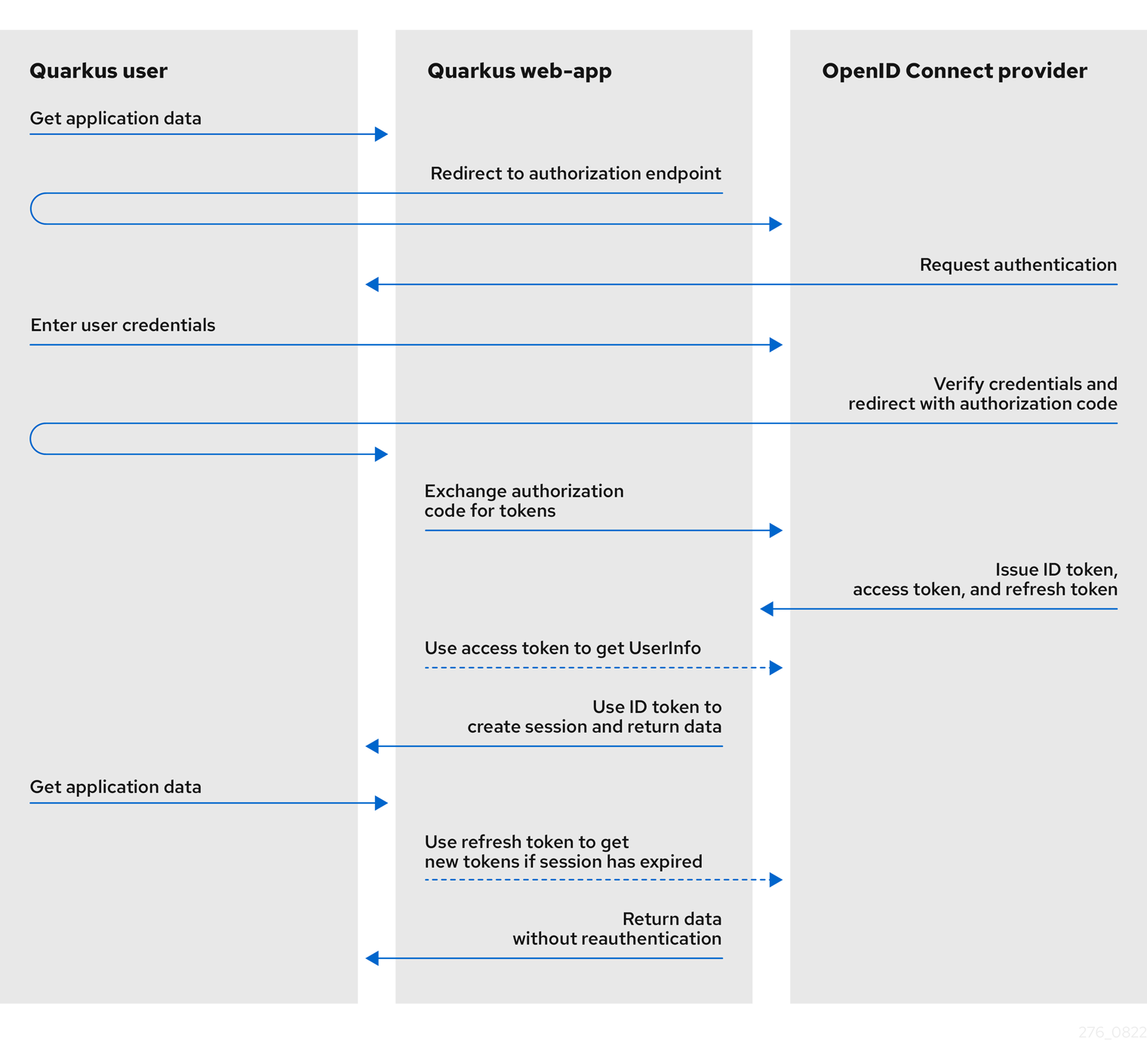
次の図は、Quarkus における認可コードフローメカニズムの概要を示しています。
-
Quarkusユーザーが、Quarkus web-appアプリケーションへのアクセスを要求します。
-
Quarkus Web-appは、ユーザーを認証エンドポイント、つまり認証用のOIDCプロバイダーにリダイレクトします。
-
OIDCプロバイダは、ユーザーをログインと認証のプロンプトにリダイレクトします。
-
プロンプトで、ユーザーは自分のユーザー認証情報を入力します。
-
OIDCプロバイダは、入力されたユーザーの資格情報を認証し、成功すると認可コードを発行して、クエリパラメータとしてコードが含まれるQuarkus Web-appにユーザーをリダイレクトします。
-
Quarkus Webアプリケーションは、この認可コードをOIDCプロバイダーと交換し、ID、アクセス、およびリフレッシュの各トークンを取得します。
認可コードフローが完了し、Quarkus web-appは発行されたトークンを使用して、ユーザーに関する情報にアクセスし、そのユーザーに関連するロールベースの認可を付与します。発行されるトークンは以下の通りです。
-
ID トークン: Quarkus ウェブアプリは ID トークン内のユーザー情報を使用して、認証されたユーザーが安全にログインできるようにし、ウェブアプリへのロールベースのアクセスを提供します。
-
アクセス トークン: Quarkus ウェブアプリは、アクセス トークンを使用して UserInfo API にアクセスし、認証されたユーザーに関する追加情報を取得したり、別のエンドポイントに伝達したりします。
-
リフレッシュ トークン: (オプション) ID およびアクセス トークンの有効期限が切れた場合、Quarkus ウェブアプリはリフレッシュ トークンを使用して新しい ID およびアクセス トークンを取得できます。
Bearer Token 認証を使用してアプリケーションを保護する方法については、OpenID Connect を使用してサービス アプリケーションを保護する を参照してください。
マルチテナント サポートの詳細については、OpenID Connect マルチテナンシーの使用 を参照してください。
クイックスタート
前提条件
このガイドを完成させるには、以下が必要です:
-
約15分
-
IDE
-
JDK 11+ がインストールされ、
JAVA_HOMEが適切に設定されていること -
Apache Maven 3.8.6
-
動作するコンテナランタイム(Docker, Podman)
-
使用したい場合は、 Quarkus CLI
-
ネイティブ実行可能ファイルをビルドしたい場合、MandrelまたはGraalVM(あるいはネイティブなコンテナビルドを使用する場合はDocker)をインストールし、 適切に設定していること
ソリューション
次の章で紹介する手順に沿って、ステップを踏んでアプリを作成することをお勧めします。ただし、完成した例にそのまま進んでも構いません。
Gitレポジトリをクローンするか git clone https://github.com/quarkusio/quarkus-quickstarts.git 、 アーカイブ をダウンロードします。
ソリューションは security-openid-connect-web-authentication-quickstart directory にあります。
Mavenプロジェクトの作成
まず、新しいプロジェクトが必要です。以下のコマンドで新規プロジェクトを作成します。
すでにQuarkusプロジェクトが設定されている場合は、プロジェクトのベースディレクトリーで以下のコマンドを実行することで、プロジェクトに oidc エクステンションを追加することができます。
quarkus extension add 'oidc'./mvnw quarkus:add-extension -Dextensions='oidc'./gradlew addExtension --extensions='oidc'これにより、 pom.xml に以下が追加されます:
<dependency>
    <groupId>io.quarkus</groupId>
    <artifactId>quarkus-oidc</artifactId>
</dependency>implementation("io.quarkus:quarkus-oidc")アプリケーションの記述
認可コードグラントのレスポンスで返されたすべてのトークンが注入されたシンプルなJAX-RSリソースを書いてみましょう。
package org.acme.security.openid.connect.web.authentication;

import javax.inject.Inject;
import javax.ws.rs.GET;
import javax.ws.rs.Path;
import javax.ws.rs.Produces;

import org.eclipse.microprofile.jwt.JsonWebToken;

import io.quarkus.oidc.IdToken;
import io.quarkus.oidc.RefreshToken;

@Path("/tokens")
public class TokenResource {

    /**
     * Injection point for the ID Token issued by the OpenID Connect Provider
     */
    @Inject
    @IdToken
    JsonWebToken idToken;

    /**
     * Injection point for the Access Token issued by the OpenID Connect Provider
     */
    @Inject
    JsonWebToken accessToken;

    /**
     * Injection point for the Refresh Token issued by the OpenID Connect Provider
     */
    @Inject
    RefreshToken refreshToken;

    /**
     * Returns the tokens available to the application. This endpoint exists only for demonstration purposes, you should not
     * expose these tokens in a real application.
     *
     * @return a HTML page containing the tokens available to the application
     */
    @GET
    @Produces("text/html")
    public String getTokens() {
        StringBuilder response = new StringBuilder().append("<html>")
                .append("<body>")
                .append("<ul>");

        Object userName = this.idToken.getClaim("preferred_username");

        if (userName != null) {
            response.append("<li>username: ").append(userName.toString()).append("</li>");
        }

        Object scopes = this.accessToken.getClaim("scope");

        if (scopes != null) {
            response.append("<li>scopes: ").append(scopes.toString()).append("</li>");
        }

        response.append("<li>refresh_token: ").append(refreshToken.getToken() != null).append("</li>");

        return response.append("</ul>").append("</body>").append("</html>").toString();
    }
}
このエンドポイントには、ID、アクセス、およびリフレッシュ トークンが注入されています。ID トークンから preferred_username クレーム、アクセス トークンから scope クレーム、およびリフレッシュ トークンの可用性ステータスを返します。
基本的にトークンを注入する必要はありません。エンドポイントが ID トークンを使用して現在認証されているユーザーとやりとりする必要がある場合や、アクセス・トークンを使用してこのユーザーに代わってダウンストリーム・サービスにアクセスする必要がある場合にのみ必要となります。
詳しくは下記の アクセスID・アクセストークン の項をご覧ください。
アプリケーションの設定
OpenID Connect エクステンションを使用すると、src/main/resources` ディレクトリーにあるはずの application.properties ファイルを使用して設定を定義することができます。
quarkus.oidc.auth-server-url=http://localhost:8180/realms/quarkus
quarkus.oidc.client-id=frontend
quarkus.oidc.credentials.secret=secret
quarkus.oidc.application-type=web-app
quarkus.http.auth.permission.authenticated.paths=/*
quarkus.http.auth.permission.authenticated.policy=authenticated
これは、アプリケーションへの認証を有効にする際に最もシンプルな設定です。
quarkus.oidc.client-id プロパティーは OpenID Connect プロバイダーが発行した client_id を参照し、 quarkus.oidc.credentials.secret プロパティーはクライアントの秘密を設定します。
OpenID Connect 認可コードフローを有効にしたいことをQuarkusに伝えるために、 quarkus.oidc.application-type プロパティーは、 web-app に設定します。これにより、ユーザーが認証のためにOpenID Connect Providerにリダイレクトされます。
最後に、保護したいパスについてQuarkusに伝えるために、 quarkus.http.auth.permission.authenticated パーミッションが設定されています。この場合では、すべてのパスは、 authenticated ユーザーだけがアクセスできるようにするポリシーで保護されています。詳細については、 セキュリティ認可ガイド を参照してください。
Keycloak サーバーの起動と設定
Keycloak サーバーを起動するにはDockerを使用し、以下のコマンドを実行するだけです。
docker run --name keycloak -e KEYCLOAK_ADMIN=admin -e KEYCLOAK_ADMIN_PASSWORD=admin -p 8180:8080 quay.io/keycloak/keycloak:{keycloak.version} start-devここで、 keycloak.version は 17.0.0 以上に設定する必要があります。
localhost:8180 で Keycloak サーバーにアクセスできるはずです。
Keycloak 管理コンソールにアクセスするには、 admin ユーザーとしてログインしてください。ユーザー名は admin 、パスワードは admin です。
新しいレルムを作成するには、https://github.com/quarkusio/quarkus-quickstarts/tree/2.16/security-openid-connect-web-authentication-quickstart/config/quarkus-realm.json[realm構成ファイル]をインポートします。詳細については、 新しいレルムの作成 方法についてのKeycloakのドキュメントを参照してください。
開発モードと JVM モードでのアプリケーションの実行
アプリケーションを開発モードで実行するには、次を使用します。
quarkus dev./mvnw quarkus:dev./gradlew --console=plain quarkusDev「開発モード」で遊び終わったら、標準のJavaアプリケーションとして実行することができます。
まずコンパイルします。
quarkus build./mvnw install./gradlew build次に、以下を実行してください。
java -jar target/quarkus-app/quarkus-run.jarネイティブモードでのアプリケーションの実行
同じデモをネイティブコードにコンパイルすることができます。
これは、生成されたバイナリーにランタイム技術が含まれており、最小限のリソースオーバーヘッドで実行できるように最適化されているため、本番環境にJVMをインストールする必要がないことを意味します。
コンパイルには少し時間がかかるので、このステップはデフォルトで無効になっています。ネイティブビルドを有効にして再度ビルドしてみましょう。
quarkus build --native./mvnw install -Dnative./gradlew build -Dquarkus.package.type=nativeコーヒーを飲み終わると、このバイナリーは以下のように直接実行出来るようになります:
./target/security-openid-connect-web-authentication-quickstart-runnerアプリケーションのテスト
テストするには、ブラウザを開いて以下のURLにアクセスする必要があります。
すべてが期待通りに動作している場合は、認証のためにKeycloakサーバーにリダイレクトされるはずです。
アプリケーションを認証するためには、Keycloakのログインページで以下の認証情報を入力する必要があります。
-
Username: alice
-
Password: alice
Login ボタンをクリックすると、アプリケーションにリダイレクトされます。
また、 Dev Services for Keycloak に依存する統合テストの書き方については、以下の Dev Services for Keycloak セクションを参照してください。
リファレンスガイド
ID とアクセストークンへのアクセス
OIDC コード認証メカニズムは、認可コードフローにおいて IDトークン 、アクセストークン、リフレッシュトークンの 3 つのトークンを取得します。
ID トークン は常に JWT トークンであり、JWT クレームでユーザー認証を表現するために使用されます。 JsonWebToken に IdToken という修飾子をつけて注入することで、ID トークンクレームにアクセスすることができます。
import javax.inject.Inject;
import org.eclipse.microprofile.jwt.JsonWebToken;
import io.quarkus.oidc.IdToken;
import io.quarkus.security.Authenticated;

@Path("/web-app")
@Authenticated
public class ProtectedResource {

    @Inject
    @IdToken
    JsonWebToken idToken;

    @GET
    public String getUserName() {
        return idToken.getName();
    }
}
アクセストークンは通常、OIDC web-app アプリケーションが、現在ログインしているユーザーの代わりに他のエンドポイントにアクセスするために使用されます。生のアクセストークンは以下のようにアクセスすることができます。
import javax.inject.Inject;
import org.eclipse.microprofile.jwt.JsonWebToken;
import io.quarkus.oidc.AccessTokenCredential;
import io.quarkus.security.Authenticated;

@Path("/web-app")
@Authenticated
public class ProtectedResource {

    @Inject
    JsonWebToken accessToken;

    // or
    // @Inject
    // AccessTokenCredential accessTokenCredential;

    @GET
    public String getReservationOnBehalfOfUser() {
        String rawAccessToken = accessToken.getRawToken();
        //or
        //String rawAccessToken = accessTokenCredential.getToken();

        // Use the raw access token to access a remote endpoint
        return getReservationfromRemoteEndpoint(rawAccesstoken);
    }
}
Quarkus web-app アプリケーションに発行された Access Token が Opaque (バイナリー) で、 JsonWebToken にパースできない場合は、 AccessTokenCredential を使用しなければならないことに注意してください。
JsonWebToken と AccessTokenCredential のインジェクションは、 @RequestScoped と @ApplicationScoped の両方のコンテキストでサポートされています。
RefreshTokenは、その セッション管理 プロセスの一部として、現在のIDとアクセストークンをリフレッシュするためにのみ使用されます。
ユーザー情報
IdTokenが現在認証されているユーザーに関する十分な情報を提供しない場合は、 quarkus.oidc.authentication.user-info-required=true プロパティーを設定することで OIDC の userinfo エンドポイントから UserInfo JSON オブジェクトを要求することができます。
リクエストは、認可コードグラント応答で返されたアクセストークンを使用して OpenID プロバイダー UserInfo エンドポイントに送信され、 io.quarkus.oidc.UserInfo (単純な javax.json.JsonObject ラッパー) オブジェクトが作成されます。 io.quarkus.oidc.UserInfo は、SecurityIdentity userinfo 属性として挿入またはアクセスできます。
設定メタデータ
現在のテナントが検出した OpenID Connect 設定メタデータ は io.quarkus.oidc.OidcConfigurationMetadata で表され、 SecurityIdentity configuration-metadata 属性として注入またはアクセスが可能です。
エンドポイントがパブリックの場合、デフォルトのテナントの OidcConfigurationMetadata が注入されます。
トークンクレームとセキュリティーアイデンティティロール
検証済みトークンからSecurityIdentityのロールにロールをマッピングする方法は、 ベアラートークン の場合と同じですが、唯一の違いは、 IDトークン がデフォルトでロールのソースとして使用されるということです。
Keycloakを使用する場合は、IDトークン用のMicroprofile JWTクライアントスコープに groups クレームを含めるように設定する必要があることに注意してください。詳細については、 Keycloakサーバー管理ガイド を参照してください。
アクセストークンのみがロールを含み、このアクセストークンが下流のエンドポイントに伝播されることを意図していない場合は、 quarkus.oidc.roles.source=accesstoken をセットします。
UserInfoがロールのソースである場合は、 quarkus.oidc.authentication.user-info-required=true と quarkus.oidc.roles.source=userinfo 、必要に応じて quarkus.oidc.roles.role-claim-path を設定します。
さらに、ここ に文書化されているようにロールを追加することにカスタム SecurityIdentityAugmentor を使用することも出来ます。
トークンの検証とイントロスペクション
トークンの検証とイントロスペクトの方法の詳細については、 トークンの検証とイントロスペクション を参照してください。
web-app アプリケーションの場合、アクセストークンはデフォルトで現在の Quarkus web-app エンドポイントにアクセスするために使用されず、代わりにこれを期待するサービスに伝播されることを意図しているため、デフォルトでは IdToken のみが検証されることに注意してくださいたとえば、OpenID Connect Provider の UserInfo エンドポイントなどへのアクセストークン。ただし、アクセストークンに現在の Quarkus エンドポイント (quarkus.oidc.roles.source=accesstoken) にアクセスするために必要なロールが含まれていると予想される場合は、また、検証されます。
トークンイントロスペクションと UserInfo キャッシュ
コードフローアクセストークンは、ロールのソースであることが期待されない限り、イントロスペクトされませんが、 UserInfo を取得するために使用されます。したがって、トークンのイントロスペクションや UserInfo が必要な場合は、コードフローアクセストークンを使用して 1 つまたは 2 つのリモート呼び出しが行われます。
デフォルトのトークンキャッシュの使用またはカスタムキャッシュ実装の登録の詳細については、Token Introspection および UserInfo キャッシュ を参照してください。
JSON Web トークンのクレーム検証
iss (発行者) クレームを含むクレーム検証については、 トークンクレーム検証 セクションを参照してください。これは ID トークンに適用されますが、 web-app アプリケーションがアクセストークンの検証を要求した場合は JWT 形式のアクセストークンにも適用されます。
リダイレクト
ユーザーが認証のために OpenID Connect プロバイダーにリダイレクトされる場合、リダイレクト URL には、認証が完了した後にユーザーをリダイレクトする必要がある場所をプロバイダーに示す redirect_uri クエリーパラメーターが含まれます。
Quarkus は、デフォルトでこのパラメーターを現在のリクエスト URL に設定します。たとえば、ユーザーが http://localhost:8080/service/1 で Quarkus サービスエンドポイントにアクセスしようとしている場合、 redirect_uri パラメーターは http://localhost:8080/service/1 に設定されます。同様に、リクエスト URL が http://localhost:8080/service/2 の場合、 redirect_uri パラメーターは http://localhost:8080/service/2 などに設定されます。
OpenID Connect プロバイダーは、すべてのリダイレクト URL に対して同じ値 (例: http://localhost:8080/service/callback) を持つように redirect_uri パラメーターを要求するように設定できます。このような場合、 quarkus.oidc.authentication.redirect-path プロパティーが設定される必要があります (例: quarkus.oidc.authentication.redirect-path=/service/callback)。また、Quarkus は redirect_uri パラメータに http://localhost:8080/service/callback のような絶対 URL を設定します。これは現在のリクエスト URL に関係なく同じです。
quarkus.oidc.authentication.redirect-path が設定されているが、ユーザーが http://localhost:8080/service/callback などのコールバック URL にリダイレクトされた後、元のリクエスト URL を復元する必要がある場合 quarkus.oidc.authentication.restore-path-after-redirect プロパティーを true に設定する必要があります。これにより、 http://localhost:8080/service/1 などのリクエスト URL が復元されます。
クッキーの取り扱い
OIDCアダプターは、セッション、コードフロー、ログアウト後の状態を保持するためにクッキーを使用します。
quarkus.oidc.authentication.cookie-path プロパティーは、特にルートが重複または異なる保護されたリソースにアクセスするときに Cookie が表示されるようにするために使用されます。次に例を示します。
-
/index.htmlと/web-app/service -
/web-app/service1と/web-app/service2 -
/web-app1/serviceと/web-app2/service
quarkus.oidc.authentication.cookie-path は、デフォルトでは / に設定されていますが、 /web-app のように、より具体的なルートパスに絞り込むことができます。
クッキーパスを動的に設定する必要がある場合は、 quarkus.oidc.authentication.cookie-path-header プロパティを設定することもできます。例えば、 quarkus.oidc.authentication.cookie-path-header=X-Forwarded-Prefix を設定すると、HTTP X-Forwarded-Prefix ヘッダーの値がクッキーパスを設定するために使用されることを意味します。
quarkus.oidc.authentication.cookie-path-header が設定されているが、現在のリクエストで設定された HTTP ヘッダーが利用できない場合は、 quarkus.oidc.authentication.cookie-path がチェックされます。
アプリケーションが複数のドメインにデプロイされている場合は、セッション Cookie の quarkus.oidc.authentication.cookie-domain プロパティーを設定して、保護されているすべての Quarkus サービスに表示されるようにしてください。たとえば、次の場所に 2 つのサービスがデプロイされている場合です。
次に、 quarkus.oidc.authentication.cookie-domain プロパティーを company.net に設定する必要があります。
ログアウト
デフォルトでは、ログアウトはOpenID Connect Providerが発行したID Tokenの有効期限に基づいて行われます。IDトークンの有効期限が切れると、Quarkusエンドポイントでの現在のユーザーセッションは無効になり、ユーザーは認証のために再度OpenID Connect Providerにリダイレクトされます。OpenID Connect Providerでのセッションがまだアクティブな場合は、ユーザーは再び資格情報を提供することなく自動的に再認証されます。
現在のユーザーセッションは、 quarkus.oidc.token.refresh-expired プロパティーを有効にすることで自動的に拡張される場合があります。 true に設定されている場合、現在の ID トークンの有効期限が切れると、リフレッシュ・トークンの付与が使用され、ID トークンだけでなく、アクセス・トークンやリフレッシュ・トークンもリフレッシュされます。
ユーザー主導型ログアウト
ユーザーは、 quarkus.oidc.logout.path プロパティーで設定されたQuarkusエンドポイントのログアウトパスにリクエストを送信することで、ログアウトを要求することができます。たとえば、エンドポイントのアドレスが https://application.com/webapp で、 quarkus.oidc.logout.path が "/logout" に設定されている場合、ログアウト要求は https://application.com/webapp/logout に送信されます。
このログアウト要求により、 RP-Initiated Logout が開始され、ユーザーは OpenID Connect Provider にリダイレクトされ、そこでログアウトできます。ログアウトが実際に意図されていることを確認するように求められます。
quarkus.oidc.logout.post-logout-path プロパティーが設定されている場合、ログアウトが完了すると、ユーザーはエンドポイントのログアウト後ページに戻ります。たとえば、エンドポイントアドレスが https://application.com/webapp で、 quarkus.oidc.logout.post-logout-path が "/signin" に設定されている場合、ユーザーは https://application.com/webapp/signin (この URI は OpenID Connect プロバイダーに有効な post_logout_redirect_uri として登録されている必要があることに注意してください)。
quarkus.oidc.logout.post-logout-path が設定されている場合、 q_post_logout Cookie が作成され、一致する state クエリーパラメーターがログアウトリダイレクト URI に追加されます。ログアウトが完了すると、OpenID Connect プロバイダーはこの state を返します。Quarkus の web-app アプリケーションでは、 state クエリーパラメーターが q_post_logout cookie の値と一致することを確認することをお勧めします。これは、たとえば JAX-RS フィルターで実行できます。
OpenID Connect マルチテナンシー を使用する場合、クッキーの名前が異なることに注意してください。例えば、 tenant_1 という ID のテナントに対しては q_post_logout_tenant_1 という名前になるなどです。
RP によって開始されるログアウトフローを設定する方法の例を次に示します。
quarkus.oidc.auth-server-url=http://localhost:8180/realms/quarkus
quarkus.oidc.client-id=frontend
quarkus.oidc.credentials.secret=secret
quarkus.oidc.application-type=web-app

quarkus.oidc.logout.path=/logout
# Logged-out users should be returned to the /welcome.html site which will offer an option to re-login:
quarkus.oidc.logout.post-logout-path=/welcome.html

# Only the authenticated users can initiate a logout:
quarkus.http.auth.permission.authenticated.paths=/logout
quarkus.http.auth.permission.authenticated.policy=authenticated

# All users can see the welcome page:
quarkus.http.auth.permission.public.paths=/welcome.html
quarkus.http.auth.permission.public.policy=permit
また、 quarkus.oidc.authentication.cookie-path に、すべてのアプリケーションリソースに共通するパス値 (この例では / ) を設定する必要がある場合もあります。詳しくは、 クッキーの取り扱い を参照してください。
OpenID Connect プロバイダーの中には、 RP-Initiated Logout 仕様をサポートしておらず (おそらく技術的にまだドラフトであるため)、OpenID Connect がよく知る end_session_endpoint メタデータプロパティーを返さないものがあることに注意してください。しかし、これらのプロバイダー特有のログアウトメカニズムは、ログアウト URL クエリーパラメーターの命名方法が異なるだけなので、問題にはなりません。
RP-Initiated Logout 仕様によると、 quarkus.oidc.logout.post-logout-path プロパティ-は post_logout_redirect_uri クエリパラメータとして表され、この仕様をサポートしていないプロバイダ-では認識されません。
この問題を回避するには、 quarkus.oidc.logout.post-logout-url-param を使用できます。 quarkus.oidc.logout.extra-params で追加されたログアウトクエリーパラメーターをさらにリクエストすることもできます。たとえば、 Auth0 でログアウトをサポートする方法は次のとおりです。
quarkus.oidc.auth-server-url=https://dev-xxx.us.auth0.com
quarkus.oidc.client-id=redacted
quarkus.oidc.credentials.secret=redacted
quarkus.oidc.application-type=web-app

quarkus.oidc.tenant-logout.logout.path=/logout
quarkus.oidc.tenant-logout.logout.post-logout-path=/welcome.html

# Auth0 does not return the `end_session_endpoint` metadata property, configure it instead
quarkus.oidc.end-session-path=v2/logout
# Auth0 will not recognize the 'post_logout_redirect_uri' query parameter so make sure it is named as 'returnTo'
quarkus.oidc.logout.post-logout-uri-param=returnTo

# Set more properties if needed.
# For example, if 'client_id' is provided then a valid logout URI should be set as Auth0 Application property, without it - as Auth0 Tenant property.
quarkus.oidc.logout.extra-params.client_id=${quarkus.oidc.client-id}
バックチャンネルログアウト
バックチャンネルログアウト は、OpenID Connect プロバイダーが、このユーザーが現在ログインしているすべてのアプリケーションから、ユーザーエージェントをバイパスして、現在のユーザーをログアウトするために使用されます。
次のように、バックチャネルログアウトをサポートするように Quarkus を設定できます。
quarkus.oidc.auth-server-url=http://localhost:8180/realms/quarkus
quarkus.oidc.client-id=frontend
quarkus.oidc.credentials.secret=secret
quarkus.oidc.application-type=web-app

quarkus.oidc.logout.backchannel.path=/back-channel-logout
絶対的な Back-Channel Logout URL は、現在のエンドポイント URL に quarkus.oidc.back-channel-logout.path を追加することで算出されます (例: http://localhost:8080/back-channel-logout)。この URL は、OpenID Connect Provider の Admin Console で設定する必要があります。
なお、OpenID Connect Providerが現在のログアウトトークンに有効期限を設定していない場合、ログアウトトークンの検証を成功させるためには、token ageプロパティも設定する必要があります。例えば、 quarkus.oidc.token.age=10S では、ログアウトトークンの iat (issued at) 時から経過してはならない秒数を10に設定します。
フロントチャネルログアウト
フロントチャネルログアウトは、ユーザーエージェントから直接、現在のユーザーをログアウトするために使用することができます。
次のように、フロントチャネルログアウトをサポートするように Quarkus を設定できます。
quarkus.oidc.auth-server-url=http://localhost:8180/realms/quarkus
quarkus.oidc.client-id=frontend
quarkus.oidc.credentials.secret=secret
quarkus.oidc.application-type=web-app

quarkus.oidc.logout.frontchannel.path=/front-channel-logout
このパスは現在のリクエストのパスと比較され、これらのパスが一致する場合、ユーザーはログアウトされます。
ローカルログアウト
Google などのソーシャル・プロバイダーと連携しており、プロバイダーのログアウトエンドポイントにリダイレクトされる ユーザー主導型ログアウト で、ユーザーがすべての Google アプリケーションからログアウトされることを懸念している場合は、ローカルセッションのクッキーのみをクリアする、 OidcSession でローカルログアウトをサポートすることができます。以下に例を示します。
import javax.inject.Inject;
import javax.ws.rs.GET;
import javax.ws.rs.Path;

import io.quarkus.oidc.OidcSession;

@Path("/service")
public class ServiceResource {

    @Inject
    OidcSession oidcSession;

    @GET
    @Path("logout")
    public String logout() {
        oidcSession.logout().await().indefinitely();
        return "You are logged out".
    }
セッション管理
keycloak.js などの OpenID Connect Provider スクリプトが認可コードフローを管理している サービスアプリケーション用のシングルページアプリケーション の場合、そのスクリプトは SPA 認証セッションの寿命も制御します。
Quarkus OIDC web-app アプリケーションで作業している場合、ユーザーセッションの寿命を管理しているのはQuarkus OIDCコード認証メカニズムです。
セッション年齢は、現在のIDTokenの寿命値と、 quarkus.oidc.authentication.session-age-extension と quarkus.oidc.token.lifespan-grace プロパティーの値を加算して計算されます。最後の2つのプロパティーのうち、 quarkus.oidc.authentication.session-age-extension だけは、必要に応じてセッションの寿命を大幅に延ばすために使用すべきです。 quarkus.oidc.token.lifespan-grace は小さなクロックスキューを考慮することだけを目的としている為です。
現在認証されているユーザーが保護された Quarkus エンドポイントに戻り、セッションクッキーに関連付けられた ID トークンの有効期限が切れた場合、デフォルトでは、再認証のために OIDC 認証エンドポイントに自動でリダイレクトされます。OIDC プロバイダーは、ユーザーとこの OIDC プロバイダーとのセッションがまだ有効であれば、必ずしも再チャレンジする必要はありませんが、ID トークンよりも長くセッションが持続するように設定されている場合は、そのようになる可能性があります。
quarkus.oidc.token.refresh-expired を指定すると、認可コード付与応答で返されたリフレッシュトークンを使用して、期限切れの ID トークン (アクセストークンも含む) がリフレッシュされます。このリフレッシュトークンは、このプロセスの一部としてリサイクル (リフレッシュ) されることもあります。その結果、新しいセッションクッキーが作成され、セッションが延長されます。
quarkus.oidc.authentication.session-age-extension は、ユーザーがあまりアクティブでないときに、期限切れの ID トークンを処理するときに重要になる可能性があることに注意してください。このような場合、ID トークンの有効期限が切れると、セッション Cookie は次のユーザーリクエスト中に Quarkus エンドポイントに戻されない可能性があり、Quarkus はそれが最初の認証リクエストであると見なします。したがって、期限切れの ID トークンを更新する必要がある場合は、 quarkus.oidc.authentication.session-age-extension を使用することが重要です。
また、 quarkus.oidc.token.refresh-token-time-skew の値内で期限が切れそうな有効な ID トークンを積極的にリフレッシュして、期限切れの ID トークンを補完することも可能です。現在のユーザーリクエストの間に、現在の ID トークンがこの quarkus.oidc.token.refresh-token-time-skew 値の範囲内で期限切れとなることが計算されると、リフレッシュされて新しいセッションクッキーが作成されます。このプロパティーには、ID トークンの寿命よりも短い値を設定する必要があります。この寿命の値に近いほど、ID トークンはより頻繁にリフレッシュされます。
シンプルな JavaScript 関数が、Quarkus エンドポイントへの ping 送信によってユーザーの活動を定期的にエミュレートし、ユーザーが再認証されるウィンドウを最小限に抑えることで、このプロセスをさらに最適化することができます。
このユーザーセッションは永久に延長されるわけではありません。リフレッシュトークンの有効期限が切れると、ID トークンを持つ復帰ユーザーは OIDC プロバイダーのエンドポイントで再認証を行う必要があります。
OidcSession
io.quarkus.oidc.OidcSession は、現在の IdToken のラッパーのようなものです。 ローカルログアウト を実行したり、現在のセッションのテナント識別子を取得したり、セッションの有効期限を確認したりすることができます。今後、より便利なメソッドが追加される予定です。
TokenStateManager
OIDC CodeAuthenticationMechanism は、デフォルトの io.quarkus.oidc.TokenStateManager インターフェイス実装を使用して、認可コードで返された ID、アクセス、更新トークンを保持するか、セッション Cookie の付与応答を更新します。これにより、Quarkus OIDC エンドポイントは完全にステートレスになります。
エンドポイントによっては、アクセストークンを必要としないものもあることに注意しましょう。アクセストークンが必要なのは、エンドポイントが UserInfo を取得したり、このアクセストークンを使って下流のサービスにアクセスしたり、アクセストークンに関連付けられたロール (デフォルトでは ID トークンのロールがチェックされます) を使用する必要がある場合のみです。このような場合は、 quarkus.oidc.token-state-manager.strategy=id-refresh-token (ID およびリフレッシュトークンのみを保持) または quarkus.oidc.token-state-manager.strategy=id-token (ID トークンだけを保持) を設定できます。
ID、アクセス、リフレッシュの各トークンが JWT トークンの場合、それらすべてを組み合わせたり (ストラテジーがデフォルトの keep-all-tokens の場合)、ID およびリフレッシュトークンのみ (ストラテジーが id-refresh-token の場合)、セッションクッキーの値が 4KB 以上になり、ブラウザーがこのクッキーを保持できない可能性があります。このような場合、 quarkus.oidc.token-state-manager.split-tokens=true を使用して、これらのトークンごとに一意のセッショントークンを持たせることができます。
また、デフォルトの TokenStateManager を設定して、トークンを暗号化してからクッキーの値として保存することもできます。これは、トークンが機密性の高い請求値を含む場合に必要な場合があります。例えば、トークンを分割して暗号化するように設定する方法は以下のとおりです。
quarkus.oidc.auth-server-url=http://localhost:8180/realms/quarkus
quarkus.oidc.client-id=quarkus-app
quarkus.oidc.credentials.secret=secret
quarkus.oidc.application-type=web-app
quarkus.oidc.token-state-manager.split-tokens=true
quarkus.oidc.token-state-manager.encryption-required=true
quarkus.oidc.token-state-manager.encryption-secret=eUk1p7UB3nFiXZGUXi0uph1Y9p34YhBU
トークン暗号化の秘密は、32 文字でなければなりません。トークンの暗号化に quarkus.oidc.credentials.secret を使用しない場合、または quarkus.oidc.credentials.secret の長さが 32 文字未満の場合のみ quarkus.oidc.token-state-manager.encryption-secret を設定する必要があることに留意してください。
トークンがセッションクッキーと関連付けられる方法をカスタマイズする必要がある場合は、独自の io.quarkus.oidc.TokenStateManager 実装を @ApplicationScoped CDI Bean として登録します。例えば、トークンをデータベースに保存し、セッションクッキーにはデータベースポインターだけを保存させたいと思うかもしれません。しかし、複数のマイクロサービスノードでトークンを利用できるようにするには、いくつかの課題が生じる可能性があることに注意してください。
簡単な例を挙げてみます。
package io.quarkus.oidc.test;

import javax.enterprise.context.ApplicationScoped;
import javax.inject.Inject;

import io.quarkus.arc.AlternativePriority;
import io.quarkus.oidc.AuthorizationCodeTokens;
import io.quarkus.oidc.OidcTenantConfig;
import io.quarkus.oidc.TokenStateManager;
import io.quarkus.oidc.runtime.DefaultTokenStateManager;
import io.smallrye.mutiny.Uni;
import io.vertx.ext.web.RoutingContext;

@ApplicationScoped
@AlternativePriority(1)
public class CustomTokenStateManager implements TokenStateManager {

    @Inject
    DefaultTokenStateManager tokenStateManager;

    @Override
    public Uni<String> createTokenState(RoutingContext routingContext, OidcTenantConfig oidcConfig,
            AuthorizationCodeTokens sessionContent, TokenStateManager.CreateTokenStateRequestContext requestContext) {
        return tokenStateManager.createTokenState(routingContext, oidcConfig, sessionContent, requestContext)
                .map(t -> (t + "|custom"));
    }

    @Override
    public Uni<AuthorizationCodeTokens> getTokens(RoutingContext routingContext, OidcTenantConfig oidcConfig,
            String tokenState, TokenStateManager.GetTokensRequestContext requestContext) {
        if (!tokenState.endsWith("|custom")) {
            throw new IllegalStateException();
        }
        String defaultState = tokenState.substring(0, tokenState.length() - 7);
        return tokenStateManager.getTokens(routingContext, oidcConfig, defaultState, requestContext);
    }

    @Override
    public Uni<Void> deleteTokens(RoutingContext routingContext, OidcTenantConfig oidcConfig, String tokenState,
            TokenStateManager.DeleteTokensRequestContext requestContext) {
        if (!tokenState.endsWith("|custom")) {
            throw new IllegalStateException();
        }
        String defaultState = tokenState.substring(0, tokenState.length() - 7);
        return tokenStateManager.deleteTokens(routingContext, oidcConfig, defaultState, requestContext);
    }
}
コード交換 (PKCE) のキーの証明
Proof Of Key for Code Exchange (PKCE) は、認可コードの傍受のリスクを最小限に抑えます。
PKCE は公開 OpenID Connect クライアント (ブラウザーで動作する SPA スクリプトなど) にとって最も重要ですが、クライアントシークレットを安全に保存し、トークンのコード交換に使用できる機密 OpenID Connect クライアントである Quarkus OIDC web-app アプリケーションにも追加レベルの保護を提供することが可能です。
OIDC の web-app エンドポイントで PKCE を有効にするには、例えば quarkus.oidc.authentication.pkce-required プロパティーと 32 文字の長さのシークレットを指定することができます。
quarkus.oidc.authentication.pkce-required=true
quarkus.oidc.authentication.pkce-secret=eUk1p7UB3nFiXZGUXi0uph1Y9p34YhBU
32文字長のクライアントシークレットをすでにお持ちの場合は、別のシークレットキーを使用する場合を除き、 quarkus.oidc.authentication.pkce-secret を設定する必要はありません。
秘密鍵は、ユーザーが認証のために OpenID Connect Provider に code_challenge クエリーパラメーターでリダイレクトされている間に、ランダムに生成される PKCE code_verifier を暗号化するために必要となります。Code_verifier` は、ユーザーが Quarkus にリダイレクトされる際に復号化され、 code やクライアントシークレットなどのパラメーターと一緒にトークンエンドポイントに送信され、コード交換を完了させることができます。プロバイダーは code_verifier の SHA256 ダイジェストが認証リクエストで指定された code_challenge と一致しない場合、コード交換に失敗します。
重要な認証イベントのリッスン
重要な OIDC 認証イベントを監視する @ApplicationScoped Bean を登録できます。リスナーは、ユーザーが初めてログインしたとき、または再認証されたとき、およびセッションが更新されたときに更新されます。今後、さらに多くのイベントが報告される可能性があります。例えば:
import javax.enterprise.context.ApplicationScoped;
import javax.enterprise.event.Observes;

import io.quarkus.oidc.IdTokenCredential;
import io.quarkus.oidc.SecurityEvent;
import io.quarkus.security.identity.AuthenticationRequestContext;
import io.vertx.ext.web.RoutingContext;

@ApplicationScoped
public class SecurityEventListener {

    public void event(@Observes SecurityEvent event) {
        String tenantId = event.getSecurityIdentity().getAttribute("tenant-id");
        RoutingContext vertxContext = event.getSecurityIdentity().getAttribute(RoutingContext.class.getName());
        vertxContext.put("listener-message", String.format("event:%s,tenantId:%s", event.getEventType().name(), tenantId));
    }
}
シングルページアプリケーション
サービスアプリケーションのシングルページアプリケーション セクションで提案されている方法で SPA を実装することが要件を満たすことができるかどうかを確認してください。
Quarkus Web アプリケーションで SPA や、 Fetch または XMLHttpRequest(XHR) などの JavaScript API を使用する場合は、OpenID Connect Provider が、Quarkus からのリダイレクト後にユーザーが認証される認証エンドポイントの CORS をサポートしない場合があることに注意してください。Quarkus アプリケーションと OpenID Connect Provider が異なる HTTP ドメイン/ポートでホストされている場合、認証に失敗することになります。
この場合、 Quarkus.oidc.authentication.java-script-auto-redirect プロパティーを false に設定すると、ステータスコード 499 と OIDC 値を持つ WWW-Authenticate ヘッダーを返すように Quarkus に指示が出されます。ブラウザースクリプトも更新して、 X-Requested-With ヘッダーに JavaScript 値を設定し、 499 の場合は最後にリクエストしたページを再読み込みするなどの処理が必要になります。
Future<void> callQuarkusService() async {
    Map<String, String> headers = Map.fromEntries([MapEntry("X-Requested-With", "JavaScript")]);

    await http
        .get("https://localhost:443/serviceCall")
        .then((response) {
            if (response.statusCode == 499) {
                window.location.assign("https://localhost.com:443/serviceCall");
            }
         });
  }
クロスオリジンリソース共有
別のドメインで動作する Single Page Application からこのアプリケーションを利用する場合は、CORS (Cross-Origin Resource Sharing) を設定する必要があります。詳細については、 HTTP CORSのドキュメントを参照してください。
GitHub およびその他の OAuth2 プロバイダーとの統合
GitHub や LinkedIn といった有名なプロバイダーのいくつかは、 OpenID Connect ではなく、OAuth2 authorization code flow をサポートするプロバイダーです。例えば、GitHub OAuth2や LinkedIn OAuth2 などです。
OpenID Connect プロバイダーと OAuth2 プロバイダーの主な違いは、OAuth2 の上に構築された OpenID Connect プロバイダーは、 OAuth2 プロバイダーが返す標準の認可コードフロー access と refresh トークンに加えて、ユーザー認証を表す ID トークン を返すという点です。
GitHub のような OAuth2 プロバイダーは IdToken を返しません。ユーザー認証の事実は暗黙の了解で、認証済みユーザーの代わりに現在の Quarkus web-app アプリケーションがデータにアクセスすることを許可する access トークンで間接的に表現されます。
例えば、GitHub で作業する場合、Quarkus のエンドポイントは access トークンを取得し、現在のユーザーの GitHub プロファイルを要求することができます。実際、標準的な OpenID Connect の UserInfo の取得も、このように動作します。OpenID Connect プロバイダーを認証することで、Quarkus アプリケーションに、ユーザーの代わりに ユーザー情報 を取得する許可を与えることになります。また、これは、OpenID Connect が OAuth2 の上に構築されていることの意味も示しています。
このような OAuth2 サーバーとの統合をサポートするには、 quarkus-oidc を設定して、 IdToken: quarkus.oidc.authentication.id-token-required=false なしで認可コードのフローレスポンスを許可する必要があります。
これは quarkus-oidc が、認可コードフローが完了したら access と refresh トークンだけでなく IdToken も返すことを想定しているためです。
注意: IdToken なしで認可コードのフローをサポートするようにエクステンションを設定しても、 quarkus-oidc の動作をサポートするために内部で IdToken が生成され、 IdToken は認証セッションをサポートし、リクエストごとに GitHub などのプロバイダーにリダイレクトされるのを回避するために使用されます。この場合、セッションの有効期限は 5 分に設定されていますが、セッション管理 セクションで説明するように、さらに延長することができます。
次のステップは、返されたアクセストークンが現在のQuarkusエンドポイントに有用であることを確認することです。OAuth2 プロバイダーがintrospection エンドポイントをサポートしている場合、 quarkus.oidc.roles.source=accesstoken でロールのソースとしてこのアクセストークンを使用できる場合があります。イントロスペクションエンドポイントが利用できない場合、最低限、このプロバイダから quarkus.oidc.authentication.user-info-required で ユーザー情報 をリクエストすることが可能であるべきです (これは、GitHub の場合です)。
ユーザー情報 を要求するエンドポイントの設定 は、 quarkus-oidc を GitHub などのプロバイダーと統合できる唯一の方法です。
ユーザー情報 を要求すると、リクエストのたびにリモートコールを行うことになるので、 UserInfo データのキャッシュを検討するとよいでしょう。詳しくは <<token-introspection-userinfo-cache,トークンイントロスペクションと UserInfo キャッシ
また、 quarkus.oidc.cache-user-info-in-idtoken=true プロパティーを指定して、 UserInfo を内部生成される IdToken に埋め込むように要求することもできます。この方法の利点は、デフォルトでは UserInfo のキャッシュ状態がエンドポイントに保持されない代わりに、セッション Cookie に保持されることです。また、 UserInfo に機密情報が含まれている場合は、 IdToken を暗号化することを検討するとよいでしょう。詳細は TokenStateManager によるトークンの暗号化 を参照してください。
また、OAuth2 サーバーは、よく知られた設定エンドポイントをサポートしていない場合があります。その場合は、検出を無効にして、認証、トークン、イントロスペクション、および/またはユーザー情報のエンドポイントパスを手動で設定する必要があります。
GitHub OAuth アプリケーションを作成した 後に、 quarkus-oidc を GitHub と統合する方法を説明します。Quarkus のエンドポイントをこのように設定します。
quarkus.oidc.provider=github
quarkus.oidc.client-id=github_app_clientid
quarkus.oidc.credentials.secret=github_app_clientsecret

# user:email scope is requested by default, use 'quarkus.oidc.authentication.scopes' to request different scopes such as `read:user`.
# See https://docs.github.com/en/developers/apps/building-oauth-apps/scopes-for-oauth-apps for more information.

# Consider enabling UserInfo Cache
# quarkus.oidc.token-cache.max-size=1000
# quarkus.oidc.token-cache.time-to-live=5M
#
# Or having UserInfo cached inside IdToken itself
# quarkus.oidc.cache-user-info-in-idtoken=true他の既知のプロバイダーの設定の詳細については、よく知られた OpenID Connect プロバイダーの設定 を参照してください。
このようなエンドポイントに必要なことは、現在認証されているユーザーのプロファイルを GET http://localhost:8080/github/userinfo で返し、それを個々の UserInfo プロパティーとしてアクセスすることです。
import javax.inject.Inject;
import javax.ws.rs.GET;
import javax.ws.rs.Path;
import javax.ws.rs.Produces;

import io.quarkus.oidc.UserInfo;
import io.quarkus.security.Authenticated;

@Path("/github")
@Authenticated
public class TokenResource {

    @Inject
    UserInfo userInfo;

    @GET
    @Path("/userinfo")
    @Produces("application/json")
    public String getUserInfo() {
        return userInfo.getUserInfoString();
    }
}
OpenID Connect マルチテナンシー の利用で複数のソーシャルプロバイダーをサポートしている場合、例えば OpenID Connect プロバイダーである Google が IdToken を返し、OAuth2 プロバイダーである GitHub が IdToken を返さず UserInfo のみアクセスを許可していれば、エンドポイントには Google と GitHub 両フロー用の SecurityIdentity しか入れられないようにすることができます。GiHub フローがアクティブになると、内部で生成された IdToken で作成されたプリンシパルが UserInfo ベースのプリンシパルに置き換えられるので、 SecurityIdentity を単純に拡張する必要があります。
package io.quarkus.it.keycloak;

import java.security.Principal;

import javax.enterprise.context.ApplicationScoped;

import io.quarkus.oidc.UserInfo;
import io.quarkus.security.identity.AuthenticationRequestContext;
import io.quarkus.security.identity.SecurityIdentity;
import io.quarkus.security.identity.SecurityIdentityAugmentor;
import io.quarkus.security.runtime.QuarkusSecurityIdentity;
import io.smallrye.mutiny.Uni;
import io.vertx.ext.web.RoutingContext;

@ApplicationScoped
public class CustomSecurityIdentityAugmentor implements SecurityIdentityAugmentor {

    @Override
    public Uni<SecurityIdentity> augment(SecurityIdentity identity, AuthenticationRequestContext context) {
        RoutingContext routingContext = identity.getAttribute(RoutingContext.class.getName());
        if (routingContext != null && routingContext.normalizedPath().endsWith("/github")) {
	        QuarkusSecurityIdentity.Builder builder = QuarkusSecurityIdentity.builder(identity);
	        UserInfo userInfo = identity.getAttribute("userinfo");
	        builder.setPrincipal(new Principal() {

	            @Override
	            public String getName() {
	                return userInfo.getString("preferred_username");
	            }

	        });
	        identity = builder.build();
        }
        return Uni.createFrom().item(identity);
    }

}
これで、ユーザーが Google または GitHub の両方を使用してアプリケーションにサインインしているときに、次のコードが機能します。
import javax.inject.Inject;
import javax.ws.rs.GET;
import javax.ws.rs.Path;
import javax.ws.rs.Produces;

import io.quarkus.security.Authenticated;
import io.quarkus.security.identity.SecurityIdentity;

@Path("/service")
@Authenticated
public class TokenResource {

    @Inject
    SecurityIdentity identity;

    @GET
    @Path("/google")
    @Produces("application/json")
    public String getUserName() {
        return identity.getPrincipal().getName();
    }

    @GET
    @Path("/github")
    @Produces("application/json")
    public String getUserName() {
        return identity.getPrincipal().getUserName();
    }
}
よりシンプルな方法としては、 @IdToken JsonWebToken と UserInfo の両方をインジェクトして、 IdToken と UserInfo を返すプロバイダーを扱うときには JsonWebToken を使用します。 IdToken を返さないプロバイダーでは、 UserInfo を使用します。
最後の重要なポイントは、GitHub OAuth アプリケーション設定に入力するコールバックパスが、GitHub 認証とアプリケーション承認が成功した後にユーザーをリダイレクトするエンドポイントパスと一致することを確認することです。この場合は、 http:localhost:8080/github/userinfo に設定する必要があります。
クラウドサービス
Google Cloud
Quarkus OIDC web-app アプリケーションは、Google Developer Consolesで BigQuery などのサービスに対するOpendId Connect(Authorization Code Flow)パーミッションを有効にしている現在認証されたユーザーに代わって、 BigQuery などの Google Cloudサービスに アクセスすることができます。
Quarkiverse のGoogle Cloud Services で行うのは超簡単で、 最新のタグ サービスの依存関係を追加するだけです。例:
<dependency>
    <groupId>io.quarkiverse.googlecloudservices</groupId>
    <artifactId>quarkus-google-cloud-bigquery</artifactId>
    <version>${quarkiverse.googlecloudservices.version}</version>
</dependency>implementation("io.quarkiverse.googlecloudservices:quarkus-google-cloud-bigquery:${quarkiverse.googlecloudservices.version}")そしてGoogle OIDCプロパティーを設定します。
quarkus.oidc.provider=google
quarkus.oidc.client-id={GOOGLE_CLIENT_ID}
quarkus.oidc.credentials.secret={GOOGLE_CLIENT_SECRET}
quarkus.oidc.token.issuer=https://accounts.google.com
プロバイダーエンドポイント設定
OIDC web-app アプリケーションは OpenID Connect プロバイダーの認証、トークン、 JsonWebKey (JWK) セット、そしておそらく UserInfo、イントロスペクション、エンドポイント (RP が起動するログアウト) アドレスを知っている必要があります。
デフォルトでは、設定された quarkus.oidc.auth-server-url に /.well-known/openid-configuration パスを追加することで検出されます。
また、ディスカバリーエンドポイントが利用できない場合や、ディスカバリーエンドポイントのラウンドトリップを節約したい場合は、ディスカバリーを無効にして、相対パスの値で設定することができます。
quarkus.oidc.auth-server-url=http://localhost:8180/realms/quarkus
quarkus.oidc.discovery-enabled=false
# Authorization endpoint: http://localhost:8180/realms/quarkus/protocol/openid-connect/auth
quarkus.oidc.authorization-path=/protocol/openid-connect/auth
# Token endpoint: http://localhost:8180/realms/quarkus/protocol/openid-connect/token
quarkus.oidc.token-path=/protocol/openid-connect/token
# JWK set endpoint: http://localhost:8180/realms/quarkus/protocol/openid-connect/certs
quarkus.oidc.jwks-path=/protocol/openid-connect/certs
# UserInfo endpoint: http://localhost:8180/realms/quarkus/protocol/openid-connect/userinfo
quarkus.oidc.user-info-path=/protocol/openid-connect/userinfo
# Token Introspection endpoint: http://localhost:8180/realms/quarkus/protocol/openid-connect/token/introspect
quarkus.oidc.introspection-path=/protocol/openid-connect/token/introspect
# End session endpoint: http://localhost:8180/realms/quarkus/protocol/openid-connect/logout
quarkus.oidc.end-session-path=/protocol/openid-connect/logout
OpenId Connect プロバイダがメタデータの検出をサポートしていても、 認可コードフローを完了させたりアプリケーションがログアウトなどの追加機能をサポートしたりするのに必要なエンドポイント URL をすべて返さないことがあります。そのような場合は、不足するエンドポイントURLをローカルに設定するだけです。
# Metadata is auto-discovered but it does not return an end-session endpoint URL

quarkus.oidc.auth-server-url=http://localhost:8180/oidcprovider/account

# Configure the end-session URL locally, it can be an absolute or relative (to 'quarkus.oidc.auth-server-url') address
quarkus.oidc.end-session-path=logout
検出されたエンドポイントURLがローカルのQuarkusエンドポイントで機能せず、より具体的な値が必要な場合、まったく同じ設定を使用して上書きすることができます。例えば、上記の例で、グローバルエンドセッションとアプリケーション固有のエンドポイントの両方をサポートするプロバイダが、グローバルエンドセッションURL( http://localhost:8180/oidcprovider/account/global-logout など)を返すと、このユーザーが現在ログインしているすべてのアプリケーションからユーザーがログアウトしますが、現在のアプリケーションはこのアプリケーションからユーザーのログアウトを取得したいだけだと想像できます。したがって、グローバルエンドセッションURLをオーバーライドするには quarkus.oidc.end-session-path=logout が使用されます。
トークンの伝播
下流サービスへの認可コードフローアクセストークンの伝播については、トークンの伝播 の項を参照してください。
Oidc プロバイダークライアント認証
quarkus.oidc.runtime.OidcProviderClient は、OpenID Connect プロバイダーへのリモートリクエストが必要なときに使用されます。ID、アクセス、リフレッシュトークンに対して認可コードを交換するとき、ID やアクセストークンをリフレッシュしたりイントロスペクトするときに、OpenID Connect プロバイダーを認証する必要があります。
すべての OIDC Client Authentication オプションがサポートされています。次に例を示します。
client_secret_basic .
quarkus.oidc.auth-server-url=http://localhost:8180/realms/quarkus/
quarkus.oidc.client-id=quarkus-app
quarkus.oidc.credentials.secret=mysecret
or
quarkus.oidc.auth-server-url=http://localhost:8180/realms/quarkus/
quarkus.oidc.client-id=quarkus-app
quarkus.oidc.credentials.client-secret.value=mysecretまたは、CredentialsProvider: から取得したシークレットを使用します。
quarkus.oidc.auth-server-url=http://localhost:8180/realms/quarkus/
quarkus.oidc.client-id=quarkus-app

# This is a key which will be used to retrieve a secret from the map of credentials returned from CredentialsProvider
quarkus.oidc.credentials.client-secret.provider.key=mysecret-key
# Set it only if more than one CredentialsProvider can be registered
quarkus.oidc.credentials.client-secret.provider.name=oidc-credentials-providerclient_secret_post:
quarkus.oidc.auth-server-url=http://localhost:8180/realms/quarkus/
quarkus.oidc.client-id=quarkus-app
quarkus.oidc.credentials.client-secret.value=mysecret
quarkus.oidc.credentials.client-secret.method=postclient_secret_jwt、署名アルゴリズムは HS256 です。
quarkus.oidc.auth-server-url=http://localhost:8180/realms/quarkus/
quarkus.oidc.client-id=quarkus-app
quarkus.oidc.credentials.jwt.secret=AyM1SysPpbyDfgZld3umj1qzKObwVMkoqQ-EstJQLr_T-1qS0gZH75aKtMN3Yj0iPS4hcgUuTwjAzZr1Z9CAowまたは、CredentialsProvider: から取得したシークレットを使用します。
quarkus.oidc.auth-server-url=http://localhost:8180/realms/quarkus/
quarkus.oidc.client-id=quarkus-app

# This is a key which will be used to retrieve a secret from the map of credentials returned from CredentialsProvider
quarkus.oidc.credentials.jwt.secret-provider.key=mysecret-key
# Set it only if more than one CredentialsProvider can be registered
quarkus.oidc.credentials.jwt.secret-provider.name=oidc-credentials-provider
PEM キーファイルを使用した private_key_jwt 、署名アルゴリズムは RS256 です。
quarkus.oidc.auth-server-url=http://localhost:8180/realms/quarkus/
quarkus.oidc.client-id=quarkus-app
quarkus.oidc.credentials.jwt.key-file=privateKey.pem
キーストアファイルを使用した private_key_jwt 、署名アルゴリズムは RS256 です。
quarkus.oidc.auth-server-url=http://localhost:8180/realms/quarkus/
quarkus.oidc.client-id=quarkus-app
quarkus.oidc.credentials.jwt.key-store-file=keystore.jks
quarkus.oidc.credentials.jwt.key-store-password=mypassword
quarkus.oidc.credentials.jwt.key-password=mykeypassword

# Private key alias inside the keystore
quarkus.oidc.credentials.jwt.key-id=mykeyAlias
client_secret_jwt または private_key_jwt 認証方法を使用することで、クライアントシークレットが漏れることはありません。
追加の JWT 認証オプション
client_secret_jwt または private_key_jwt のいずれかの認証方法を使用する場合、Apple post_jwt メソッドは JWT 署名アルゴリズム、鍵識別子、オーディエンス、サブジェクト、および発行者をカスタマイズすることができます。以下に例を示します。
# private_key_jwt client authentication

quarkus.oidc.auth-server-url=http://localhost:8180/realms/quarkus/
quarkus.oidc.client-id=quarkus-app
quarkus.oidc.credentials.jwt.key-file=privateKey.pem

# This is a token key identifier 'kid' header - set it if your OpenID Connect provider requires it.
# Note if the key is represented in a JSON Web Key (JWK) format with a `kid` property then
# using 'quarkus.oidc.credentials.jwt.token-key-id' is not necessary.
quarkus.oidc.credentials.jwt.token-key-id=mykey

# Use RS512 signature algorithm instead of the default RS256
quarkus.oidc.credentials.jwt.signature-algorithm=RS512

# The token endpoint URL is the default audience value, use the base address URL instead:
quarkus.oidc.credentials.jwt.audience=${quarkus.oidc-client.auth-server-url}

# custom subject instead of the client id :
quarkus.oidc.credentials.jwt.subject=custom-subject

# custom issuer instead of the client id :
quarkus.oidc.credentials.jwt.issuer=custom-issuer
Apple POST JWT
Apple OpenID Connect プロバイダーは client_secret_post メソッドを使用します。ここで、secret は private_key_jwt 認証メソッドで生成された JWT ですが、Apple アカウント固有の発行者とサブジェクトプロパティークレームを使用します。
quarkus-oidc は、以下のように設定できる標準外の client_secret_post_jwt 認証方法をサポートしています。
# Apple provider configuration sets a 'client_secret_post_jwt' authentication method
quarkus.oidc.provider=apple

quarkus.oidc.client-id=${apple.client-id}
quarkus.oidc.credentials.jwt.key-file=ecPrivateKey.pem
quarkus.oidc.credentials.jwt.token-key-id=${apple.key-id}
# Apple provider configuration sets ES256 signature algorithm

quarkus.oidc.credentials.jwt.subject=${apple.subject}
quarkus.oidc.credentials.jwt.issuer=${apple.issuer}
相互 TLS
OpenID Connect プロバイダーによっては、クライアントが Mutual TLS (mTLS) 認証プロセスの一部として認証されることを要求する場合があります。
quarkus-oidc は、 mTLS をサポートするように次のように設定できます。
quarkus.oidc.tls.verification=certificate-validation

# Keystore configuration
quarkus.oidc.tls.key-store-file=client-keystore.jks
quarkus.oidc.tls.key-store-password=${key-store-password}

# Add more keystore properties if needed:
#quarkus.oidc.tls.key-store-alias=keyAlias
#quarkus.oidc.tls.key-store-alias-password=keyAliasPassword

# Truststore configuration
quarkus.oidc.tls.trust-store-file=client-truststore.jks
quarkus.oidc.tls.trust-store-password=${trust-store-password}
# Add more truststore properties if needed:
#quarkus.oidc.tls.trust-store-alias=certAlias
イントロスペクションエンドポイント認証
OpenID Connect プロバイダーによってはイントロスペクションエンドポイントに対して、Oidc プロバイダークライアント認証 セクションで説明した client_secret_basic または client_secret_post クライアント認証方式をサポートするように設定済みの client_id と client_secret とは異なる認証情報での基本認証による認証が要求される場合があります。
トークンをイントロスペクトする必要があり、イントロスペクションエンドポイント固有の認証メカニズムが必要な場合は次のように quarkus-oidc を設定することができます:
quarkus.oidc.introspection-credentials.name=introspection-user-name
quarkus.oidc.introspection-credentials.secret=introspection-user-secret
テスト
テストプロジェクトに以下の依存関係を追加することから始めます。
<dependency>
    <groupId>net.sourceforge.htmlunit</groupId>
    <artifactId>htmlunit</artifactId>
    <exclusions>
        <exclusion>
            <groupId>org.eclipse.jetty</groupId>
            <artifactId>*</artifactId>
       </exclusion>
    </exclusions>
    <scope>test</scope>
</dependency>
<dependency>
    <groupId>io.quarkus</groupId>
    <artifactId>quarkus-junit5</artifactId>
    <scope>test</scope>
</dependency>testImplementation("net.sourceforge.htmlunit:htmlunit")
testImplementation("io.quarkus:quarkus-junit5")Wiremock
次の依存関係を追加します。
<dependency>
    <groupId>io.quarkus</groupId>
    <artifactId>quarkus-test-oidc-server</artifactId>
    <scope>test</scope>
</dependency>testImplementation("io.quarkus:quarkus-test-oidc-server")RESTテストエンドポイントを用意し、 application.properties を以下のように設定します。
# keycloak.url is set by OidcWiremockTestResource
quarkus.oidc.auth-server-url=${keycloak.url}/realms/quarkus/
quarkus.oidc.client-id=quarkus-web-app
quarkus.oidc.credentials.secret=secret
quarkus.oidc.application-type=web-app
最後に、例えば次のようにテストコードを書きます。
import static org.junit.jupiter.api.Assertions.assertEquals;

import org.junit.jupiter.api.Test;

import com.gargoylesoftware.htmlunit.SilentCssErrorHandler;
import com.gargoylesoftware.htmlunit.WebClient;
import com.gargoylesoftware.htmlunit.html.HtmlForm;
import com.gargoylesoftware.htmlunit.html.HtmlPage;

import io.quarkus.test.common.QuarkusTestResource;
import io.quarkus.test.junit.QuarkusTest;
import io.quarkus.test.oidc.server.OidcWiremockTestResource;

@QuarkusTest
@QuarkusTestResource(OidcWiremockTestResource.class)
public class CodeFlowAuthorizationTest {

    @Test
    public void testCodeFlow() throws Exception {
        try (final WebClient webClient = createWebClient()) {
            // the test REST endpoint listens on '/code-flow'
            HtmlPage page = webClient.getPage("http://localhost:8081/code-flow");

            HtmlForm form = page.getFormByName("form");
            // user 'alice' has the 'user' role
            form.getInputByName("username").type("alice");
            form.getInputByName("password").type("alice");

            page = form.getInputByValue("login").click();

            assertEquals("alice", page.getBody().asText());
        }
    }

    private WebClient createWebClient() {
        WebClient webClient = new WebClient();
        webClient.setCssErrorHandler(new SilentCssErrorHandler());
        return webClient;
    }
}
OidcWiremockTestResource は alice と admin ユーザーを認識します。ユーザー alice にはデフォルトで user ロールしかありませんが、 quarkus.test.oidc.token.user-roles システムプロパティーでカスタマイズできます。ユーザー admin にはデフォルトで user と admin ロールがありますが、 quarkus.test.oidc.token.user-roles システムプロパティーでカスタマイズできます。
さらに、 OidcWiremockTestResource はトークン発行者と視聴者を https://service.example.com に設定します。これは quarkus.test.oidc.token.issuer と quarkus.test.oidc.token.audience システムのプロパティーでカスタマイズすることができます。
OidcWiremockTestResource は、すべての OpenID Connect プロバイダーをエミュレートするために使用することができます。
Dev Services for Keycloak
Keycloak に対する統合テストには、Dev Services for Keycloak を使用することをお勧めします。 Dev Services for Keycloak は、テストコンテナーを起動して初期化します。これにより、 quarkus レルム、 quarkus-app クライアント (secret シークレット) が作成され、 alice (admin および user ロール) および bob (user ロール) ユーザーが追加されます。これらのプロパティーはすべてカスタマイズできます。
最初に、 application.properties を準備します。完全に空の application.properties から始めることができます。これは、 Dev Services for Keycloak が実行中のテストコンテナーをポイントする quarkus.oidc.auth-server-url ならびに quarkus.oidc.client-id=quarkus-app および quarkus.oidc.credentials.secret=secret を登録するためです。
ただし、必要なすべての quarkus-oidc プロパティーがすでに設定されている場合は、 quarkus.oidc.auth-server-url を Dev Services for Keycloak の prod プロファイルに関連付けるだけでコンテナーを起動できます。以下に例を示します。
%prod.quarkus.oidc.auth-server-url=http://localhost:8180/realms/quarkusテストを実行する前にカスタムレルムファイルを Keycloak にインポートする必要がある場合は、次のように Dev Services for Keycloak を設定できます。
%prod.quarkus.oidc.auth-server-url=http://localhost:8180/realms/quarkus
quarkus.keycloak.devservices.realm-path=quarkus-realm.json
最後に、上記の Wiremock セクションで説明したのと同じ方法で、テストコードを記述します。唯一の違いは @QuarkusTestResource が不要になったことです。
@QuarkusTest
public class CodeFlowAuthorizationTest {
}
KeycloakTestResourceLifecycleManager
Keycloak に対して統合テストを行う必要がある場合は、Dev Services For Keycloak で行うことをお勧めします。 Dev Services for Keycloak を使用しない正当な理由がある場合にのみ、テストに KeycloakTestResourceLifecycleManager を使用してください。
以下の依存関係を追加することから始めます。
<dependency>
    <groupId>io.quarkus</groupId>
    <artifactId>quarkus-test-keycloak-server</artifactId>
    <scope>test</scope>
</dependency>testImplementation("io.quarkus:quarkus-test-keycloak-server")これは、Keycloak コンテナーを開始する io.quarkus.test.common.QuarkusTestResourceLifecycleManager の実装である io.quarkus.test.keycloak.server.KeycloakTestResourceLifecycleManager を提供します。
そして、Maven Surefire プラグインを次のように設定します。
<plugin>
    <artifactId>maven-surefire-plugin</artifactId>
    <configuration>
        <systemPropertyVariables>
            <!-- or, alternatively, configure 'keycloak.version' -->
            <keycloak.docker.image>${keycloak.docker.image}</keycloak.docker.image>
            <!--
              Disable HTTPS if required:
              <keycloak.use.https>false</keycloak.use.https>
            -->
        </systemPropertyVariables>
    </configuration>
</plugin>
(ネイティブイメージでテストする場合は同様に Maven Failsafe プラグインを使用します)。
そして、設定を行い、上記の Wiremock セクションで説明されているのと同じようにテストコードを記述します。唯一の違いkは QuarkusTestResource という名前です。
import io.quarkus.test.keycloak.server.KeycloakTestResourceLifecycleManager;

@QuarkusTest
@QuarkusTestResource(KeycloakTestResourceLifecycleManager.class)
public class CodeFlowAuthorizationTest {
}
KeycloakTestResourceLifecycleManager は alice と admin ユーザーを登録します。ユーザー alice にはデフォルトで user ロールしかありませんが、 keycloak.token.user-roles システムプロパティーでカスタマイズできます。ユーザー admin にはデフォルトで user と admin ロールがありますが、 keycloak.token.admin-roles システムプロパティーでカスタマイズできます。
デフォルトでは、 KeycloakTestResourceLifecycleManager は HTTPS を使用して Keycloak インスタンスを初期化しますが、 keycloak.use.https=false で無効にできます。デフォルトのレルム名は quarkus で、クライアント ID quarkus-web-app は、必要に応じて値をカスタマイズするために keycloak.realm および keycloak.web-app.client システムプロパティーを設定します。
TestSecurity アノテーション
注入された JsonWebToken とともに TestingSecurityを利用 セクションで、 @TestSecurity と @OidcSecurity アノテーションを使って web-app アプリケーションエンドポイントコードをテストする際の詳細な情報をご覧ください。このコードは注入した ID とアクセス JsonWebToken、さらに UserInfo と OidcConfigurationMetadata にも依存しています。
ログでエラーを確認する方法
トークン検証エラーの詳細を確認するには、 io.quarkus.oidc.runtime.OidcProvider TRACE レベルのログを有効にしてください。
quarkus.log.category."io.quarkus.oidc.runtime.OidcProvider".level=TRACE
quarkus.log.category."io.quarkus.oidc.runtime.OidcProvider".min-level=TRACE
OidcProvider クライアント初期化エラーの詳細を確認するには、 io.quarkus.oidc.runtime.OidcRecorder TRACE レベルのログを有効にしてください。
quarkus.log.category."io.quarkus.oidc.runtime.OidcRecorder".level=TRACE
quarkus.log.category."io.quarkus.oidc.runtime.OidcRecorder".min-level=TRACE
リバースプロキシーの背後での実行
Quarkusアプリケーションがリバースプロキシー/ゲートウェイ/ファイアウォールの背後で実行されている場合、HTTP Host ヘッダーが内部IPアドレスにリセットされたり、HTTPS接続が終了したりした場合などに、OIDC認証メカニズムが影響を受けることがあります。たとえば、認可コードフロー redirect_uri パラメーターが、期待される外部ホストではなく内部ホストに設定されている場合があります。
このような場合、プロキシーによって転送された元のヘッダーを認識するようにQuarkusを設定する必要があります。詳細については、リバースプロキシーの背後での実行 Vert.xのドキュメントセクションを参照してください。
例えば、Quarkus のエンドポイントが Kubernetes Ingress の背後にあるクラスターで実行されている場合、計算された redirect_uri パラメーターが内部のエンドポイントアドレスを指している可能性があるので、OpenID Connect Provider からこのエンドポイントへのリダイレクトは機能しないかもしれません。この問題は、以下のような設定で解決することができます。
quarkus.http.proxy.proxy-address-forwarding=true
quarkus.http.proxy.allow-forwarded=false
quarkus.http.proxy.enable-forwarded-host=true
quarkus.http.proxy.forwarded-host-header=X-ORIGINAL-HOST
ここで、 X-ORIGINAL-HOST は、外部エンドポイントアドレスを表すために Kubernetes Ingress によって設定されます。
quarkus.oidc.authentication.force-redirect-https-scheme プロパティーは、QuarkusアプリケーションがSSL終端リバースプロキシーの後ろで実行されている場合にも使用できます。
OpenID Connect プロバイダーへの外部および内部アクセス
OpenID Connect Provider の外部アクセス可能な認証、ログアウト、その他のエンドポイントは、自動検出された URL や内部 URL quarkus.oidc.auth-server-url に対して設定された URL とは異なる HTTP(S) URL を持つ場合があることに注意してください。このような場合、エンドポイントから発行者確認の失敗が報告され、外部からアクセス可能な接続プロバイダーのエンドポイントへのリダイレクトに失敗する可能性があります。
このような場合、Keycloak を使用する場合は、外部からアクセス可能なベース URL に設定された KEYCLOAK_FRONTEND_URL システムプロパティーで起動してください。他の Openid Connect プロバイダーと連携している場合は、プロバイダーのドキュメントを確認してください。
認証要求をカスタマイズする
デフォルトでは、ユーザーが認証のために OpenID Connect プロバイダーにリダイレクトした際に、 response_type (code に設定)、 scope ('openid' に設定)、 client_id、 redirect_uri および state プロパティーのみが HTTP クエリーパメータとして渡されています。
quarkus.oidc.authentication.extra-params を使用すると、さらに多くのプロパティーを追加することができます。例えば、OpenID Connect プロバイダーによっては、認可コードをリダイレクト URI のフラグメントの一部として返すことを選択する場合があり、認証プロセスを壊してしまいます。これは以下のように修正することができます。
quarkus.oidc.authentication.extra-params.response_mode=query認証エラー応答をカスタマイズする
OpenID Connect Authorization のエンドポイントでユーザー認証が失敗した場合、例えば、プロバイダーへのリダイレクトに含まれる無効なスコープやその他の無効なパラメーターが原因で、プロバイダーは code ではなく error で error_description パラメーターでユーザーを Quarkus にリダイレクトし直します。
このような場合、デフォルトでは HTTP 401 が返されます。しかし、ユーザーにわかりやすいエラーメッセージを返すために、カスタムのパブリックエラーエンドポイントを呼び出すように要求することができます。例えば、 quarkus.oidc.authentication.error-path を使用します。
quarkus.oidc.authentication.error-path=/errorこれはフォワードスラッシュで始まり、現在のエンドポイントのベース URI からの相対パスでなければなりません。例えば、'/error' と設定され、現在のリクエスト URI が https://localhost:8080/callback?error=invalid_scope であれば、最終的に https://localhost:8080/error?error=invalid_scope へリダイレクトされます。
このエラーエンドポイントは、このページにリダイレクトされたユーザーが再び認証されることを避けるために、パブリックリソースであることが重要です。
設定リファレンス
ビルド時に固定される設定プロパティ - 他のすべての設定プロパティは実行時にオーバーライド可能
タイプ |
デフォルト |
|
|---|---|---|
If DevServices has been explicitly enabled or disabled. When DevServices is enabled Quarkus will attempt to automatically configure and start Keycloak when running in Dev or Test mode and when Docker is running. Environment variable: Show more |
boolean |
|
The container image name to use, for container based DevServices providers. Image with a Quarkus based distribution is used by default. Image with a WildFly based distribution can be selected instead, for example: 'quay.io/keycloak/keycloak:19.0.3-legacy'. Note Keycloak Quarkus and Keycloak WildFly images are initialized differently. By default, Dev Services for Keycloak will assume it is a Keycloak Quarkus image if the image version does not end with a '-legacy' string. Set 'quarkus.keycloak.devservices.keycloak-x-image' to override this check. Environment variable: Show more |
string |
|
If Keycloak-X image is used. By default, Dev Services for Keycloak will assume a Keycloak-X image is used if the image name contains a 'keycloak-x' string. Set 'quarkus.keycloak.devservices.keycloak-x-image' to override this check which may be necessary if you build custom Keycloak-X or Keycloak images. You do not need to set this property if the default check works. Environment variable: Show more |
boolean |
|
Indicates if the Keycloak container managed by Quarkus Dev Services is shared. When shared, Quarkus looks for running containers using label-based service discovery. If a matching container is found, it is used, and so a second one is not started. Otherwise, Dev Services for Keycloak starts a new container.
The discovery uses the Environment variable: Show more |
boolean |
|
The value of the Environment variable: Show more |
string |
|
The comma-separated list of class or file system paths to Keycloak realm files which will be used to initialize Keycloak. The first value in this list will be used to initialize default tenant connection properties. Environment variable: Show more |
文字列のリスト |
|
The JAVA_OPTS passed to the keycloak JVM Environment variable: Show more |
string |
|
Show Keycloak log messages with a "Keycloak:" prefix. Environment variable: Show more |
boolean |
|
Keycloak start command. Use this property to experiment with Keycloak start options, see Environment variable: Show more |
string |
|
The Keycloak realm name. This property will be used to create the realm if the realm file pointed to by the 'realm-path' property does not exist, default value is 'quarkus' in this case. If the realm file pointed to by the 'realm-path' property exists then it is still recommended to set this property for Dev Services for Keycloak to avoid parsing the realm file in order to determine the realm name. Environment variable: Show more |
string |
|
Indicates if the Keycloak realm has to be created when the realm file pointed to by the 'realm-path' property does not exist. Disable it if you’d like to create a realm using Keycloak Administration Console or Keycloak Admin API from Environment variable: Show more |
boolean |
|
Optional fixed port the dev service will listen to. If not defined, the port will be chosen randomly. Environment variable: Show more |
int |
|
The Keycloak users map containing the username and password pairs. If this map is empty then two users, 'alice' and 'bob' with the passwords matching their names will be created. This property will be used to create the Keycloak users if the realm file pointed to by the 'realm-path' property does not exist. Environment variable: Show more |
|
|
The Keycloak user roles. If this map is empty then a user named 'alice' will get 'admin' and 'user' roles and all other users will get a 'user' role. This property will be used to create the Keycloak roles if the realm file pointed to by the 'realm-path' property does not exist. Environment variable: Show more |
|
|
If the OIDC extension is enabled. Environment variable: Show more |
boolean |
|
Grant type which will be used to acquire a token to test the OIDC 'service' applications Environment variable: Show more |
|
|
The WebClient timeout. Use this property to configure how long an HTTP client used by Dev UI handlers will wait for a response when requesting tokens from OpenId Connect Provider and sending them to the service endpoint. Environment variable: Show more |
|
|
Enable the registration of the Default TokenIntrospection and UserInfo Cache implementation bean. Note it only allows to use the default implementation, one needs to configure it in order to activate it, please see Environment variable: Show more |
boolean |
|
The base URL of the OpenID Connect (OIDC) server, for example, Environment variable: Show more |
string |
|
Enables OIDC discovery. If the discovery is disabled then the OIDC endpoint URLs must be configured individually. Environment variable: Show more |
boolean |
|
Relative path or absolute URL of the OIDC token endpoint which issues access and refresh tokens. Environment variable: Show more |
string |
|
Relative path or absolute URL of the OIDC token revocation endpoint. Environment variable: Show more |
string |
|
The client-id of the application. Each application has a client-id that is used to identify the application Environment variable: Show more |
string |
|
The maximum amount of time connecting to the currently unavailable OIDC server will be attempted for. The number of times the connection request will be repeated is calculated by dividing the value of this property by 2. For example, setting it to Environment variable: Show more |
||
The number of times an attempt to re-establish an already available connection will be repeated for. Note this property is different to the Environment variable: Show more |
int |
|
The amount of time after which the current OIDC connection request will time out. Environment variable: Show more |
|
|
The maximum size of the connection pool used by the WebClient Environment variable: Show more |
int |
|
Client secret which is used for a Environment variable: Show more |
string |
|
The client secret value - it will be ignored if 'secret.key' is set Environment variable: Show more |
string |
|
The CredentialsProvider name which should only be set if more than one CredentialsProvider is registered Environment variable: Show more |
string |
|
The CredentialsProvider client secret key Environment variable: Show more |
string |
|
Authentication method. Environment variable: Show more |
|
|
If provided, indicates that JWT is signed using a secret key Environment variable: Show more |
string |
|
The CredentialsProvider name which should only be set if more than one CredentialsProvider is registered Environment variable: Show more |
string |
|
The CredentialsProvider client secret key Environment variable: Show more |
string |
|
If provided, indicates that JWT is signed using a private key in PEM or JWK format. You can use the Environment variable: Show more |
string |
|
If provided, indicates that JWT is signed using a private key from a key store Environment variable: Show more |
string |
|
A parameter to specify the password of the key store file. If not given, the default ("password") is used. Environment variable: Show more |
string |
|
The private key id/alias Environment variable: Show more |
string |
|
The private key password Environment variable: Show more |
string |
|
JWT audience ('aud') claim value. By default, the audience is set to the address of the OpenId Connect Provider’s token endpoint. Environment variable: Show more |
string |
|
Key identifier of the signing key added as a JWT 'kid' header Environment variable: Show more |
string |
|
Issuer of the signing key added as a JWT 'iss' claim (default: client id) Environment variable: Show more |
string |
|
Subject of the signing key added as a JWT 'sub' claim (default: client id) Environment variable: Show more |
string |
|
Signature algorithm, also used for the Environment variable: Show more |
string |
|
JWT life-span in seconds. It will be added to the time it was issued at to calculate the expiration time. Environment variable: Show more |
int |
|
The host (name or IP address) of the Proxy. Note: If OIDC adapter needs to use a Proxy to talk with OIDC server (Provider), then at least the "host" config item must be configured to enable the usage of a Proxy. Environment variable: Show more |
string |
|
The port number of the Proxy. Default value is 80. Environment variable: Show more |
int |
|
The username, if Proxy needs authentication. Environment variable: Show more |
string |
|
The password, if Proxy needs authentication. Environment variable: Show more |
string |
|
Certificate validation and hostname verification, which can be one of the following values from enum Environment variable: Show more |
|
|
An optional key store which holds the certificate information instead of specifying separate files. Environment variable: Show more |
path |
|
An optional parameter to specify type of the key store file. If not given, the type is automatically detected based on the file name. Environment variable: Show more |
string |
|
An optional parameter to specify a provider of the key store file. If not given, the provider is automatically detected based on the key store file type. Environment variable: Show more |
string |
|
A parameter to specify the password of the key store file. If not given, the default ("password") is used. Environment variable: Show more |
string |
|
An optional parameter to select a specific key in the key store. When SNI is disabled, if the key store contains multiple keys and no alias is specified, the behavior is undefined. Environment variable: Show more |
string |
|
An optional parameter to define the password for the key, in case it’s different from Environment variable: Show more |
string |
|
An optional trust store which holds the certificate information of the certificates to trust Environment variable: Show more |
path |
|
A parameter to specify the password of the trust store file. Environment variable: Show more |
string |
|
A parameter to specify the alias of the trust store certificate. Environment variable: Show more |
string |
|
An optional parameter to specify type of the trust store file. If not given, the type is automatically detected based on the file name. Environment variable: Show more |
string |
|
An optional parameter to specify a provider of the trust store file. If not given, the provider is automatically detected based on the trust store file type. Environment variable: Show more |
string |
|
A unique tenant identifier. It must be set by Environment variable: Show more |
string |
|
If this tenant configuration is enabled. Environment variable: Show more |
boolean |
|
The application type, which can be one of the following values from enum Environment variable: Show more |
|
|
Relative path or absolute URL of the OIDC authorization endpoint which authenticates the users. This property must be set for the 'web-app' applications if OIDC discovery is disabled. This property will be ignored if the discovery is enabled. Environment variable: Show more |
string |
|
Relative path or absolute URL of the OIDC userinfo endpoint. This property must only be set for the 'web-app' applications if OIDC discovery is disabled and 'authentication.user-info-required' property is enabled. This property will be ignored if the discovery is enabled. Environment variable: Show more |
string |
|
Relative path or absolute URL of the OIDC RFC7662 introspection endpoint which can introspect both opaque and JWT tokens. This property must be set if OIDC discovery is disabled and 1) the opaque bearer access tokens have to be verified or 2) JWT tokens have to be verified while the cached JWK verification set with no matching JWK is being refreshed. This property will be ignored if the discovery is enabled. Environment variable: Show more |
string |
|
Relative path or absolute URL of the OIDC JWKS endpoint which returns a JSON Web Key Verification Set. This property should be set if OIDC discovery is disabled and the local JWT verification is required. This property will be ignored if the discovery is enabled. Environment variable: Show more |
string |
|
Relative path or absolute URL of the OIDC end_session_endpoint. This property must be set if OIDC discovery is disabled and RP Initiated Logout support for the 'web-app' applications is required. This property will be ignored if the discovery is enabled. Environment variable: Show more |
string |
|
Public key for the local JWT token verification. OIDC server connection will not be created when this property is set. Environment variable: Show more |
string |
|
Name Environment variable: Show more |
string |
|
Secret Environment variable: Show more |
string |
|
Include OpenId Connect Client ID configured with 'quarkus.oidc.client-id' Environment variable: Show more |
boolean |
|
List of paths to claims containing an array of groups. Each path starts from the top level JWT JSON object and can contain multiple segments where each segment represents a JSON object name only, example: "realm/groups". Use double quotes with the namespace qualified claim names. This property can be used if a token has no 'groups' claim but has the groups set in one or more different claims. Environment variable: Show more |
文字列のリスト |
|
Separator for splitting a string which may contain multiple group values. It will only be used if the "role-claim-path" property points to one or more custom claims whose values are strings. A single space will be used by default because the standard 'scope' claim may contain a space separated sequence. Environment variable: Show more |
string |
|
Source of the principal roles. Environment variable: Show more |
|
|
Expected issuer 'iss' claim value. Note this property overrides the Environment variable: Show more |
string |
|
Expected audience 'aud' claim value which may be a string or an array of strings. Environment variable: Show more |
文字列のリスト |
|
Expected token type Environment variable: Show more |
string |
|
Life span grace period in seconds. When checking token expiry, current time is allowed to be later than token expiration time by at most the configured number of seconds. When checking token issuance, current time is allowed to be sooner than token issue time by at most the configured number of seconds. Environment variable: Show more |
int |
|
Token age. It allows for the number of seconds to be specified that must not elapse since the Environment variable: Show more |
||
Name of the claim which contains a principal name. By default, the 'upn', 'preferred_username' and Environment variable: Show more |
string |
|
Refresh expired authorization code flow ID or access tokens. If this property is enabled then a refresh token request will be performed if the authorization code ID or access token has expired and, if successful, the local session will be updated with the new set of tokens. Otherwise, the local session will be invalidated and the user redirected to the OpenID Provider to re-authenticate. In this case the user may not be challenged again if the OIDC provider session is still active. For this option be effective the Environment variable: Show more |
boolean |
|
Refresh token time skew in seconds. If this property is enabled then the configured number of seconds is added to the current time when checking if the authorization code ID or access token should be refreshed. If the sum is greater than the authorization code ID or access token’s expiration time then a refresh is going to happen. This property will be ignored if the 'refresh-expired' property is not enabled. Environment variable: Show more |
||
Forced JWK set refresh interval in minutes. Environment variable: Show more |
|
|
Custom HTTP header that contains a bearer token. This option is valid only when the application is of type Environment variable: Show more |
string |
|
Decryption key location. JWT tokens can be inner-signed and encrypted by OpenId Connect providers. However, it is not always possible to remotely introspect such tokens because the providers may not control the private decryption keys. In such cases set this property to point to the file containing the decryption private key in PEM or JSON Web Key (JWK) format. Note that if a 'private_key_jwt' client authentication method is used then the private key which is used to sign client authentication JWT tokens will be used to try to decrypt an encrypted ID token if this property is not set. Environment variable: Show more |
string |
|
Allow the remote introspection of JWT tokens when no matching JWK key is available. Note this property is set to 'true' by default for backward-compatibility reasons and will be set to Environment variable: Show more |
boolean |
|
Require that JWT tokens are only introspected remotely. Environment variable: Show more |
boolean |
|
Allow the remote introspection of the opaque tokens. Set this property to 'false' if only JWT tokens are expected. Environment variable: Show more |
boolean |
|
Indirectly verify that the opaque (binary) access token is valid by using it to request UserInfo. Opaque access token is considered valid if the provider accepted this token and returned a valid UserInfo. You should only enable this option if the opaque access tokens have to be accepted but OpenId Connect provider does not have a token introspection endpoint. This property will have no effect when JWT tokens have to be verified. Environment variable: Show more |
boolean |
|
The relative path of the logout endpoint at the application. If provided, the application is able to initiate the logout through this endpoint in conformance with the OpenID Connect RP-Initiated Logout specification. Environment variable: Show more |
string |
|
Relative path of the application endpoint where the user should be redirected to after logging out from the OpenID Connect Provider. This endpoint URI must be properly registered at the OpenID Connect Provider as a valid redirect URI. Environment variable: Show more |
string |
|
Name of the post logout URI parameter which will be added as a query parameter to the logout redirect URI. Environment variable: Show more |
string |
|
The relative path of the Back-Channel Logout endpoint at the application. Environment variable: Show more |
string |
|
The relative path of the Front-Channel Logout endpoint at the application. Environment variable: Show more |
string |
|
Authorization code flow response mode Environment variable: Show more |
|
|
Relative path for calculating a "redirect_uri" query parameter. It has to start from a forward slash and will be appended to the request URI’s host and port. For example, if the current request URI is 'https://localhost:8080/service' then a 'redirect_uri' parameter will be set to 'https://localhost:8080/' if this property is set to '/' and be the same as the request URI if this property has not been configured. Note the original request URI will be restored after the user has authenticated if 'restorePathAfterRedirect' is set to 'true'. Environment variable: Show more |
string |
|
If this property is set to 'true' then the original request URI which was used before the authentication will be restored after the user has been redirected back to the application. Note if Environment variable: Show more |
boolean |
|
Remove the query parameters such as 'code' and 'state' set by the OIDC server on the redirect URI after the user has authenticated by redirecting a user to the same URI but without the query parameters. Environment variable: Show more |
boolean |
|
Relative path to the public endpoint which will process the error response from the OIDC authorization endpoint. If the user authentication has failed then the OIDC provider will return an 'error' and an optional 'error_description' parameters, instead of the expected authorization 'code'. If this property is set then the user will be redirected to the endpoint which can return a user-friendly error description page. It has to start from a forward slash and will be appended to the request URI’s host and port. For example, if it is set as '/error' and the current request URI is 'https://localhost:8080/callback?error=invalid_scope' then a redirect will be made to 'https://localhost:8080/error?error=invalid_scope'. If this property is not set then HTTP 401 status will be returned in case of the user authentication failure. Environment variable: Show more |
string |
|
Both ID and access tokens are fetched from the OIDC provider as part of the authorization code flow. ID token is always verified on every user request as the primary token which is used to represent the principal and extract the roles. Access token is not verified by default since it is meant to be propagated to the downstream services. The verification of the access token should be enabled if it is injected as a JWT token. Access tokens obtained as part of the code flow will always be verified if Environment variable: Show more |
boolean |
|
Force 'https' as the 'redirect_uri' parameter scheme when running behind an SSL terminating reverse proxy. This property, if enabled, will also affect the logout Environment variable: Show more |
boolean |
|
List of scopes Environment variable: Show more |
文字列のリスト |
|
Add the 'openid' scope automatically to the list of scopes. This is required for OpenId Connect providers but will not work for OAuth2 providers such as Twitter OAuth2 which does not accept that scope and throws an error. Environment variable: Show more |
boolean |
|
Request URL query parameters which, if present, will be added to the authentication redirect URI. Environment variable: Show more |
文字列のリスト |
|
If enabled the state, session and post logout cookies will have their 'secure' parameter set to 'true' when HTTP is used. It may be necessary when running behind an SSL terminating reverse proxy. The cookies will always be secure if HTTPS is used even if this property is set to false. Environment variable: Show more |
boolean |
|
Cookie name suffix. For example, a session cookie name for the default OIDC tenant is 'q_session' but can be changed to 'q_session_test' if this property is set to 'test'. Environment variable: Show more |
string |
|
Cookie path parameter value which, if set, will be used to set a path parameter for the session, state and post logout cookies. The Environment variable: Show more |
string |
|
Cookie path header parameter value which, if set, identifies the incoming HTTP header whose value will be used to set a path parameter for the session, state and post logout cookies. If the header is missing then the Environment variable: Show more |
string |
|
Cookie domain parameter value which, if set, will be used for the session, state and post logout cookies. Environment variable: Show more |
string |
|
SameSite attribute for the session cookie. Environment variable: Show more |
|
|
If this property is set to 'true' then an OIDC UserInfo endpoint will be called. Environment variable: Show more |
boolean |
|
Session age extension in minutes. The user session age property is set to the value of the ID token life-span by default and the user will be redirected to the OIDC provider to re-authenticate once the session has expired. If this property is set to a non-zero value then the expired ID token can be refreshed before the session has expired. This property will be ignored if the Environment variable: Show more |
|
|
If this property is set to 'true' then a normal 302 redirect response will be returned if the request was initiated via JavaScript API such as XMLHttpRequest or Fetch and the current user needs to be (re)authenticated which may not be desirable for Single Page Applications since it automatically following the redirect may not work given that OIDC authorization endpoints typically do not support CORS. If this property is set to Environment variable: Show more |
boolean |
|
Requires that ID token is available when the authorization code flow completes. Disable this property only when you need to use the authorization code flow with OAuth2 providers which do not return ID token - an internal IdToken will be generated in such cases. Environment variable: Show more |
boolean |
|
Internal ID token lifespan. This property is only checked when an internal IdToken is generated when Oauth2 providers do not return IdToken. Environment variable: Show more |
|
|
Requires that a Proof Key for Code Exchange (PKCE) is used. Environment variable: Show more |
boolean |
|
Secret which will be used to encrypt a Proof Key for Code Exchange (PKCE) code verifier in the code flow state. This secret must be set if PKCE is required but no client secret is set. The length of the secret which will be used to encrypt the code verifier must be 32 characters long. Environment variable: Show more |
string |
|
Default TokenStateManager strategy. Environment variable: Show more |
|
|
Default TokenStateManager keeps all tokens (ID, access and refresh) returned in the authorization code grant response in a single session cookie by default. Enable this property to minimize a session cookie size Environment variable: Show more |
boolean |
|
Requires that the tokens are encrypted before being stored in the cookies. Environment variable: Show more |
boolean |
|
Secret which will be used to encrypt the tokens. This secret must be set if the token encryption is required but no client secret is set. The length of the secret which will be used to encrypt the tokens must be 32 characters long. Environment variable: Show more |
string |
|
Allow caching the token introspection data. Note enabling this property does not enable the cache itself but only permits to cache the token introspection for a given tenant. If the default token cache can be used then please see Environment variable: Show more |
boolean |
|
Allow caching the user info data. Note enabling this property does not enable the cache itself but only permits to cache the user info data for a given tenant. If the default token cache can be used then please see Environment variable: Show more |
boolean |
|
Allow inlining UserInfo in IdToken instead of caching it in the token cache. This property is only checked when an internal IdToken is generated when Oauth2 providers do not return IdToken. Inlining UserInfo in the generated IdToken allows to store it in the session cookie and avoids introducing a cached state. Environment variable: Show more |
boolean |
|
Well known OpenId Connect provider identifier Environment variable: Show more |
|
|
Maximum number of cache entries. Set it to a positive value if the cache has to be enabled. Environment variable: Show more |
int |
|
Maximum amount of time a given cache entry is valid for. Environment variable: Show more |
|
|
Clean up timer interval. If this property is set then a timer will check and remove the stale entries periodically. Environment variable: Show more |
||
Grant options Environment variable: Show more |
|
|
A map of required claims and their expected values. For example, Environment variable: Show more |
|
|
Additional properties which will be added as the query parameters to the logout redirect URI. Environment variable: Show more |
|
|
Additional properties which will be added as the query parameters to the authentication redirect URI. Environment variable: Show more |
|
|
Additional parameters, in addition to the required Environment variable: Show more |
|
|
Custom HTTP headers which have to be sent to complete the authorization code grant request. Environment variable: Show more |
|
|
タイプ |
デフォルト |
|
The base URL of the OpenID Connect (OIDC) server, for example, Environment variable: Show more |
string |
|
Enables OIDC discovery. If the discovery is disabled then the OIDC endpoint URLs must be configured individually. Environment variable: Show more |
boolean |
|
Relative path or absolute URL of the OIDC token endpoint which issues access and refresh tokens. Environment variable: Show more |
string |
|
Relative path or absolute URL of the OIDC token revocation endpoint. Environment variable: Show more |
string |
|
The client-id of the application. Each application has a client-id that is used to identify the application Environment variable: Show more |
string |
|
The maximum amount of time connecting to the currently unavailable OIDC server will be attempted for. The number of times the connection request will be repeated is calculated by dividing the value of this property by 2. For example, setting it to Environment variable: Show more |
||
The number of times an attempt to re-establish an already available connection will be repeated for. Note this property is different to the Environment variable: Show more |
int |
|
The amount of time after which the current OIDC connection request will time out. Environment variable: Show more |
|
|
The maximum size of the connection pool used by the WebClient Environment variable: Show more |
int |
|
Client secret which is used for a Environment variable: Show more |
string |
|
The client secret value - it will be ignored if 'secret.key' is set Environment variable: Show more |
string |
|
The CredentialsProvider name which should only be set if more than one CredentialsProvider is registered Environment variable: Show more |
string |
|
The CredentialsProvider client secret key Environment variable: Show more |
string |
|
Authentication method. Environment variable: Show more |
|
|
If provided, indicates that JWT is signed using a secret key Environment variable: Show more |
string |
|
The CredentialsProvider name which should only be set if more than one CredentialsProvider is registered Environment variable: Show more |
string |
|
The CredentialsProvider client secret key Environment variable: Show more |
string |
|
If provided, indicates that JWT is signed using a private key in PEM or JWK format. You can use the Environment variable: Show more |
string |
|
If provided, indicates that JWT is signed using a private key from a key store Environment variable: Show more |
string |
|
A parameter to specify the password of the key store file. If not given, the default ("password") is used. Environment variable: Show more |
string |
|
The private key id/alias Environment variable: Show more |
string |
|
The private key password Environment variable: Show more |
string |
|
JWT audience ('aud') claim value. By default, the audience is set to the address of the OpenId Connect Provider’s token endpoint. Environment variable: Show more |
string |
|
Key identifier of the signing key added as a JWT 'kid' header Environment variable: Show more |
string |
|
Issuer of the signing key added as a JWT 'iss' claim (default: client id) Environment variable: Show more |
string |
|
Subject of the signing key added as a JWT 'sub' claim (default: client id) Environment variable: Show more |
string |
|
Signature algorithm, also used for the Environment variable: Show more |
string |
|
JWT life-span in seconds. It will be added to the time it was issued at to calculate the expiration time. Environment variable: Show more |
int |
|
The host (name or IP address) of the Proxy. Note: If OIDC adapter needs to use a Proxy to talk with OIDC server (Provider), then at least the "host" config item must be configured to enable the usage of a Proxy. Environment variable: Show more |
string |
|
The port number of the Proxy. Default value is 80. Environment variable: Show more |
int |
|
The username, if Proxy needs authentication. Environment variable: Show more |
string |
|
The password, if Proxy needs authentication. Environment variable: Show more |
string |
|
Certificate validation and hostname verification, which can be one of the following values from enum Environment variable: Show more |
|
|
An optional key store which holds the certificate information instead of specifying separate files. Environment variable: Show more |
path |
|
An optional parameter to specify type of the key store file. If not given, the type is automatically detected based on the file name. Environment variable: Show more |
string |
|
An optional parameter to specify a provider of the key store file. If not given, the provider is automatically detected based on the key store file type. Environment variable: Show more |
string |
|
A parameter to specify the password of the key store file. If not given, the default ("password") is used. Environment variable: Show more |
string |
|
An optional parameter to select a specific key in the key store. When SNI is disabled, if the key store contains multiple keys and no alias is specified, the behavior is undefined. Environment variable: Show more |
string |
|
An optional parameter to define the password for the key, in case it’s different from Environment variable: Show more |
string |
|
An optional trust store which holds the certificate information of the certificates to trust Environment variable: Show more |
path |
|
A parameter to specify the password of the trust store file. Environment variable: Show more |
string |
|
A parameter to specify the alias of the trust store certificate. Environment variable: Show more |
string |
|
An optional parameter to specify type of the trust store file. If not given, the type is automatically detected based on the file name. Environment variable: Show more |
string |
|
An optional parameter to specify a provider of the trust store file. If not given, the provider is automatically detected based on the trust store file type. Environment variable: Show more |
string |
|
A unique tenant identifier. It must be set by Environment variable: Show more |
string |
|
If this tenant configuration is enabled. Environment variable: Show more |
boolean |
|
The application type, which can be one of the following values from enum Environment variable: Show more |
|
|
Relative path or absolute URL of the OIDC authorization endpoint which authenticates the users. This property must be set for the 'web-app' applications if OIDC discovery is disabled. This property will be ignored if the discovery is enabled. Environment variable: Show more |
string |
|
Relative path or absolute URL of the OIDC userinfo endpoint. This property must only be set for the 'web-app' applications if OIDC discovery is disabled and 'authentication.user-info-required' property is enabled. This property will be ignored if the discovery is enabled. Environment variable: Show more |
string |
|
Relative path or absolute URL of the OIDC RFC7662 introspection endpoint which can introspect both opaque and JWT tokens. This property must be set if OIDC discovery is disabled and 1) the opaque bearer access tokens have to be verified or 2) JWT tokens have to be verified while the cached JWK verification set with no matching JWK is being refreshed. This property will be ignored if the discovery is enabled. Environment variable: Show more |
string |
|
Relative path or absolute URL of the OIDC JWKS endpoint which returns a JSON Web Key Verification Set. This property should be set if OIDC discovery is disabled and the local JWT verification is required. This property will be ignored if the discovery is enabled. Environment variable: Show more |
string |
|
Relative path or absolute URL of the OIDC end_session_endpoint. This property must be set if OIDC discovery is disabled and RP Initiated Logout support for the 'web-app' applications is required. This property will be ignored if the discovery is enabled. Environment variable: Show more |
string |
|
Public key for the local JWT token verification. OIDC server connection will not be created when this property is set. Environment variable: Show more |
string |
|
Name Environment variable: Show more |
string |
|
Secret Environment variable: Show more |
string |
|
Include OpenId Connect Client ID configured with 'quarkus.oidc.client-id' Environment variable: Show more |
boolean |
|
List of paths to claims containing an array of groups. Each path starts from the top level JWT JSON object and can contain multiple segments where each segment represents a JSON object name only, example: "realm/groups". Use double quotes with the namespace qualified claim names. This property can be used if a token has no 'groups' claim but has the groups set in one or more different claims. Environment variable: Show more |
文字列のリスト |
|
Separator for splitting a string which may contain multiple group values. It will only be used if the "role-claim-path" property points to one or more custom claims whose values are strings. A single space will be used by default because the standard 'scope' claim may contain a space separated sequence. Environment variable: Show more |
string |
|
Source of the principal roles. Environment variable: Show more |
|
|
Expected issuer 'iss' claim value. Note this property overrides the Environment variable: Show more |
string |
|
Expected audience 'aud' claim value which may be a string or an array of strings. Environment variable: Show more |
文字列のリスト |
|
A map of required claims and their expected values. For example, Environment variable: Show more |
|
|
Expected token type Environment variable: Show more |
string |
|
Life span grace period in seconds. When checking token expiry, current time is allowed to be later than token expiration time by at most the configured number of seconds. When checking token issuance, current time is allowed to be sooner than token issue time by at most the configured number of seconds. Environment variable: Show more |
int |
|
Token age. It allows for the number of seconds to be specified that must not elapse since the Environment variable: Show more |
||
Name of the claim which contains a principal name. By default, the 'upn', 'preferred_username' and Environment variable: Show more |
string |
|
Refresh expired authorization code flow ID or access tokens. If this property is enabled then a refresh token request will be performed if the authorization code ID or access token has expired and, if successful, the local session will be updated with the new set of tokens. Otherwise, the local session will be invalidated and the user redirected to the OpenID Provider to re-authenticate. In this case the user may not be challenged again if the OIDC provider session is still active. For this option be effective the Environment variable: Show more |
boolean |
|
Refresh token time skew in seconds. If this property is enabled then the configured number of seconds is added to the current time when checking if the authorization code ID or access token should be refreshed. If the sum is greater than the authorization code ID or access token’s expiration time then a refresh is going to happen. This property will be ignored if the 'refresh-expired' property is not enabled. Environment variable: Show more |
||
Forced JWK set refresh interval in minutes. Environment variable: Show more |
|
|
Custom HTTP header that contains a bearer token. This option is valid only when the application is of type Environment variable: Show more |
string |
|
Decryption key location. JWT tokens can be inner-signed and encrypted by OpenId Connect providers. However, it is not always possible to remotely introspect such tokens because the providers may not control the private decryption keys. In such cases set this property to point to the file containing the decryption private key in PEM or JSON Web Key (JWK) format. Note that if a 'private_key_jwt' client authentication method is used then the private key which is used to sign client authentication JWT tokens will be used to try to decrypt an encrypted ID token if this property is not set. Environment variable: Show more |
string |
|
Allow the remote introspection of JWT tokens when no matching JWK key is available. Note this property is set to 'true' by default for backward-compatibility reasons and will be set to Environment variable: Show more |
boolean |
|
Require that JWT tokens are only introspected remotely. Environment variable: Show more |
boolean |
|
Allow the remote introspection of the opaque tokens. Set this property to 'false' if only JWT tokens are expected. Environment variable: Show more |
boolean |
|
Indirectly verify that the opaque (binary) access token is valid by using it to request UserInfo. Opaque access token is considered valid if the provider accepted this token and returned a valid UserInfo. You should only enable this option if the opaque access tokens have to be accepted but OpenId Connect provider does not have a token introspection endpoint. This property will have no effect when JWT tokens have to be verified. Environment variable: Show more |
boolean |
|
The relative path of the logout endpoint at the application. If provided, the application is able to initiate the logout through this endpoint in conformance with the OpenID Connect RP-Initiated Logout specification. Environment variable: Show more |
string |
|
Relative path of the application endpoint where the user should be redirected to after logging out from the OpenID Connect Provider. This endpoint URI must be properly registered at the OpenID Connect Provider as a valid redirect URI. Environment variable: Show more |
string |
|
Name of the post logout URI parameter which will be added as a query parameter to the logout redirect URI. Environment variable: Show more |
string |
|
Additional properties which will be added as the query parameters to the logout redirect URI. Environment variable: Show more |
|
|
The relative path of the Back-Channel Logout endpoint at the application. Environment variable: Show more |
string |
|
The relative path of the Front-Channel Logout endpoint at the application. Environment variable: Show more |
string |
|
Authorization code flow response mode Environment variable: Show more |
|
|
Relative path for calculating a "redirect_uri" query parameter. It has to start from a forward slash and will be appended to the request URI’s host and port. For example, if the current request URI is 'https://localhost:8080/service' then a 'redirect_uri' parameter will be set to 'https://localhost:8080/' if this property is set to '/' and be the same as the request URI if this property has not been configured. Note the original request URI will be restored after the user has authenticated if 'restorePathAfterRedirect' is set to 'true'. Environment variable: Show more |
string |
|
If this property is set to 'true' then the original request URI which was used before the authentication will be restored after the user has been redirected back to the application. Note if Environment variable: Show more |
boolean |
|
Remove the query parameters such as 'code' and 'state' set by the OIDC server on the redirect URI after the user has authenticated by redirecting a user to the same URI but without the query parameters. Environment variable: Show more |
boolean |
|
Relative path to the public endpoint which will process the error response from the OIDC authorization endpoint. If the user authentication has failed then the OIDC provider will return an 'error' and an optional 'error_description' parameters, instead of the expected authorization 'code'. If this property is set then the user will be redirected to the endpoint which can return a user-friendly error description page. It has to start from a forward slash and will be appended to the request URI’s host and port. For example, if it is set as '/error' and the current request URI is 'https://localhost:8080/callback?error=invalid_scope' then a redirect will be made to 'https://localhost:8080/error?error=invalid_scope'. If this property is not set then HTTP 401 status will be returned in case of the user authentication failure. Environment variable: Show more |
string |
|
Both ID and access tokens are fetched from the OIDC provider as part of the authorization code flow. ID token is always verified on every user request as the primary token which is used to represent the principal and extract the roles. Access token is not verified by default since it is meant to be propagated to the downstream services. The verification of the access token should be enabled if it is injected as a JWT token. Access tokens obtained as part of the code flow will always be verified if Environment variable: Show more |
boolean |
|
Force 'https' as the 'redirect_uri' parameter scheme when running behind an SSL terminating reverse proxy. This property, if enabled, will also affect the logout Environment variable: Show more |
boolean |
|
List of scopes Environment variable: Show more |
文字列のリスト |
|
Add the 'openid' scope automatically to the list of scopes. This is required for OpenId Connect providers but will not work for OAuth2 providers such as Twitter OAuth2 which does not accept that scope and throws an error. Environment variable: Show more |
boolean |
|
Additional properties which will be added as the query parameters to the authentication redirect URI. Environment variable: Show more |
|
|
Request URL query parameters which, if present, will be added to the authentication redirect URI. Environment variable: Show more |
文字列のリスト |
|
If enabled the state, session and post logout cookies will have their 'secure' parameter set to 'true' when HTTP is used. It may be necessary when running behind an SSL terminating reverse proxy. The cookies will always be secure if HTTPS is used even if this property is set to false. Environment variable: Show more |
boolean |
|
Cookie name suffix. For example, a session cookie name for the default OIDC tenant is 'q_session' but can be changed to 'q_session_test' if this property is set to 'test'. Environment variable: Show more |
string |
|
Cookie path parameter value which, if set, will be used to set a path parameter for the session, state and post logout cookies. The Environment variable: Show more |
string |
|
Cookie path header parameter value which, if set, identifies the incoming HTTP header whose value will be used to set a path parameter for the session, state and post logout cookies. If the header is missing then the Environment variable: Show more |
string |
|
Cookie domain parameter value which, if set, will be used for the session, state and post logout cookies. Environment variable: Show more |
string |
|
SameSite attribute for the session cookie. Environment variable: Show more |
|
|
If this property is set to 'true' then an OIDC UserInfo endpoint will be called. Environment variable: Show more |
boolean |
|
Session age extension in minutes. The user session age property is set to the value of the ID token life-span by default and the user will be redirected to the OIDC provider to re-authenticate once the session has expired. If this property is set to a non-zero value then the expired ID token can be refreshed before the session has expired. This property will be ignored if the Environment variable: Show more |
|
|
If this property is set to 'true' then a normal 302 redirect response will be returned if the request was initiated via JavaScript API such as XMLHttpRequest or Fetch and the current user needs to be (re)authenticated which may not be desirable for Single Page Applications since it automatically following the redirect may not work given that OIDC authorization endpoints typically do not support CORS. If this property is set to Environment variable: Show more |
boolean |
|
Requires that ID token is available when the authorization code flow completes. Disable this property only when you need to use the authorization code flow with OAuth2 providers which do not return ID token - an internal IdToken will be generated in such cases. Environment variable: Show more |
boolean |
|
Internal ID token lifespan. This property is only checked when an internal IdToken is generated when Oauth2 providers do not return IdToken. Environment variable: Show more |
|
|
Requires that a Proof Key for Code Exchange (PKCE) is used. Environment variable: Show more |
boolean |
|
Secret which will be used to encrypt a Proof Key for Code Exchange (PKCE) code verifier in the code flow state. This secret must be set if PKCE is required but no client secret is set. The length of the secret which will be used to encrypt the code verifier must be 32 characters long. Environment variable: Show more |
string |
|
Additional parameters, in addition to the required Environment variable: Show more |
|
|
Custom HTTP headers which have to be sent to complete the authorization code grant request. Environment variable: Show more |
|
|
Default TokenStateManager strategy. Environment variable: Show more |
|
|
Default TokenStateManager keeps all tokens (ID, access and refresh) returned in the authorization code grant response in a single session cookie by default. Enable this property to minimize a session cookie size Environment variable: Show more |
boolean |
|
Requires that the tokens are encrypted before being stored in the cookies. Environment variable: Show more |
boolean |
|
Secret which will be used to encrypt the tokens. This secret must be set if the token encryption is required but no client secret is set. The length of the secret which will be used to encrypt the tokens must be 32 characters long. Environment variable: Show more |
string |
|
Allow caching the token introspection data. Note enabling this property does not enable the cache itself but only permits to cache the token introspection for a given tenant. If the default token cache can be used then please see Environment variable: Show more |
boolean |
|
Allow caching the user info data. Note enabling this property does not enable the cache itself but only permits to cache the user info data for a given tenant. If the default token cache can be used then please see Environment variable: Show more |
boolean |
|
Allow inlining UserInfo in IdToken instead of caching it in the token cache. This property is only checked when an internal IdToken is generated when Oauth2 providers do not return IdToken. Inlining UserInfo in the generated IdToken allows to store it in the session cookie and avoids introducing a cached state. Environment variable: Show more |
boolean |
|
Well known OpenId Connect provider identifier Environment variable: Show more |
|
|
期間フォーマットについて
期間のフォーマットは標準の 数値で始まる期間の値を指定することもできます。この場合、値が数値のみで構成されている場合、コンバーターは値を秒として扱います。そうでない場合は、 |

