Agent MCP
|
Experimental
この機能は現在、実験的です。 |
概要
The Quarkus Agent MCP server is a standalone Model Context Protocol (MCP) server that provides AI coding agents with a complete Quarkus development experience. This is the recommended way to integrate AI coding agents with Quarkus applications.
The Quarkus Agent MCP server acts as a comprehensive development assistant, offering:
-
Project scaffolding — Create new Quarkus applications with customizable extensions
-
Application lifecycle management — Start, stop, and restart your application, with automatic recovery from crashes
-
Dev MCP proxy — Access all Dev MCP tools from the running application
-
Documentation search — Semantic search across Quarkus documentation using RAG (Retrieval-Augmented Generation)
-
Extension skills — Get extension-specific coding patterns, best practices, and testing guidelines
-
Version management — Check for updates and get upgrade reports
インストール
The Quarkus Agent MCP server requires JBang. Make sure JBang is installed before configuring your agent:
jbang versionIf JBang is not installed, follow the instructions at jbang.dev/download.
設定
Most coding agents use stdio transport. For example, with Claude Code:
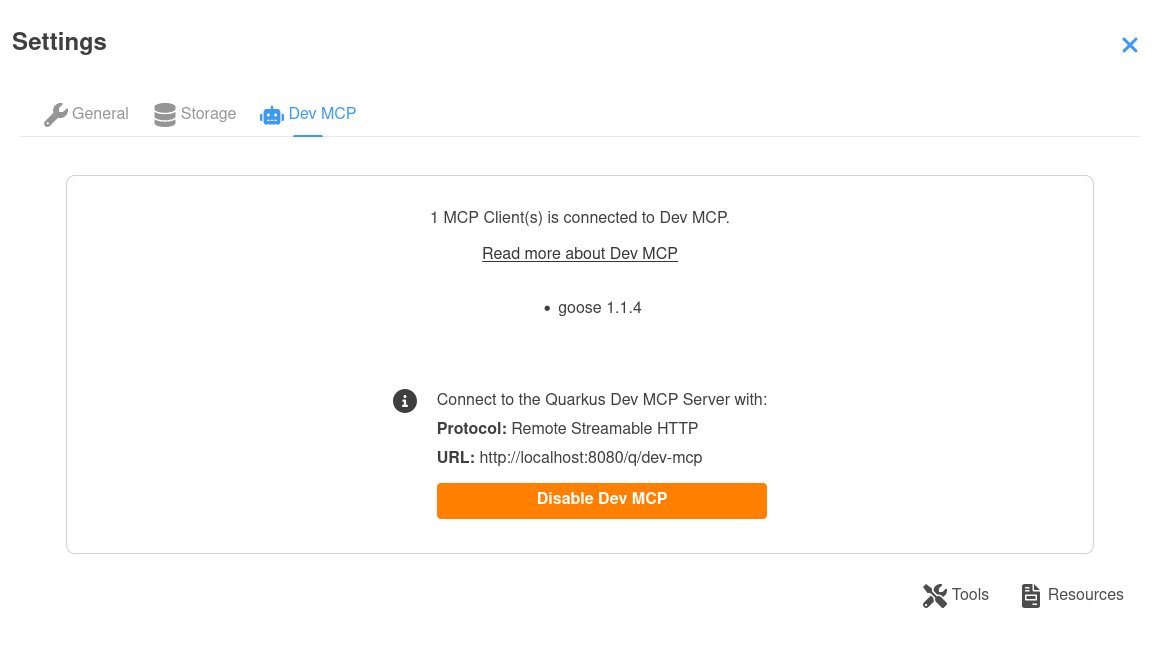
claude mcp add quarkus-agent -- jbang quarkus-agent-mcp@quarkusioOpen the Dev UI settings dialog and select the Dev MCP tab to see configuration snippets for all supported agents and IDEs (Claude Code, OpenCode, Cline, Goose, Zed, VS Code, Cursor, Claude Desktop, Windsurf, and JetBrains IDEs).
Feature
Project creation
The Agent MCP server can create new Quarkus applications with your choice of extensions, build tool (Maven or Gradle), and Quarkus version. It automatically starts the application in dev mode after creation.
Application lifecycle management
The server manages your Quarkus application’s lifecycle:
-
Start applications in dev mode
-
Monitor application health
-
Automatic restart on crashes
-
優雅なシャットダウン
-
Access application logs
Dev MCP integration
Through the Dev MCP proxy, AI agents can access all Dev MCP tools and resources from your running Quarkus application, including:
-
Running tests
-
Managing extensions
-
Viewing configuration
-
Accessing build-time data
-
Invoking extension-specific tools
Documentation search with RAG
The Agent MCP server includes a semantic search capability powered by a Retrieval-Augmented Generation (RAG) system. This allows AI coding agents to search Quarkus documentation intelligently and get relevant answers to questions.
動作原理
The documentation RAG system:
-
Indexes Quarkus documentation — On first use, the server downloads and indexes the official Quarkus documentation for the version matching your project (or the latest version if no project is specified)
-
Creates embeddings — Documentation is chunked and converted into vector embeddings for semantic search
-
Semantic retrieval — When an AI agent searches for documentation, the system finds the most relevant chunks based on semantic similarity, not just keyword matching
-
Version-aware — Documentation matches your project’s Quarkus version, ensuring accuracy
使用方法
AI coding agents can search documentation by querying the Quarkus Agent MCP server. For example, searching for "how to configure datasource" will return relevant documentation chunks about datasource configuration, even if those exact words don’t appear in the documentation.
The RAG system is automatically initialized on the first documentation search. The initial indexing may take a moment, but subsequent searches are fast.
Extension documentation RAG
In addition to the main Quarkus documentation, the RAG system also includes extension-specific documentation from Quarkiverse and third-party extensions. Each extension can contribute its own documentation, which is automatically discovered and indexed alongside the core documentation.
This ensures that when working with an extension, AI agents have access to:
-
Extension-specific configuration options
-
API usage patterns
-
Integration examples
-
Troubleshooting guides
Extensions contribute documentation in one of two ways:
-
Bundled — the RAG SQL is included directly in the deployment JAR (suitable for extensions with a single documentation page)
-
Separate artifact — the RAG SQL is published as a standalone artifact and the deployment JAR contains a small pointer file (recommended for extensions with multiple documentation pages, to avoid bloating the deployment JAR)
Both approaches are discovered automatically by the MCP server. For details on how to contribute your extension’s documentation, see the Contributing Extension Documentation guide.
Extension skills
Extensions can provide AI coding agents with extension-specific coding guidelines, testing patterns, and common pitfalls by shipping a quarkus-skill.md file.
During the Quarkus build, all skill files are automatically discovered, composed with extension metadata (name, description, guide URL, categories), and aggregated into a single io.quarkus:quarkus-extension-skills JAR following the Agent Skills specification.
This JAR is published to Maven Central with each Quarkus release and is compatible with SkillsJars.
How skills work
When an AI agent needs to work with a specific Quarkus extension, it can request the skill for that extension. The Quarkus Agent MCP server:
-
Identifies the extensions in your project
-
Retrieves the corresponding skills from the
quarkus-extension-skillsJAR -
Composes a skill document that includes:
-
Extension metadata (name, description, guide URL)
-
Coding patterns and best practices
-
Testing guidelines
-
Available Dev MCP tools
-
Common pitfalls to avoid
-
Skills can be customized at three levels:
-
JAR defaults — Shipped with the extension
-
Global customizations — Stored in
~/.quarkus/skills/and apply to all projects -
Project customizations — Stored in
.quarkus/skills/and apply only to the current project
By default, customizations enhance (append to) the base skill. You can also use override mode to completely replace a base skill.
Adding a skill file to your extension
Place a quarkus-skill.md file in your extension’s deployment module at:
my-extension/deployment/src/main/resources/META-INF/quarkus-skill.mdThe Quarkus build automatically discovers all quarkus-skill.md files across all extensions and aggregates them into the quarkus-extension-skills artifact.
If your extension’s runtime module has a description field in META-INF/quarkus-extension.yaml, it will be included in the composed skill’s YAML frontmatter to help AI agents discover and understand your extension.
The categories field under metadata is also included, allowing AI agents to group skills by category.
While optional, providing a description and categories is recommended:
name: "My Extension"
description: "A concise description of what this extension does"
artifact: ${project.groupId}:${project.artifactId}:${project.version}
metadata:
  guide: "https://quarkus.io/guides/my-extension"
  categories:
  - "web"
The file should contain concise, actionable Markdown content. Focus on what an AI agent needs to know to use your extension correctly:
-
Key patterns — how to use the main APIs, annotations, and CDI beans.
-
Testing — how to write tests using
@QuarkusTest, Dev Services, and extension-specific test utilities. -
Common pitfalls — mistakes that agents (and developers) frequently make.
Example for a hypothetical extension:
### Data Access

- Inject `MyClient` with `@Inject` — it is an `@ApplicationScoped` CDI bean.
- Use `client.query("...")` for read operations.
- Always wrap write operations in `@Transactional`.

### Testing

- Use `@QuarkusTest` — Dev Services starts a backing service automatically.
- Inject `MyClient` in tests for direct assertions.

### Common Pitfalls

- Do NOT create `MyClient` manually with `new` — always let CDI inject it.
- Do NOT set the connection URL without a `%prod.` profile prefix — this disables Dev Services.
What gets composed
The skill file content is not shipped as-is.
During the Quarkus build, the aggregate-skills goal scans the source tree for all quarkus-skill.md files and composes each one with extension metadata to produce a SKILL.md file at META-INF/skills/{extension-name}/SKILL.md inside the aggregated JAR.
The composed document follows the Agent Skills specification and includes:
-
YAML frontmatter — the skill name, extension description from
quarkus-extension.yaml, license, guide URL, and categories as structured metadata for agent discovery. -
Skill body — the patterns, testing guidelines, and pitfalls authored by the extension developer.
-
Dev MCP tools — the skill is automatically enriched with an "Available Dev MCP Tools" section listing each MCP tool the extension enables by default, including tool names, descriptions, and parameters. Tools are discovered from runtime methods annotated with both
@JsonRpcDescriptionand@DevMCPEnableByDefault, and from deployment processor classes annotated with@DevMcpBuildTimeTool.
Example of a composed SKILL.md:
---
name: quarkus-my-extension
description: "A brief description of the extension from quarkus-extension.yaml"
license: Apache-2.0
metadata:
  guide: https://quarkus.io/guides/my-extension
  categories: "web, data"
---

### Data Access
...

### Available Dev MCP Tools

| Tool | Description | Parameters |
|------|-------------|------------|
| `quarkus-my-extension_getData` | Get current status | — |
| `quarkus-my-extension_updateValue` | Update a value | `name` (required): The name, `value` (required): The new value |
The Dev MCP tools section is appended during the Quarkus build by the aggregate-skills Maven goal.
Only tools that are enabled by default are included.
All modules are scanned via Jandex on compiled classes.
The enriched skills are baked into the quarkus-extension-skills JAR published with each Quarkus release.
For runtime methods, add both @JsonRpcDescription and @DevMCPEnableByDefault annotations on the method (see Dev MCP guide).
For deployment build-time actions, annotate the processor class with @DevMcpBuildTimeTool:
@DevMcpBuildTimeTool(name = "updateProperty", (1)
    description = "Update a configuration property", (2)
    params = {
        @DevMcpParam(name = "name", description = "The property name"), (3)
        @DevMcpParam(name = "value", description = "The new value")
    })
public class ConfigurationProcessor {
    // ...
}| 1 | The tool name, matching the methodName in the builder chain. |
| 2 | A human-readable description of what this tool does. |
| 3 | Parameter descriptions. Use required = false for optional parameters. |
The annotation is repeatable — add one per tool on the same class.
This is the deployment-classpath counterpart of @JsonRpcDescription + @DevMCPEnableByDefault used on runtime methods.
What NOT to put in the skill file
-
Extension description or guide links — these are automatically added from
quarkus-extension.yaml. -
Configuration properties — reference the guide instead. A link is auto-generated.
-
Obvious instructions — focus on Quarkus-specific patterns and gotchas, not generic advice.
Advanced topics
Direct connection to Dev MCP
While the Quarkus Agent MCP server is the recommended approach, you can also connect directly to the Dev MCP endpoint exposed by your running application. Direct connection does not provide application lifecycle management, documentation search, or extension skills, but may be useful for advanced use cases or custom integrations.
See the Dev MCP guide for details on direct connection.

