OptaPlanner - OptaPlanner での AI を使用したスケジュールの最適化
このガイドでは、 OptaPlanner の制約解決人工知能 (AI) を使用して Quarkus アプリケーションを作成するプロセスについて説明します。
何を構築するか
生徒と教師の時間割を最適化する REST アプリケーションを作成します。
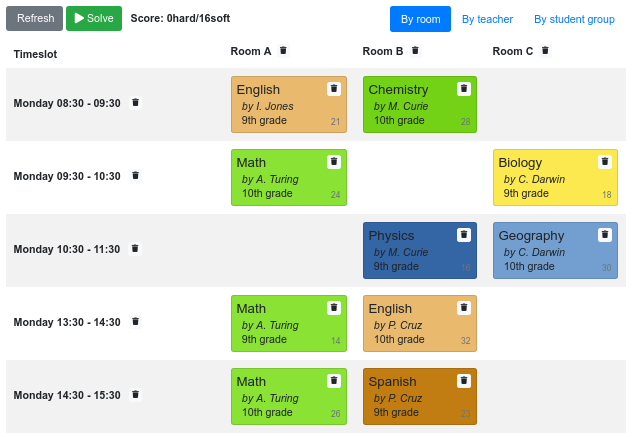
サービスは、ハードおよびソフトスケジューリング 制約 に従い、AI を使用して自動的に Lesson インスタンスを Timeslot および Room インスタンスに割り当てます。
-
教室は同時に最大 1 つのレッスンを持つことができます。
-
教師は同時に最大 1 つのレッスンを教えることができます。
-
生徒は同時に最大 1 つのレッスンに参加できます。
-
教師はすべてのレッスンを同じ教室で教えることを好みます。
-
教師は連続してレッスンを教えることを好み、レッスン間に空き時間があることを嫌います。
-
生徒は連続して同じテーマのレッスンに出席することを嫌います。
数学的に言えば、学校の時間割は NP-hard な問題です。これは、スケーリングが難しいことを意味します。考えられるすべての組み合わせを総当たり攻撃で繰り返すだけでは、スーパーコンピューターであっても重要なデータセットだけで数百万年かかります。幸い、OptaPlanner などの AI 制約ソルバーには、妥当な時間内に最適に近いソリューションを提供できる高度なアルゴリズムがあります。
ソリューション
次の章で紹介する手順に沿って、ステップを踏んでアプリを作成することをお勧めします。ただし、完成した例にそのまま進んでも構いません。
Gitリポジトリをクローンする: git clone https://github.com/quarkusio/quarkus-quickstarts.git 、またはhttps://github.com/quarkusio/quarkus-quickstarts/archive/main.zip[archive] をダウンロードする。
ソリューションは、 optaplanner-quickstart ディレクトリー にあります。
前提条件
このガイドを完成させるには、以下が必要です:
-
ざっと 30 minutes
-
IDE
-
JDK 11+ がインストールされ、
JAVA_HOMEが適切に設定されていること -
Apache Maven 3.8.6
-
使用したい場合は、 Quarkus CLI
ビルドファイルと依存関係
code.quarkus.io を使用して、Maven または Gradle 用に次のエクステンションを備えたアプリケーションを生成します。
-
RESTEasy Reactive (
quarkus-resteasy-reactive) -
RESTEasy Reactive Jackson (
quarkus-resteasy-reactive-jackson) -
OptaPlanner (
optaplanner-quarkus) -
OptaPlanner Jackson (
optaplanner-quarkus-jackson)
または、コマンドラインから生成します。
これには、ビルドファイルの次の依存関係が含まれます。
<dependencyManagement>
    <dependencies>
        <dependency>
            <groupId>io.quarkus.platform</groupId>
            <artifactId>quarkus-bom</artifactId>
            <version>2.13.9.Final</version>
            <type>pom</type>
            <scope>import</scope>
        </dependency>
        <dependency>
            <groupId>io.quarkus.platform</groupId>
            <artifactId>quarkus-optaplanner-bom</artifactId>
            <version>2.13.9.Final</version>
            <type>pom</type>
            <scope>import</scope>
        </dependency>
    </dependencies>
</dependencyManagement>
<dependencies>
    <dependency>
        <groupId>io.quarkus</groupId>
        <artifactId>quarkus-resteasy-reactive</artifactId>
    </dependency>
    <dependency>
        <groupId>io.quarkus</groupId>
        <artifactId>quarkus-resteasy-reactive-jackson</artifactId>
    </dependency>
    <dependency>
        <groupId>org.optaplanner</groupId>
        <artifactId>optaplanner-quarkus</artifactId>
    </dependency>
    <dependency>
        <groupId>org.optaplanner</groupId>
        <artifactId>optaplanner-quarkus-jackson</artifactId>
    </dependency>

    <dependency>
        <groupId>io.quarkus</groupId>
        <artifactId>quarkus-junit5</artifactId>
        <scope>test</scope>
    </dependency>
</dependencies>dependencies {
implementation enforcedPlatform("io.quarkus.platform:quarkus-bom:2.13.9.Final")
implementation enforcedPlatform("io.quarkus.platform:quarkus-optaplanner-bom:2.13.9.Final")
implementation 'io.quarkus:quarkus-resteasy-reactive'
implementation 'io.quarkus:quarkus-resteasy-reactive-jackson'
implementation 'org.optaplanner:optaplanner-quarkus'
implementation 'org.optaplanner:optaplanner-quarkus-jackson'
testImplementation 'io.quarkus:quarkus-junit5'
}ドメインオブジェクトのモデル化
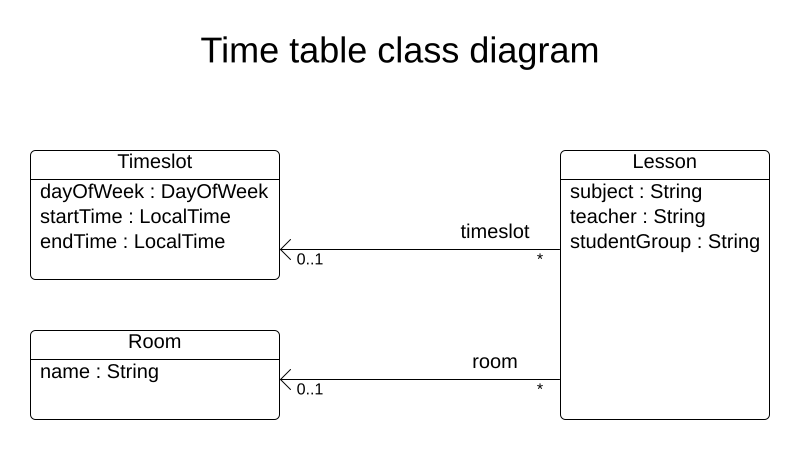
目標は、各レッスンをタイムスロットと教室に割り当てることです。次のクラスを作成します。
タイムスロット
Timeslot クラスは、たとえば 月曜日 10:30 - 11:30 または 火曜日 13:30 - 14:30 のように、レッスンが行われる時間の間隔を表します。簡単にするために、すべてのタイムスロットは同じ時間間隔で、昼食やその他の休憩時間のタイムスロットはありません。
高校の時間割は毎週同じものが繰り返されるため、タイムスロットに日付はありません。したがって、 継続的な計画作成 は必要ありません。
src/main/java/org/acme/optaplanner/domain/Timeslot.java クラスを作成します。
package org.acme.optaplanner.domain;

import java.time.DayOfWeek;
import java.time.LocalTime;

public class Timeslot {

    private DayOfWeek dayOfWeek;
    private LocalTime startTime;
    private LocalTime endTime;

    public Timeslot() {
    }

    public Timeslot(DayOfWeek dayOfWeek, LocalTime startTime, LocalTime endTime) {
        this.dayOfWeek = dayOfWeek;
        this.startTime = startTime;
        this.endTime = endTime;
    }

    public DayOfWeek getDayOfWeek() {
        return dayOfWeek;
    }

    public LocalTime getStartTime() {
        return startTime;
    }

    public LocalTime getEndTime() {
        return endTime;
    }

    @Override
    public String toString() {
        return dayOfWeek + " " + startTime;
    }

}
解決する間は Timeslot インスタンスは変更されないため、 Timeslot は_問題の事実_と呼ばれます。このようなクラスに、OptaPlanner 固有のアノテーションは必要ありません。
toString() メソッドは出力を短く保つため、後で示すように、OptaPlanner の DEBUG または TRACE のログは読みやすくなっています。
教室
Room クラスは、 Room A や Room B のように、レッスンが実施される場所を表します。わかりやすくするために、すべての教室に定員制限はなく、すべてのレッスンに対応できます。
src/main/java/org/acme/optaplanner/domain/Room.java クラスを作成します。
package org.acme.optaplanner.domain;

public class Room {

    private String name;

    public Room() {
    }

    public Room(String name) {
        this.name = name;
    }

    public String getName() {
        return name;
    }

    @Override
    public String toString() {
        return name;
    }

}
解決の間、 Room インスタンスは変更されないため、 Room も 問題のファクト です。
レッスン
Lesson クラスで表されるレッスンでは、 Math by A.Turing for 9th grade または Chemistry by M.Curie for 10th grade のように、教師は生徒グループにいずれかの教科を教えます。同じ教師が週に複数回、その教科を同じ生徒グループに教える場合、 id のみ異なる複数の Lesson インスタンスがあります。たとえば、9 年生には週に 6 回の数学の授業があります。
解決中に、OptaPlanner は Lesson クラスの timeslot フィールドと room フィールドを変更し、各レッスンをタイムスロットと教室に割り当てます。OptaPlanner はこれらのフィールドを変更するため、 Lesson は プランニングエンティティー です。
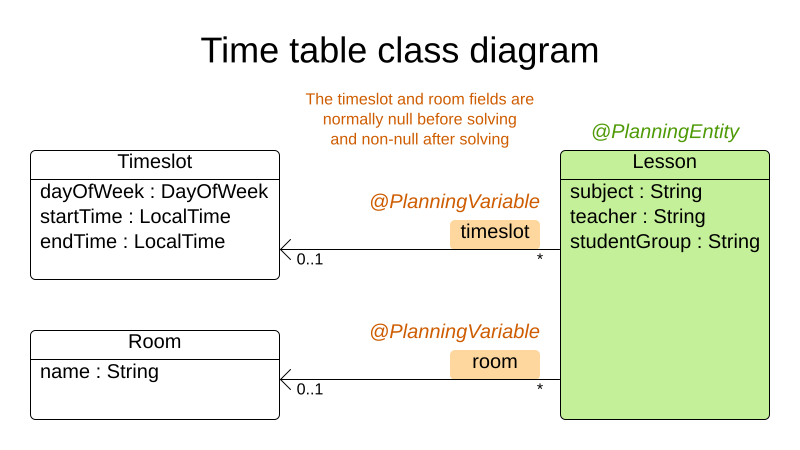
前の図のほとんどのフィールドには、オレンジ色のフィールドを除いて、入力データが含まれています。レッスンの timeslot フィールドと room フィールドは、入力データでは割り当てられておらず (null)、出力データでは割り当てられています (非 null)。OptaPlanner は、解決中にこれらのフィールドを変更します。このようなフィールドは、プランニング変数と呼ばれます。OptaPlanner がそれらを認識するためには、 timeslot フィールドと room フィールドの両方に @PlanningVariable アノテーションが必要です。それらを含むクラス Lesson には、 @PlanningEntity アノテーションが必要です。
src/main/java/org/acme/optaplanner/domain/Lesson.java クラスを作成します。
package org.acme.optaplanner.domain;

import org.optaplanner.core.api.domain.entity.PlanningEntity;
import org.optaplanner.core.api.domain.lookup.PlanningId;
import org.optaplanner.core.api.domain.variable.PlanningVariable;

@PlanningEntity
public class Lesson {

    @PlanningId
    private Long id;

    private String subject;
    private String teacher;
    private String studentGroup;

    @PlanningVariable(valueRangeProviderRefs = "timeslotRange")
    private Timeslot timeslot;
    @PlanningVariable(valueRangeProviderRefs = "roomRange")
    private Room room;

    public Lesson() {
    }

    public Lesson(Long id, String subject, String teacher, String studentGroup) {
        this.id = id;
        this.subject = subject;
        this.teacher = teacher;
        this.studentGroup = studentGroup;
    }

    public Long getId() {
        return id;
    }

    public String getSubject() {
        return subject;
    }

    public String getTeacher() {
        return teacher;
    }

    public String getStudentGroup() {
        return studentGroup;
    }

    public Timeslot getTimeslot() {
        return timeslot;
    }

    public void setTimeslot(Timeslot timeslot) {
        this.timeslot = timeslot;
    }

    public Room getRoom() {
        return room;
    }

    public void setRoom(Room room) {
        this.room = room;
    }

    @Override
    public String toString() {
        return subject + "(" + id + ")";
    }

}
Lesson クラスには @PlanningEntity アノテーションがあり、このクラスには 1 つ以上のプランニング変数が含まれているため、OptaPlanner はこのクラスが解決中に変更されることを認識しています。
timeslot フィールドには @PlanningVariable アノテーションがあるため、OptaPlanner はその値を変更できることを認識しています。このフィールドに割り当てる可能性のある Timeslot インスタンスを見つけるために、OptaPlanner は valueRangeProviderRefs プロパティーを使用して、選択元となる List<Timeslot> を提供する値の範囲プロバイダー (後で説明) に接続します。
同じ理由で、 room フィールドにも @PlanningVariable アノテーションがあります。
|
任意制約解決のユースケースの |
制約の定義とスコアの計算
スコア は、特定のソリューションの品質を表します。スコアが高ければ品質が高いことを表しています。OptaPlanner は使用できる時間内に見つかった最高スコアのソリューションを最良のソリューションとして探します。それは 最適な ソリューションかもしれません。
このユースケースにはハードとソフトの制約があるため、スコアを表すためには HardSoftScore クラスを使用します。
-
ハード制約を破ってはいけません。例: 教室は同時に最大 1 つのレッスンを持つことができます。
-
ソフト制約を破ってはいけません。例: 教師は 1 つの教室で教えることを好みます。
ハード制約は、他のハード制約に対して重み付けされます。ソフト制約も、他のソフト制約に対して重み付けされます。それぞれの重みに関係なく、ハード制約は常にソフト制約の重みを上回ります。
スコアを計算するには、 EasyScoreCalculator クラスを実装します。
public class TimeTableEasyScoreCalculator implements EasyScoreCalculator<TimeTable, HardSoftScore> {

    @Override
    public HardSoftScore calculateScore(TimeTable timeTable) {
        List<Lesson> lessonList = timeTable.getLessonList();
        int hardScore = 0;
        for (Lesson a : lessonList) {
            for (Lesson b : lessonList) {
                if (a.getTimeslot() != null && a.getTimeslot().equals(b.getTimeslot())
                        && a.getId() < b.getId()) {
                    // A room can accommodate at most one lesson at the same time.
                    if (a.getRoom() != null && a.getRoom().equals(b.getRoom())) {
                        hardScore--;
                    }
                    // A teacher can teach at most one lesson at the same time.
                    if (a.getTeacher().equals(b.getTeacher())) {
                        hardScore--;
                    }
                    // A student can attend at most one lesson at the same time.
                    if (a.getStudentGroup().equals(b.getStudentGroup())) {
                        hardScore--;
                    }
                }
            }
        }
        int softScore = 0;
        // Soft constraints are only implemented in the optaplanner-quickstarts code
        return HardSoftScore.of(hardScore, softScore);
    }

}残念ながら、増分ではないため、それはうまくスケーリングされません。レッスンが異なるタイムスロットまたは教室に割り当てられるたびに、すべてのレッスンが再評価されて新しいスコアが計算されます。
代わりに、 src/main/java/org/acme/optaplanner/solutioner/TimeTableConstraintProvider.java クラスを作成して、増分スコア計算を実行します。これは、JavaStreams と SQL に触発された OptaPlanner の ConstraintStreamAPI を使用します。
package org.acme.optaplanner.solver;

import org.acme.optaplanner.domain.Lesson;
import org.optaplanner.core.api.score.buildin.hardsoft.HardSoftScore;
import org.optaplanner.core.api.score.stream.Constraint;
import org.optaplanner.core.api.score.stream.ConstraintFactory;
import org.optaplanner.core.api.score.stream.ConstraintProvider;
import org.optaplanner.core.api.score.stream.Joiners;

public class TimeTableConstraintProvider implements ConstraintProvider {

    @Override
    public Constraint[] defineConstraints(ConstraintFactory constraintFactory) {
        return new Constraint[] {
                // Hard constraints
                roomConflict(constraintFactory),
                teacherConflict(constraintFactory),
                studentGroupConflict(constraintFactory),
                // Soft constraints are only implemented in the optaplanner-quickstarts code
        };
    }

    Constraint roomConflict(ConstraintFactory constraintFactory) {
        // A room can accommodate at most one lesson at the same time.

        // Select a lesson ...
        return constraintFactory
                .forEach(Lesson.class)
                // ... and pair it with another lesson ...
                .join(Lesson.class,
                        // ... in the same timeslot ...
                        Joiners.equal(Lesson::getTimeslot),
                        // ... in the same room ...
                        Joiners.equal(Lesson::getRoom),
                        // ... and the pair is unique (different id, no reverse pairs) ...
                        Joiners.lessThan(Lesson::getId))
                // ... then penalize each pair with a hard weight.
                .penalize("Room conflict", HardSoftScore.ONE_HARD);
    }

    Constraint teacherConflict(ConstraintFactory constraintFactory) {
        // A teacher can teach at most one lesson at the same time.
        return constraintFactory.forEach(Lesson.class)
                .join(Lesson.class,
                        Joiners.equal(Lesson::getTimeslot),
                        Joiners.equal(Lesson::getTeacher),
                        Joiners.lessThan(Lesson::getId))
                .penalize("Teacher conflict", HardSoftScore.ONE_HARD);
    }

    Constraint studentGroupConflict(ConstraintFactory constraintFactory) {
        // A student can attend at most one lesson at the same time.
        return constraintFactory.forEach(Lesson.class)
                .join(Lesson.class,
                        Joiners.equal(Lesson::getTimeslot),
                        Joiners.equal(Lesson::getStudentGroup),
                        Joiners.lessThan(Lesson::getId))
                .penalize("Student group conflict", HardSoftScore.ONE_HARD);
    }

}
ConstraintProvider は、のスケーリングは EasyScoreCalculator より桁違いに優れており、O(n²) ではなく O (n) です。
プランニングソリューションでドメインオブジェクトを収集します
TimeTable は、単一データセットのすべての Timeslot、 Room、および Lesson インスタンスをラップします。さらに、これにはすべてのレッスンが含まれており、各レッスンには特定のプランニング変数があるため、これは plannning solution であり、スコアがあります。
-
レッスンがまだ割り当てられていない場合、それは uninitialized ソリューションです。たとえば、スコアが
-4init/0hard/0softのソリューションです。 -
ハード制約を破る場合、それは infeasible ソリューションです。たとえば、スコアが
-2hard/-3softのソリューションです。 -
すべてのハード制約に準拠している場合、それは feasible ソリューションです。たとえば、スコアが
0hard/-7softのソリューションです。
src/main/java/org/acme/optaplanner/domain/TimeTable.java クラスを作成します。
package org.acme.optaplanner.domain;

import java.util.List;

import org.optaplanner.core.api.domain.solution.PlanningEntityCollectionProperty;
import org.optaplanner.core.api.domain.solution.PlanningScore;
import org.optaplanner.core.api.domain.solution.PlanningSolution;
import org.optaplanner.core.api.domain.solution.ProblemFactCollectionProperty;
import org.optaplanner.core.api.domain.valuerange.ValueRangeProvider;
import org.optaplanner.core.api.score.buildin.hardsoft.HardSoftScore;

@PlanningSolution
public class TimeTable {

    @ValueRangeProvider(id = "timeslotRange")
    @ProblemFactCollectionProperty
    private List<Timeslot> timeslotList;
    @ValueRangeProvider(id = "roomRange")
    @ProblemFactCollectionProperty
    private List<Room> roomList;
    @PlanningEntityCollectionProperty
    private List<Lesson> lessonList;

    @PlanningScore
    private HardSoftScore score;

    public TimeTable() {
    }

    public TimeTable(List<Timeslot> timeslotList, List<Room> roomList, List<Lesson> lessonList) {
        this.timeslotList = timeslotList;
        this.roomList = roomList;
        this.lessonList = lessonList;
    }

    public List<Timeslot> getTimeslotList() {
        return timeslotList;
    }

    public List<Room> getRoomList() {
        return roomList;
    }

    public List<Lesson> getLessonList() {
        return lessonList;
    }

    public HardSoftScore getScore() {
        return score;
    }

}
TimeTable クラスに @PlanningSolution アノテーションがあるため、OptaPlanner はこのクラスにすべての入力データと出力データが含まれていると認識します。
具体的には、このクラスは問題の入力です。
-
すべてのタイムスロットを含む
timeslotListフィールド-
解決中に変更されないため、これは問題のファクトのリストです。
-
-
すべての教室を含む
roomListフィールド-
解決中に変更されないため、これは問題のファクトのリストです。
-
-
すべてのレッスンを含む
lessonListフィールド-
解決中に変更されるため、これはプランニングエンティティーのリストです。
-
各
レッスンの:-
timeslotフィールドとroomフィールドの値は、通常の場合はまだnullであるため割り当てられていません。それはプランニング変数です。 -
subject、Teacher、studentGroupなどの他のフィールドが入力されます。これらのフィールドは、問題のプロパティーです。
-
-
ただし、このクラスはソリューションの出力でもあります。
-
解決した後、各
Lessonインスタンスに null 以外のtimeslotフィールドとroomフィールドがあるlessonListフィールド -
出力ソリューションの品質を表す
scoreフィールド (例:0hard/-5soft)
値の範囲プロバイダー
timeslotList フィールドは値の範囲プロバイダーです。これは、OptaPlanner が Lesson インスタンスの timeslot フィールドに割り当てるために選択できる Timeslot インスタンスを保持します。 timeslotList フィールドには @ValueRangeProvider アノテーションがあり、 id プロパティーの値を Lesson クラスの @PlanningVariable アノテーションの valueRangeProviderRefs プロパティーの値と照合することにより、 @PlanningVariable を @ValueRangeProvider に接続します。
同じロジックに従って、 roomList フィールドにも @ValueRangeProvider アノテーションがあります。
問題のファクトとプランニングエンティティーのプロパティー
さらに、OptaPlanner は、変更できる Lesson インスタンスと、 TimeTableConstraintProvider がスコア計算に使用する Timeslot および Room インスタンスを取得する方法を知る必要があります。
timeslotList フィールドと roomList フィールドには @ProblemFactCollectionProperty アノテーションがあるため、 TimeTableConstraintProvider はこれらのインスタンス_から_選択できます。
lessonList には @PlanningEntityCollectionProperty アノテーションがあるため、OptaPlanner は解決中にそれらを変更でき、 TimeTableConstraintProvider はそれら_から_も選択できます。
ソルバーサービスの作成
これで、すべてをまとめて REST サービスを作成する準備が整いました。ただし、REST スレッドの planning problem を解決すると、HTTP タイムアウトの問題が発生します。したがって、Quarkus エクステンションは SolverManager インスタンスを挿入します。これにより、別のスレッドプールでソルバーが実行され、複数のデータセットを並行して解決できます。
src/main/java/org/acme/optaplanner/rest/TimeTableResource.java クラスを作成します。
package org.acme.optaplanner.rest;

import java.util.UUID;
import java.util.concurrent.ExecutionException;
import javax.inject.Inject;
import javax.ws.rs.POST;
import javax.ws.rs.Path;

import org.acme.optaplanner.domain.TimeTable;
import org.optaplanner.core.api.solver.SolverJob;
import org.optaplanner.core.api.solver.SolverManager;

@Path("/timeTable")
public class TimeTableResource {

    @Inject
    SolverManager<TimeTable, UUID> solverManager;

    @POST
    @Path("/solve")
    public TimeTable solve(TimeTable problem) {
        UUID problemId = UUID.randomUUID();
        // Submit the problem to start solving
        SolverJob<TimeTable, UUID> solverJob = solverManager.solve(problemId, problem);
        TimeTable solution;
        try {
            // Wait until the solving ends
            solution = solverJob.getFinalBestSolution();
        } catch (InterruptedException | ExecutionException e) {
            throw new IllegalStateException("Solving failed.", e);
        }
        return solution;
    }

}
分かりやすくするために、この最初の実装はソルバーが終了するのを待ちますが、それでも HTTP タイムアウトが発生する可能性があります。_完全な_実装では、HTTP タイムアウトはさらにスムーズに回避されます。
終了時刻の設定
終了設定または終了イベントがない場合、ソルバーは永久に実行されます。これを回避するには、解決時間を 5 秒に制限します。これは、HTTP タイムアウトを回避するのに十分な短さです。
src/main/resources/application.properties ファイルを作成します。
# The solver runs only for 5 seconds to avoid an HTTP timeout in this simple implementation.
# It's recommended to run for at least 5 minutes ("5m") otherwise.
quarkus.optaplanner.solver.termination.spent-limit=5s
アプリケーションの実行
最初にアプリケーションを起動します。
quarkus dev./mvnw quarkus:dev./gradlew --console=plain quarkusDevアプリケーションの試行
これでアプリケーションが実行されたため、REST サービスをテストできます。任意の REST クライアントを使用できます。次の例では、Linux コマンド curl を使用して POST 要求を送信します。
$ curl -i -X POST http://localhost:8080/timeTable/solve -H "Content-Type:application/json" -d '{"timeslotList":[{"dayOfWeek":"MONDAY","startTime":"08:30:00","endTime":"09:30:00"},{"dayOfWeek":"MONDAY","startTime":"09:30:00","endTime":"10:30:00"}],"roomList":[{"name":"Room A"},{"name":"Room B"}],"lessonList":[{"id":1,"subject":"Math","teacher":"A. Turing","studentGroup":"9th grade"},{"id":2,"subject":"Chemistry","teacher":"M. Curie","studentGroup":"9th grade"},{"id":3,"subject":"French","teacher":"M. Curie","studentGroup":"10th grade"},{"id":4,"subject":"History","teacher":"I. Jones","studentGroup":"10th grade"}]}'約 5 秒後に、 application.properties で定義された終了時間に応じて、サービスは次の例のような出力を返します。
HTTP/1.1 200
Content-Type: application/json
...

{"timeslotList":...,"roomList":...,"lessonList":[{"id":1,"subject":"Math","teacher":"A. Turing","studentGroup":"9th grade","timeslot":{"dayOfWeek":"MONDAY","startTime":"08:30:00","endTime":"09:30:00"},"room":{"name":"Room A"}},{"id":2,"subject":"Chemistry","teacher":"M. Curie","studentGroup":"9th grade","timeslot":{"dayOfWeek":"MONDAY","startTime":"09:30:00","endTime":"10:30:00"},"room":{"name":"Room A"}},{"id":3,"subject":"French","teacher":"M. Curie","studentGroup":"10th grade","timeslot":{"dayOfWeek":"MONDAY","startTime":"08:30:00","endTime":"09:30:00"},"room":{"name":"Room B"}},{"id":4,"subject":"History","teacher":"I. Jones","studentGroup":"10th grade","timeslot":{"dayOfWeek":"MONDAY","startTime":"09:30:00","endTime":"10:30:00"},"room":{"name":"Room B"}}],"score":"0hard/0soft"}
アプリケーションが 4 つのレッスンすべてを 2 つのタイムスロットのいずれか 1 つと、2 つの教室のいずれか 1 つに割り当てていることに注意してください。また、すべてのハード制約に準拠していることにも注意してください。たとえば、M. Curie の 2 つのレッスンは異なるタイムスロットにあります。
サーバー側では、 info ログに OptaPlanner が 5 秒間で何をしたかが示されます。
... Solving started: time spent (33), best score (-8init/0hard/0soft), environment mode (REPRODUCIBLE), random (JDK with seed 0).
... Construction Heuristic phase (0) ended: time spent (73), best score (0hard/0soft), score calculation speed (459/sec), step total (4).
... Local Search phase (1) ended: time spent (5000), best score (0hard/0soft), score calculation speed (28949/sec), step total (28398).
... Solving ended: time spent (5000), best score (0hard/0soft), score calculation speed (28524/sec), phase total (2), environment mode (REPRODUCIBLE).
アプリケーションのテスト
優れたアプリケーションには、テストカバレッジが含まれます。
制約のテスト
各制約を個別にテストするには、単体テストで ConstraintVerifier を使用します。各制約のコーナーケースを他のテストとは別にテストします。これにより、適切なテストカバレッジで新しい制約を追加する際のメンテナーンスが軽減されます。
ビルドファイルに optaplanner-test 依存関係を追加します。
<dependency>
    <groupId>org.optaplanner</groupId>
    <artifactId>optaplanner-test</artifactId>
    <scope>test</scope>
</dependency>testImplementation("org.optaplanner:optaplanner-test")src/test/java/org/acme/optaplanner/solutioner/TimeTableConstraintProviderTest.java クラスを作成します。
package org.acme.optaplanner.solver;

import java.time.DayOfWeek;
import java.time.LocalTime;

import javax.inject.Inject;

import io.quarkus.test.junit.QuarkusTest;
import org.acme.optaplanner.domain.Lesson;
import org.acme.optaplanner.domain.Room;
import org.acme.optaplanner.domain.TimeTable;
import org.acme.optaplanner.domain.Timeslot;
import org.junit.jupiter.api.Test;
import org.optaplanner.test.api.score.stream.ConstraintVerifier;

@QuarkusTest
class TimeTableConstraintProviderTest {

    private static final Room ROOM = new Room("Room1");
    private static final Timeslot TIMESLOT1 = new Timeslot(DayOfWeek.MONDAY, LocalTime.of(9,0), LocalTime.NOON);
    private static final Timeslot TIMESLOT2 = new Timeslot(DayOfWeek.TUESDAY, LocalTime.of(9,0), LocalTime.NOON);

    @Inject
    ConstraintVerifier<TimeTableConstraintProvider, TimeTable> constraintVerifier;

    @Test
    void roomConflict() {
        Lesson firstLesson = new Lesson(1, "Subject1", "Teacher1", "Group1");
        Lesson conflictingLesson = new Lesson(2, "Subject2", "Teacher2", "Group2");
        Lesson nonConflictingLesson = new Lesson(3, "Subject3", "Teacher3", "Group3");

        firstLesson.setRoom(ROOM);
        firstLesson.setTimeslot(TIMESLOT1);

        conflictingLesson.setRoom(ROOM);
        conflictingLesson.setTimeslot(TIMESLOT1);

        nonConflictingLesson.setRoom(ROOM);
        nonConflictingLesson.setTimeslot(TIMESLOT2);

        constraintVerifier.verifyThat(TimeTableConstraintProvider::roomConflict)
                .given(firstLesson, conflictingLesson, nonConflictingLesson)
                .penalizesBy(1);
    }

}
このテストは、制約 TimeTableConstraintProvider::roomConflict が、同じ教室に 3 つのレッスンが指定され、2 つのレッスンのタイムスロットが同じ場合に、一致の重み 1 でペナルティを課すことを確認します。したがって、制約の重みが 10hard の場合、スコアは -10hard 減少します。
制約の重みは本番環境に入る前に定期的に変更されるため、 ConstraintVerifier は (その制約の重みが ConstraintProvider にハードコーディングされている場合でも) テスト中は制約の重みを無視することに注意してください。このように、制約の重みを微調整してもユニットテストが中断されることはありません。
ソルバーのテスト
JUnit テストでは、テストデータセットを生成し、それを TimeTableResource に送信して解決します。
src/test/java/org/acme/optaplanner/rest/TimeTableResourceTest.java クラスを作成します。
package org.acme.optaplanner.rest;

import java.time.DayOfWeek;
import java.time.LocalTime;
import java.util.ArrayList;
import java.util.List;

import javax.inject.Inject;

import io.quarkus.test.junit.QuarkusTest;
import org.acme.optaplanner.domain.Room;
import org.acme.optaplanner.domain.Timeslot;
import org.acme.optaplanner.domain.Lesson;
import org.acme.optaplanner.domain.TimeTable;
import org.acme.optaplanner.rest.TimeTableResource;
import org.junit.jupiter.api.Test;
import org.junit.jupiter.api.Timeout;

import static org.junit.jupiter.api.Assertions.assertFalse;
import static org.junit.jupiter.api.Assertions.assertNotNull;
import static org.junit.jupiter.api.Assertions.assertTrue;

@QuarkusTest
public class TimeTableResourceTest {

    @Inject
    TimeTableResource timeTableResource;

    @Test
    @Timeout(600_000)
    public void solve() {
        TimeTable problem = generateProblem();
        TimeTable solution = timeTableResource.solve(problem);
        assertFalse(solution.getLessonList().isEmpty());
        for (Lesson lesson : solution.getLessonList()) {
            assertNotNull(lesson.getTimeslot());
            assertNotNull(lesson.getRoom());
        }
        assertTrue(solution.getScore().isFeasible());
    }

    private TimeTable generateProblem() {
        List<Timeslot> timeslotList = new ArrayList<>();
        timeslotList.add(new Timeslot(DayOfWeek.MONDAY, LocalTime.of(8, 30), LocalTime.of(9, 30)));
        timeslotList.add(new Timeslot(DayOfWeek.MONDAY, LocalTime.of(9, 30), LocalTime.of(10, 30)));
        timeslotList.add(new Timeslot(DayOfWeek.MONDAY, LocalTime.of(10, 30), LocalTime.of(11, 30)));
        timeslotList.add(new Timeslot(DayOfWeek.MONDAY, LocalTime.of(13, 30), LocalTime.of(14, 30)));
        timeslotList.add(new Timeslot(DayOfWeek.MONDAY, LocalTime.of(14, 30), LocalTime.of(15, 30)));

        List<Room> roomList = new ArrayList<>();
        roomList.add(new Room("Room A"));
        roomList.add(new Room("Room B"));
        roomList.add(new Room("Room C"));

        List<Lesson> lessonList = new ArrayList<>();
        lessonList.add(new Lesson(101L, "Math", "B. May", "9th grade"));
        lessonList.add(new Lesson(102L, "Physics", "M. Curie", "9th grade"));
        lessonList.add(new Lesson(103L, "Geography", "M. Polo", "9th grade"));
        lessonList.add(new Lesson(104L, "English", "I. Jones", "9th grade"));
        lessonList.add(new Lesson(105L, "Spanish", "P. Cruz", "9th grade"));

        lessonList.add(new Lesson(201L, "Math", "B. May", "10th grade"));
        lessonList.add(new Lesson(202L, "Chemistry", "M. Curie", "10th grade"));
        lessonList.add(new Lesson(203L, "History", "I. Jones", "10th grade"));
        lessonList.add(new Lesson(204L, "English", "P. Cruz", "10th grade"));
        lessonList.add(new Lesson(205L, "French", "M. Curie", "10th grade"));
        return new TimeTable(timeslotList, roomList, lessonList);
    }

}
このテストは、解決した後、すべてのレッスンがタイムスロットと教室に割り当てられていることを確認します。また、実行可能なソリューション (厳しい制約が破られていない) が見つかったことを確認します。
テストプロパティーを src/main/resources/application.properties ファイルに追加します。
quarkus.optaplanner.solver.termination.spent-limit=5s

# Effectively disable spent-time termination in favor of the best-score-limit
%test.quarkus.optaplanner.solver.termination.spent-limit=1h
%test.quarkus.optaplanner.solver.termination.best-score-limit=0hard/*soft
通常、ソルバーは 200 ミリ秒未満で実行可能なソリューションを見つけます。 application.properties は、実行可能なソリューション (0hard/* soft) が見つかり次第すぐに終了するように、テスト中にソルバーの終了を上書きすることに注意してください。これにより、ユニットテストが任意のハードウェアで実行される可能性があるため、ソルバー時間をハードコーディングする必要がなくなります。このアプローチにより、低速マシンでも実行可能なソリューションを見つけるのに十分な時間、テストが実行されます。ただし、高速マシンであっても、厳密に必要な時間より 1 ミリ秒も長く実行されることはありません。
ロギング
ConstraintProvider に制約を追加するときは、同じ時間で解決した後、 info ログでの_スコア計算速度_に注意してパフォーマンスへの影響を評価してください。
... Solving ended: ..., score calculation speed (29455/sec), ...OptaPlanner が内部で問題をどのように解決しているかを理解するには、 application.properties ファイルまたは -D システムプロパティーのロギングを変更します。
quarkus.log.category."org.optaplanner".level=debugdebug ロギングを使用して、すべての ステップ を表示します。
... Solving started: time spent (67), best score (-20init/0hard/0soft), environment mode (REPRODUCIBLE), random (JDK with seed 0).
...     CH step (0), time spent (128), score (-18init/0hard/0soft), selected move count (15), picked move ([Math(101) {null -> Room A}, Math(101) {null -> MONDAY 08:30}]).
...     CH step (1), time spent (145), score (-16init/0hard/0soft), selected move count (15), picked move ([Physics(102) {null -> Room A}, Physics(102) {null -> MONDAY 09:30}]).
...
trace ロギングを使用して、すべての ステップ と、ステップごとのすべての 動き を表示します。
まとめ
これで、 OptaPlanner を使用して Quarkus アプリケーションを開発しました。
さらなる改善: データベースと UI の統合
次に、データベースと UI の統合を追加しましょう。
-
Timeslot、Room、Lessonを Hibernate および Panache を使用してデータベースに保存します。 -
TimeTableResourceを調整して、単一のトランザクションでTimeTableインスタンスを読み書きし、適切にそれらを使用します。package org.acme.optaplanner.rest; import javax.inject.Inject; import javax.transaction.Transactional; import javax.ws.rs.GET; import javax.ws.rs.POST; import javax.ws.rs.Path; import io.quarkus.panache.common.Sort; import org.acme.optaplanner.domain.Lesson; import org.acme.optaplanner.domain.Room; import org.acme.optaplanner.domain.TimeTable; import org.acme.optaplanner.domain.Timeslot; import org.optaplanner.core.api.score.ScoreManager; import org.optaplanner.core.api.score.buildin.hardsoft.HardSoftScore; import org.optaplanner.core.api.solver.SolverManager; import org.optaplanner.core.api.solver.SolverStatus; @Path("/timeTable") public class TimeTableResource { public static final Long SINGLETON_TIME_TABLE_ID = 1L; @Inject SolverManager<TimeTable, Long> solverManager; @Inject ScoreManager<TimeTable, HardSoftScore> scoreManager; // To try, open http://localhost:8080/timeTable @GET public TimeTable getTimeTable() { // Get the solver status before loading the solution // to avoid the race condition that the solver terminates between them SolverStatus solverStatus = getSolverStatus(); TimeTable solution = findById(SINGLETON_TIME_TABLE_ID); scoreManager.updateScore(solution); // Sets the score solution.setSolverStatus(solverStatus); return solution; } @POST @Path("/solve") public void solve() { solverManager.solveAndListen(SINGLETON_TIME_TABLE_ID, this::findById, this::save); } public SolverStatus getSolverStatus() { return solverManager.getSolverStatus(SINGLETON_TIME_TABLE_ID); } @POST @Path("/stopSolving") public void stopSolving() { solverManager.terminateEarly(SINGLETON_TIME_TABLE_ID); } @Transactional protected TimeTable findById(Long id) { if (!SINGLETON_TIME_TABLE_ID.equals(id)) { throw new IllegalStateException("There is no timeTable with id (" + id + ")."); } // Occurs in a single transaction, so each initialized lesson references the same timeslot/room instance // that is contained by the timeTable's timeslotList/roomList. return new TimeTable( Timeslot.listAll(Sort.by("dayOfWeek").and("startTime").and("endTime").and("id")), Room.listAll(Sort.by("name").and("id")), Lesson.listAll(Sort.by("subject").and("teacher").and("studentGroup").and("id"))); } @Transactional protected void save(TimeTable timeTable) { for (Lesson lesson : timeTable.getLessonList()) { // TODO this is awfully naive: optimistic locking causes issues if called by the SolverManager Lesson attachedLesson = Lesson.findById(lesson.getId()); attachedLesson.setTimeslot(lesson.getTimeslot()); attachedLesson.setRoom(lesson.getRoom()); } } }わかりやすくするために、このコードは 1 つの
TimeTableインスタンスのみを処理しますが、簡単にマルチテナンシーを有効にして、異なる高校の複数のTimeTableインスタンスを並行処理できます。getTimeTable()メソッドは、データベースから最新のタイムテーブルを返します。ScoreManager(自動的に挿入されます) を使用してそのタイムテーブルのスコアを計算するため、UI でスコアを表示できます。solve()メソッドは、現在のタイムテーブルを解決し、タイムスロットと教室の割り当てをデータベースに保存するジョブを開始します。SolverManager.solveAndListen()メソッドを使用して、中間の最適ソリューションをリッスンし、それに応じてデータベースを更新します。これにより、バックエンドが解決している間も、UI に進行状況を表示できます。 -
TimeTableResourceTestインスタンスを適切に調整します。これで、solve()メソッドがすぐに返されます。ソルバーが解決を完了するまで、最新のソリューションをポーリングします。package org.acme.optaplanner.rest; import javax.inject.Inject; import io.quarkus.test.junit.QuarkusTest; import org.acme.optaplanner.domain.Lesson; import org.acme.optaplanner.domain.TimeTable; import org.junit.jupiter.api.Test; import org.junit.jupiter.api.Timeout; import org.optaplanner.core.api.solver.SolverStatus; import static org.junit.jupiter.api.Assertions.assertFalse; import static org.junit.jupiter.api.Assertions.assertNotNull; import static org.junit.jupiter.api.Assertions.assertTrue; @QuarkusTest public class TimeTableResourceTest { @Inject TimeTableResource timeTableResource; @Test @Timeout(600_000) public void solveDemoDataUntilFeasible() throws InterruptedException { timeTableResource.solve(); TimeTable timeTable = timeTableResource.getTimeTable(); while (timeTable.getSolverStatus() != SolverStatus.NOT_SOLVING) { // Quick polling (not a Test Thread Sleep anti-pattern) // Test is still fast on fast machines and doesn't randomly fail on slow machines. Thread.sleep(20L); timeTable = timeTableResource.getTimeTable(); } assertFalse(timeTable.getLessonList().isEmpty()); for (Lesson lesson : timeTable.getLessonList()) { assertNotNull(lesson.getTimeslot()); assertNotNull(lesson.getRoom()); } assertTrue(timeTable.getScore().isFeasible()); } } -
これらの REST メソッドに魅力的な Web UI を構築して、タイムテーブルを視覚化します。
クイックスタートソースコード で、どのように表示されるか確認します。

